


More on Personal Growth

Jari Roomer
3 years ago
Successful people have this one skill.
Without self-control, you'll waste time chasing dopamine fixes.
I found a powerful quote in Tony Robbins' Awaken The Giant Within:
“Most of the challenges that we have in our personal lives come from a short-term focus” — Tony Robbins
Most people are short-term oriented, but highly successful people are long-term oriented.
Successful people act in line with their long-term goals and values, while the rest are distracted by short-term pleasures and dopamine fixes.
Instant gratification wrecks lives
Instant pleasure is fleeting. Quickly fading effects leave you craving more stimulation.
Before you know it, you're in a cycle of quick fixes. This explains binging on food, social media, and Netflix.
These things cause a dopamine spike, which is entertaining. This dopamine spike crashes quickly, leaving you craving more stimulation.
It's fine to watch TV or play video games occasionally. Problems arise when brain impulses aren't controlled. You waste hours chasing dopamine fixes.
Instant gratification becomes problematic when it interferes with long-term goals, happiness, and life fulfillment.
Most rewarding things require delay
Life's greatest rewards require patience and delayed gratification. They must be earned through patience, consistency, and effort.
Ex:
A fit, healthy body
A deep connection with your spouse
A thriving career/business
A healthy financial situation
These are some of life's most rewarding things, but they take work and patience. They all require the ability to delay gratification.
To have a healthy bank account, you must save (and invest) a large portion of your monthly income. This means no new tech or clothes.
If you want a fit, healthy body, you must eat better and exercise three times a week. So no fast food and Netflix.
It's a battle between what you want now and what you want most.
Successful people choose what they want most over what they want now. It's a major difference.
Instant vs. delayed gratification
Most people subconsciously prefer instant rewards over future rewards, even if the future rewards are more significant.
We humans aren't logical. Emotions and instincts drive us. So we act against our goals and values.
Fortunately, instant gratification bias can be overridden. This is a modern superpower. Effective methods include:
#1: Train your brain to handle overstimulation
Training your brain to function without constant stimulation is a powerful change. Boredom can lead to long-term rewards.
Unlike impulsive shopping, saving money is boring. Having lots of cash is amazing.
Compared to video games, deep work is boring. A successful online business is rewarding.
Reading books is boring compared to scrolling through funny videos on social media. Knowledge is invaluable.
You can't do these things if your brain is overstimulated. Your impulses will control you. To reduce overstimulation addiction, try:
Daily meditation (10 minutes is enough)
Daily study/work for 90 minutes (no distractions allowed)
First hour of the day without phone, social media, and Netflix
Nature walks, journaling, reading, sports, etc.
#2: Make Important Activities Less Intimidating
Instant gratification helps us cope with stress. Starting a book or business can be intimidating. Video games and social media offer a quick escape in such situations.
Make intimidating tasks less so. Break them down into small tasks. Start a new business/side-hustle by:
Get domain name
Design website
Write out a business plan
Research competition/peers
Approach first potential client
Instead of one big mountain, divide it into smaller sub-tasks. This makes a task easier and less intimidating.
#3: Plan ahead for important activities
Distractions will invade unplanned time. Your time is dictated by your impulses, which are usually Netflix, social media, fast food, and video games. It wants quick rewards and dopamine fixes.
Plan your days and be proactive with your time. Studies show that scheduling activities makes you 3x more likely to do them.
To achieve big goals, you must plan. Don't gamble.
Want to get fit? Schedule next week's workouts. Want a side-job? Schedule your work time.

Scott Stockdale
3 years ago
A Day in the Life of Lex Fridman Can Help You Hit 6-Month Goals
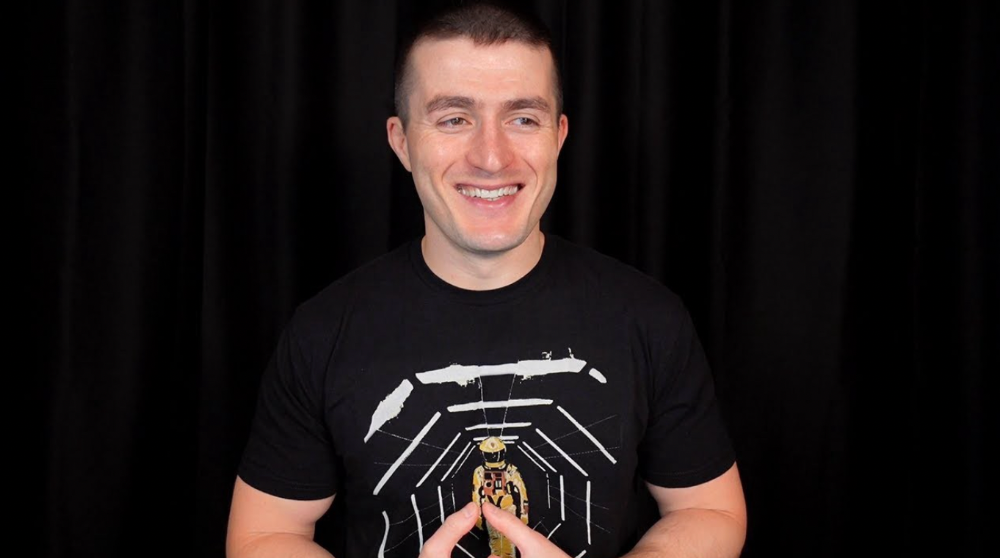
The Lex Fridman podcast host has interviewed Elon Musk.
Lex is a minimalist YouTuber. His videos are sloppy. Suits are his trademark.
In a video, he shares a typical day. I've smashed my 6-month goals using its ideas.
Here's his schedule.
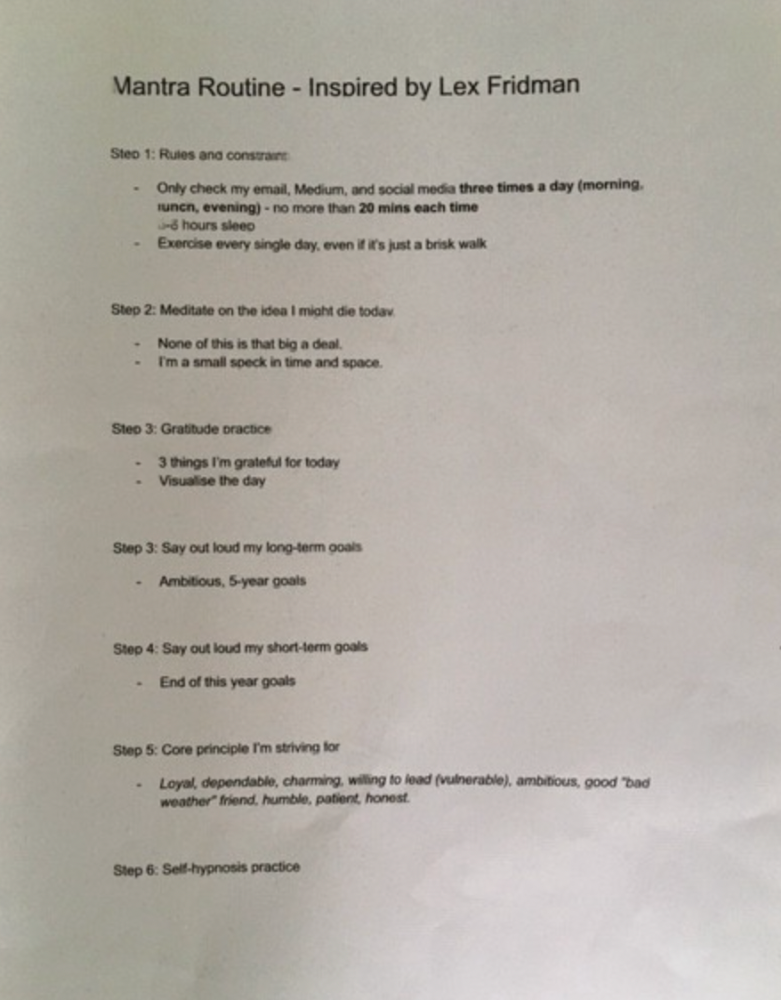
Morning Mantra
Not woo-woo. Lex's mantra reflects his practicality.
Four parts.
Rulebook
"I remember the game's rules," he says.
Among them:
Sleeping 6–8 hours nightly
1–3 times a day, he checks social media.
Every day, despite pain, he exercises. "I exercise uninjured body parts."
Visualize
He imagines his day. "Like Sims..."
He says three things he's grateful for and contemplates death.
"Today may be my last"
Objectives
Then he visualizes his goals. He starts big. Five-year goals.
Short-term goals follow. Lex says they're year-end goals.
Near but out of reach.
Principles
He lists his principles. Assertions. His goals.
He acknowledges his cliche beliefs. Compassion, empathy, and strength are key.
Here's my mantra routine:
Four-Hour Deep Work
Lex begins a four-hour deep work session after his mantra routine. Today's toughest.
AI is Lex's specialty. His video doesn't explain what he does.
Clearly, he works hard.
Before starting, he has water, coffee, and a bathroom break.
"During deep work sessions, I minimize breaks."
He's distraction-free. Phoneless. Silence. Nothing. Any loose ideas are typed into a Google doc for later. He wants to work.
"Just get the job done. Don’t think about it too much and feel good once it’s complete." — Lex Fridman
30-Minute Social Media & Music
After his first deep work session, Lex rewards himself.
10 minutes on social media, 20 on music. Upload content and respond to comments in 10 minutes. 20 minutes for guitar or piano.
"In the real world, I’m currently single, but in the music world, I’m in an open relationship with this beautiful guitar. Open relationship because sometimes I cheat on her with the acoustic." — Lex Fridman
Two-hour exercise
Then exercise for two hours.
Daily runs six miles. Then he chooses how far to go. Run time is an hour.
He does bodyweight exercises. Every minute for 15 minutes, do five pull-ups and ten push-ups. It's David Goggins-inspired. He aims for an hour a day.
He's hungry. Before running, he takes a salt pill for electrolytes.
He'll then take a one-minute cold shower while listening to cheesy songs. Afterward, he might eat.
Four-Hour Deep Work
Lex's second work session.
He works 8 hours a day.
Again, zero distractions.
Eating
The video's meal doesn't look appetizing, but it's healthy.
It's ground beef with vegetables. Cauliflower is his "ground-floor" veggie. "Carrots are my go-to party food."
Lex's keto diet includes 1800–2000 calories.
He drinks a "nutrient-packed" Atheltic Greens shake and takes tablets. It's:
One daily tablet of sodium.
Magnesium glycinate tablets stopped his keto headaches.
Potassium — "For electrolytes"
Fish oil: healthy joints
“So much of nutrition science is barely a science… I like to listen to my own body and do a one-person, one-subject scientific experiment to feel good.” — Lex Fridman
Four-hour shallow session
This work isn't as mentally taxing.
Lex planned to:
Finish last session's deep work (about an hour)
Adobe Premiere podcasting (about two hours).
Email-check (about an hour). Three times a day max. First, check for emergencies.
If he's sick, he may watch Netflix or YouTube documentaries or visit friends.
“The possibilities of chaos are wide open, so I can do whatever the hell I want.” — Lex Fridman
Two-hour evening reading
Nonstop work.
Lex ends the day reading academic papers for an hour. "Today I'm skimming two machine learning and neuroscience papers"
This helps him "think beyond the paper."
He reads for an hour.
“When I have a lot of energy, I just chill on the bed and read… When I’m feeling tired, I jump to the desk…” — Lex Fridman
Takeaways
Lex's day-in-the-life video is inspiring.
He has positive energy and works hard every day.
Schedule:
Mantra Routine includes rules, visualizing, goals, and principles.
Deep Work Session #1: Four hours of focus.
10 minutes social media, 20 minutes guitar or piano. "Music brings me joy"
Six-mile run, then bodyweight workout. Two hours total.
Deep Work #2: Four hours with no distractions. Google Docs stores random thoughts.
Lex supplements his keto diet.
This four-hour session is "open to chaos."
Evening reading: academic papers followed by fiction.
"I value some things in life. Work is one. The other is loving others. With those two things, life is great." — Lex Fridman

Tim Denning
3 years ago
Read These Books on Personal Finance to Boost Your Net Worth
And retire sooner.

Books can make you filthy rich.
If you apply what you learn. In 2011, I was broke and had broken dreams.
Someone suggested I read finance books. One Up On Wall Street was his first recommendation.
Finance books were my crack.
I've read every money book since then. Some are good, but most stink.
These books will make you rich.
The Almanack of Naval Ravikant by Eric Jorgenson
This isn't a cliche book.
This book was inspired by a How to Get Rich tweet thread.
It’s one of the best tweets I’ve ever read.
Naval thinks differently. He nukes ordinary ideas. I've never heard better money advice.
Eric Jorgenson wrote a book about this tweet thread with Navals permission. A must-read, easy-to-digest book.
Best quote
Seek wealth, not money or status. Wealth is having assets that earn while you sleep. Money is how we transfer time and wealth. Status is your place in the social hierarchy — Naval
Morgan Housel's The Psychology of Money
Many finance books advise investing like a dunce.
They almost all peddle the buy an index fund BS. Different book.
It's about money-making psychology. Because any fool can get rich and drunk on their ego. Few can consistently make money.
Each chapter is short. A single-page chapter breaks all book publishing rules.
Best quote
Spending money to show people how much money you have is the fastest way to have less money — Morgan Housel
J.L. Collins' The Simple Path to Wealth
Most of the best money books were written by bloggers.
JL Collins blogs. This easy-to-read book was written for his daughter.
This book popularized the phrase F You Money. With enough money in your bank account and investment portfolio, you can say F You more.
A bad boss is an example. You can leave instead of enduring his wrath.
You can then sit at home and look for another job while financially secure. JL says its mind-freedom is powerful.
Best phrasing
You own the things you own and they in turn own you — J.L. Collins
Tony Robbins' Unshakeable
I like Tony. This book makes me sweaty.
Tony interviews the world's top financiers. He interviews people who rarely do so.
This book taught me all-weather portfolio. It's a way to invest in different asset classes in good, bad, recession, or depression times.
Look at it:
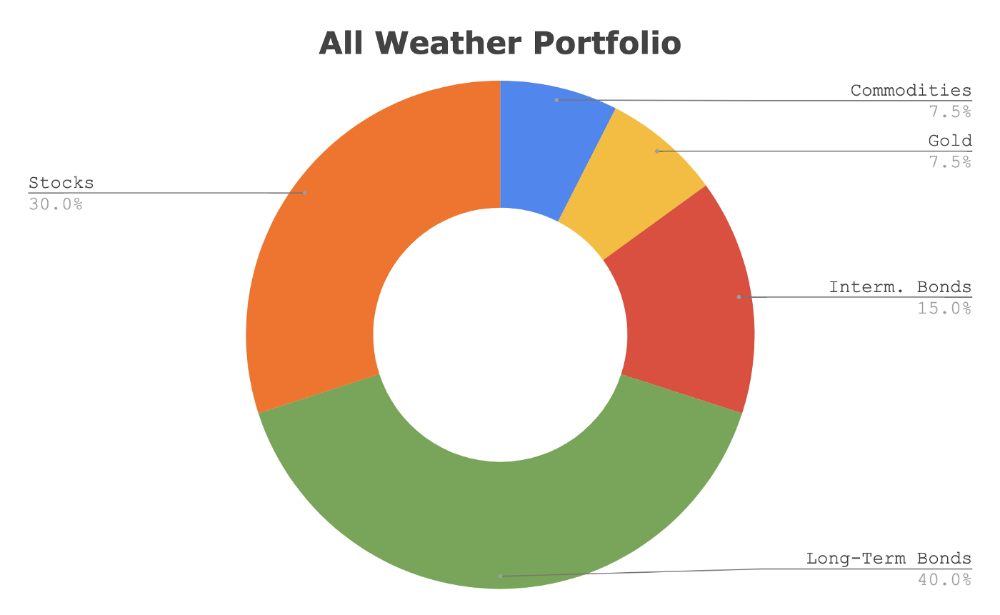
Investing isn’t about buying one big winner — that’s gambling. It’s about investing in a diversified portfolio of assets.
Best phrasing
The best opportunities come in times of maximum pessimism — Tony Robbins
Ben Graham's The Intelligent Investor
This book helped me distinguish between a spectator and an investor.
Spectators are those who shout that crypto, NFTs, or XYZ platform will die.
Tourists. They want attention and to say "I told you so." They make short-term and long-term predictions like fortunetellers. LOL. Idiots.
Benjamin Graham teaches smart investing. You'll buy a long-term asset. To be confident in recessions, use dollar-cost averaging.
Best phrasing
Those who do not remember the past are condemned to repeat it. — Benjamin Graham
The Napoleon Hill book Think and Grow Rich
This classic book introduced positive thinking to modern self-help.
Lazy pessimists can't become rich. No way.
Napoleon said, "Thoughts create reality."
No surprise that he discusses obsession and focus in this book. They are the fastest ways to make more money to invest in time and wealth-protecting assets.
Best phrasing
The starting point of all achievement is DESIRE. Keep this constantly in mind. Weak desire brings weak results, just as a small fire makes a small amount of heat — Napoleon Hill
Ramit Sethi's book I Will Teach You To Be Rich
This book is mostly good. The part about credit cards is trash.
Avoid credit card temptations. I don't care about their airline points.
This book teaches you to master money basics (that many people mess up) then automate it so your monkey brain doesn't ruin your financial future.
The book includes great negotiation tactics to help you make more money in less time.
Best quote
The 85 Percent Solution: Getting started is more important than becoming an expert — Ramit Sethi
David Bach's The Automatic Millionaire
You've probably met a six- or seven-figure earner who's broke. All their money goes to useless things like cars.
Money isn't as essential as what you do with it. David teaches how to automate your earnings for more money.
Compounding works once investing is automated. So you get rich.
His strategy eliminates luck and (almost) guarantees millionaire status.
Best phrasing
Every time you earn one dollar, make sure to pay yourself first — David Bach
Thomas J. Stanley's The Millionaire Next Door
Thomas defies the definition of rich.
He spends much of the book highlighting millionaire traits he's studied.
Rich people are quiet, so you wouldn't know they're wealthy. They don't earn much money or drive a BMW.
Thomas will give you the math to get started.
Best phrasing
I am not impressed with what people own. But I’m impressed with what they achieve. I’m proud to be a physician. Always strive to be the best in your field…. Don’t chase money. If you are the best in your field, money will find you. — Thomas J. Stanley
by Bill Perkins "Die With Zero"
Let’s end with one last book.
Bill's book angered many people. He says we spend too much time saving for retirement and die rich. That bank money is lost time.
Your grandkids could use the money. When children inherit money, they become lazy, entitled a-holes.
Bill wants us to spend our money on life-enhancing experiences. Stop saving money like monopoly monkeys.
Best phrasing
You should be focusing on maximizing your life enjoyment rather than on maximizing your wealth. Those are two very different goals. Money is just a means to an end: Having money helps you to achieve the more important goal of enjoying your life. But trying to maximize money actually gets in the way of achieving the more important goal — Bill Perkins
You might also like

Scott Galloway
3 years ago
Don't underestimate the foolish
ZERO GRACE/ZERO MALICE
Big companies and wealthy people make stupid mistakes too.
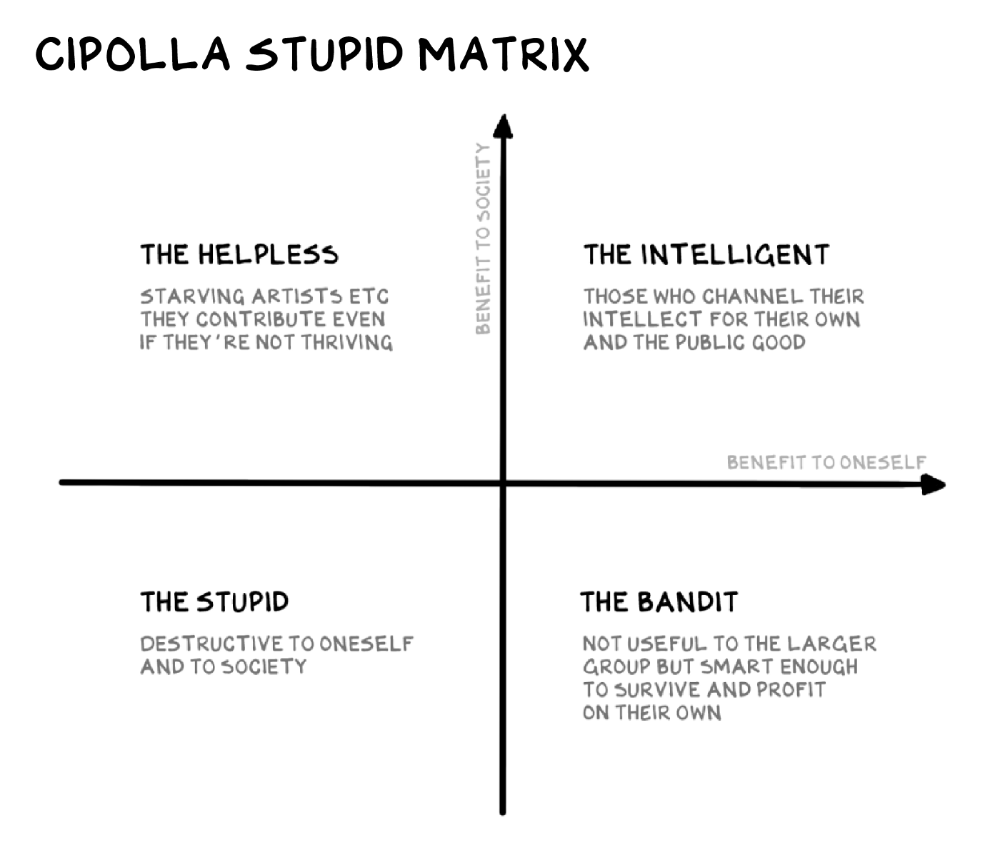
Your ancestors kept snakes and drank bad water. You (probably) don't because you've learnt from their failures via instinct+, the ultimate life-lessons streaming network in your head. Instincts foretell the future. If you approach a lion, it'll eat you. Our society's nuanced/complex decisions have surpassed instinct. Human growth depends on how we handle these issues. 80% of people believe they are above-average drivers, yet few believe they make many incorrect mistakes that make them risky. Stupidity hurts others like death. Basic Laws of Human Stupidity by Carlo Cipollas:
Everyone underestimates the prevalence of idiots in our society.
Any other trait a person may have has no bearing on how likely they are to be stupid.
A dumb individual is one who harms someone without benefiting themselves and may even lose money in the process.
Non-dumb people frequently underestimate how destructively powerful stupid people can be.
The most dangerous kind of person is a moron.
Professor Cippola defines stupid as bad for you and others. We underestimate the corporate world's and seemingly successful people's ability to make bad judgments that harm themselves and others. Success is an intoxication that makes you risk-aggressive and blurs your peripheral vision.
Stupid companies and decisions:
Big Dumber
Big-company bad ideas have more bulk and inertia. The world's most valuable company recently showed its board a VR headset. Jony Ive couldn't destroy Apple's terrible idea in 2015. Mr. Ive said that VR cut users off from the outer world, made them seem outdated, and lacked practical uses. Ives' design team doubted users would wear headsets for lengthy periods.
VR has cost tens of billions of dollars over a decade to prove nobody wants it. The next great SaaS startup will likely come from Florence, not Redmond or San Jose.
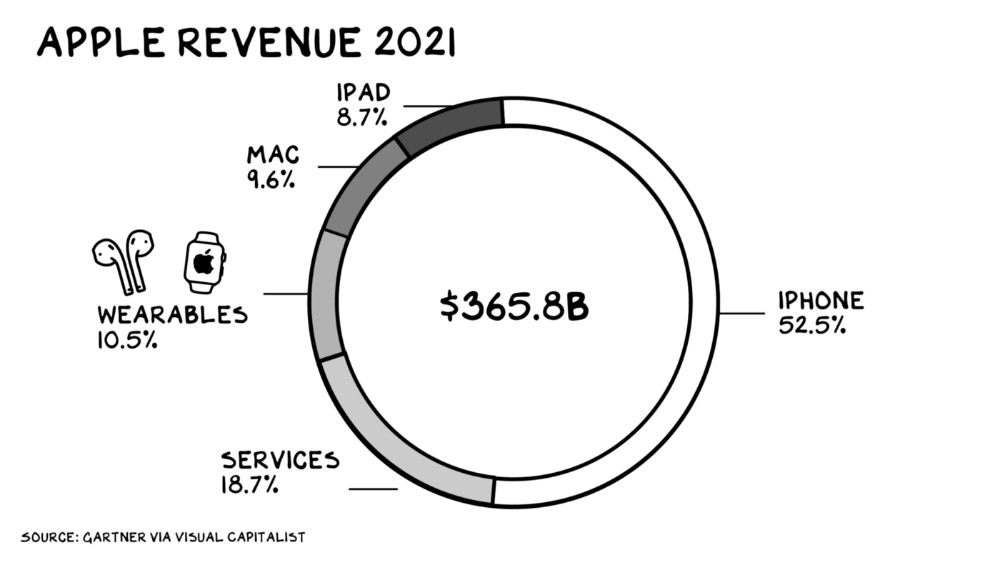
Apple Watch and Airpods have made the Cupertino company the world's largest jewelry maker. 10.5% of Apple's income, or $38 billion, comes from wearables in 2021. (seven times the revenue of Tiffany & Co.). Jewelry makes you more appealing and useful. Airpods and Apple Watch do both.
Headsets make you less beautiful and useful and promote isolation, loneliness, and unhappiness among American teenagers. My sons pretend they can't hear or see me when on their phones. VR headsets lack charisma.
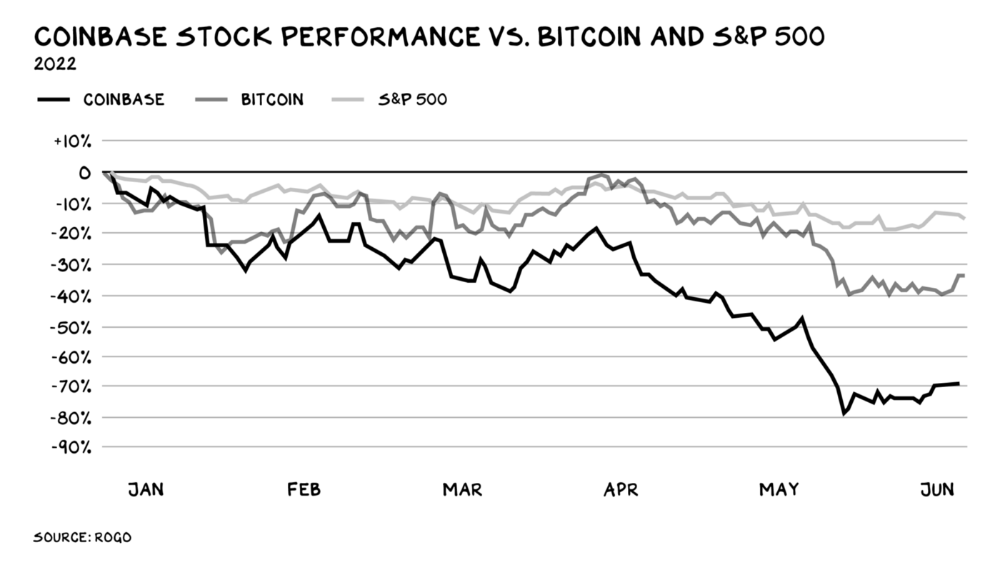
Coinbase disclosed a plan to generate division and tension within its workplace weeks after Apple was pitched $2,000 smokes. The crypto-trading platform is piloting a program that rates staff after every interaction. If a coworker says anything you don't like, you should tell them how to improve. Everyone gets a 110-point scorecard. Coworkers should evaluate a person's rating while deciding whether to listen to them. It's ridiculous.
Organizations leverage our superpower of cooperation. This encourages non-cooperation, period. Bridgewater's founder Ray Dalio designed the approach to promote extreme transparency. Dalio has 223 billion reasons his managerial style works. There's reason to suppose only a small group of people, largely traders, will endure a granular scorecard. Bridgewater has 20% first-year turnover. Employees cry in bathrooms, and sex scandals are settled by ignoring individuals with poor believability levels. Coinbase might take solace that the stock is 80% below its initial offering price.
Poor Stupid
Fools' ledgers are valuable. More valuable are lists of foolish rich individuals.
Robinhood built a $8 billion corporation on financial ignorance. The firm's median account value is $240, and its stock has dropped 75% since last summer. Investors, customers, and society lose. Stupid. Luna published a comparable list on the blockchain, grew to $41 billion in market cap, then plummeted.
A podcast presenter is recruiting dentists and small-business owners to invest in Elon Musk's Twitter takeover. Investors pay a 7% fee and 10% of the upside for the chance to buy Twitter at a 35% premium to the current price. The proposal legitimizes CNBC's Trade Like Chuck advertising (Chuck made $4,600 into $460,000 in two years). This is stupid because it adds to the Twitter deal's desperation. Mr. Musk made an impression when he urged his lawyers to develop a legal rip-cord (There are bots on the platform!) to abandon the share purchase arrangement (for less than they are being marketed by the podcaster). Rolls-Royce may pay for this list of the dumb affluent because it includes potential Cullinan buyers.
Worst company? Flowcarbon, founded by WeWork founder Adam Neumann, operates at the convergence of carbon and crypto to democratize access to offsets and safeguard the earth's natural carbon sinks. Can I get an ayahuasca Big Gulp?
Neumann raised $70 million with their yogababble drink. More than half of the consideration came from selling GNT. Goddess Nature Token. I hope the company gets an S-1. Or I'll start a decentralized AI Meta Renewable NFTs company. My Community Based Ebitda coin will fund the company. Possible.
Stupidity inside oneself
This weekend, I was in NYC with my boys. My 14-year-old disappeared. He's realized I'm not cool and is mad I let the charade continue. When out with his dad, he likes to stroll home alone and depart before me. Friends told me hell would return, but I was surprised by how fast the eye roll came.
Not so with my 11-year-old. We went to The Edge, a Hudson Yards observation platform where you can see the city from 100 storeys up for $38. This is hell's seventh ring. Leaning into your boys' interests is key to engaging them (dad tip). Neither loves Crossfit, WW2 history, or antitrust law.
We take selfies on the Thrilling Glass Floor he spots. Dad, there's a bar! Coke? I nod, he rushes to the bar, stops, runs back for money, and sprints back. Sitting on stone seats, drinking Atlanta Champagne, he turns at me and asks, Isn't this amazing? I'll never reach paradise.
Later that night, the lads are asleep and I've had two Zacapas and Cokes. I SMS some friends about my day and how I feel about sons/fatherhood/etc. How I did. They responded and approached. The next morning, I'm sober, have distance from my son, and feel ashamed by my texts. Less likely to impulsively share my emotions with others. Stupid again.
:max_bytes(150000):strip_icc():format(webp)/adam_hayes-5bfc262a46e0fb005118b414.jpg)
Adam Hayes
3 years ago
Bernard Lawrence "Bernie" Madoff, the largest Ponzi scheme in history
Madoff who?
Bernie Madoff ran the largest Ponzi scheme in history, defrauding thousands of investors over at least 17 years, and possibly longer. He pioneered electronic trading and chaired Nasdaq in the 1990s. On April 14, 2021, he died while serving a 150-year sentence for money laundering, securities fraud, and other crimes.
Understanding Madoff
Madoff claimed to generate large, steady returns through a trading strategy called split-strike conversion, but he simply deposited client funds into a single bank account and paid out existing clients. He funded redemptions by attracting new investors and their capital, but the market crashed in late 2008. He confessed to his sons, who worked at his firm, on Dec. 10, 2008. Next day, they turned him in. The fund reported $64.8 billion in client assets.
Madoff pleaded guilty to 11 federal felony counts, including securities fraud, wire fraud, mail fraud, perjury, and money laundering. Ponzi scheme became a symbol of Wall Street's greed and dishonesty before the financial crisis. Madoff was sentenced to 150 years in prison and ordered to forfeit $170 billion, but no other Wall Street figures faced legal ramifications.
Bernie Madoff's Brief Biography
Bernie Madoff was born in Queens, New York, on April 29, 1938. He began dating Ruth (née Alpern) when they were teenagers. Madoff told a journalist by phone from prison that his father's sporting goods store went bankrupt during the Korean War: "You watch your father, who you idolize, build a big business and then lose everything." Madoff was determined to achieve "lasting success" like his father "whatever it took," but his career had ups and downs.
Early Madoff investments
At 22, he started Bernard L. Madoff Investment Securities LLC. First, he traded penny stocks with $5,000 he earned installing sprinklers and as a lifeguard. Family and friends soon invested with him. Madoff's bets soured after the "Kennedy Slide" in 1962, and his father-in-law had to bail him out.
Madoff felt he wasn't part of the Wall Street in-crowd. "We weren't NYSE members," he told Fishman. "It's obvious." According to Madoff, he was a scrappy market maker. "I was happy to take the crumbs," he told Fishman, citing a client who wanted to sell eight bonds; a bigger firm would turn it down.
Recognition
Success came when he and his brother Peter built electronic trading capabilities, or "artificial intelligence," that attracted massive order flow and provided market insights. "I had all these major banks coming down, entertaining me," Madoff told Fishman. "It was mind-bending."
By the late 1980s, he and four other Wall Street mainstays processed half of the NYSE's order flow. Controversially, he paid for much of it, and by the late 1980s, Madoff was making in the vicinity of $100 million a year. He was Nasdaq chairman from 1990 to 1993.
Madoff's Ponzi scheme
It is not certain exactly when Madoff's Ponzi scheme began. He testified in court that it began in 1991, but his account manager, Frank DiPascali, had been at the firm since 1975.
Why Madoff did the scheme is unclear. "I had enough money to support my family's lifestyle. "I don't know why," he told Fishman." Madoff could have won Wall Street's respect as a market maker and electronic trading pioneer.
Madoff told Fishman he wasn't solely responsible for the fraud. "I let myself be talked into something, and that's my fault," he said, without saying who convinced him. "I thought I could escape eventually. I thought it'd be quick, but I couldn't."
Carl Shapiro, Jeffry Picower, Stanley Chais, and Norm Levy have been linked to Bernard L. Madoff Investment Securities LLC for years. Madoff's scheme made these men hundreds of millions of dollars in the 1960s and 1970s.
Madoff told Fishman, "Everyone was greedy, everyone wanted to go on." He says the Big Four and others who pumped client funds to him, outsourcing their asset management, must have suspected his returns or should have. "How can you make 15%-18% when everyone else is making less?" said Madoff.
How Madoff Got Away with It for So Long
Madoff's high returns made clients look the other way. He deposited their money in a Chase Manhattan Bank account, which merged to become JPMorgan Chase & Co. in 2000. The bank may have made $483 million from those deposits, so it didn't investigate.
When clients redeemed their investments, Madoff funded the payouts with new capital he attracted by promising unbelievable returns and earning his victims' trust. Madoff created an image of exclusivity by turning away clients. This model let half of Madoff's investors profit. These investors must pay into a victims' fund for defrauded investors.
Madoff wooed investors with his philanthropy. He defrauded nonprofits, including the Elie Wiesel Foundation for Peace and Hadassah. He approached congregants through his friendship with J. Ezra Merkin, a synagogue officer. Madoff allegedly stole $1 billion to $2 billion from his investors.
Investors believed Madoff for several reasons:
- His public portfolio seemed to be blue-chip stocks.
- His returns were high (10-20%) but consistent and not outlandish. In a 1992 interview with Madoff, the Wall Street Journal reported: "[Madoff] insists the returns were nothing special, given that the S&P 500-stock index returned 16.3% annually from 1982 to 1992. 'I'd be surprised if anyone thought matching the S&P over 10 years was remarkable,' he says.
- "He said he was using a split-strike collar strategy. A collar protects underlying shares by purchasing an out-of-the-money put option.
SEC inquiry
The Securities and Exchange Commission had been investigating Madoff and his securities firm since 1999, which frustrated many after he was prosecuted because they felt the biggest damage could have been prevented if the initial investigations had been rigorous enough.
Harry Markopolos was a whistleblower. In 1999, he figured Madoff must be lying in an afternoon. The SEC ignored his first Madoff complaint in 2000.
Markopolos wrote to the SEC in 2005: "The largest Ponzi scheme is Madoff Securities. This case has no SEC reward, so I'm turning it in because it's the right thing to do."
Many believed the SEC's initial investigations could have prevented Madoff's worst damage.
Markopolos found irregularities using a "Mosaic Method." Madoff's firm claimed to be profitable even when the S&P fell, which made no mathematical sense given what he was investing in. Markopolos said Madoff Securities' "undisclosed commissions" were the biggest red flag (1 percent of the total plus 20 percent of the profits).
Markopolos concluded that "investors don't know Bernie Madoff manages their money." Markopolos learned Madoff was applying for large loans from European banks (seemingly unnecessary if Madoff's returns were high).
The regulator asked Madoff for trading account documentation in 2005, after he nearly went bankrupt due to redemptions. The SEC drafted letters to two of the firms on his six-page list but didn't send them. Diana Henriques, author of "The Wizard of Lies: Bernie Madoff and the Death of Trust," documents the episode.
In 2008, the SEC was criticized for its slow response to Madoff's fraud.
Confession, sentencing of Bernie Madoff
Bernard L. Madoff Investment Securities LLC reported 5.6% year-to-date returns in November 2008; the S&P 500 fell 39%. As the selling continued, Madoff couldn't keep up with redemption requests, and on Dec. 10, he confessed to his sons Mark and Andy, who worked at his firm. "After I told them, they left, went to a lawyer, who told them to turn in their father, and I never saw them again. 2008-12-11: Bernie Madoff arrested.
Madoff insists he acted alone, but several of his colleagues were jailed. Mark Madoff died two years after his father's fraud was exposed. Madoff's investors committed suicide. Andy Madoff died of cancer in 2014.
2009 saw Madoff's 150-year prison sentence and $170 billion forfeiture. Marshals sold his three homes and yacht. Prisoner 61727-054 at Butner Federal Correctional Institution in North Carolina.
Madoff's lawyers requested early release on February 5, 2020, claiming he has a terminal kidney disease that may kill him in 18 months. Ten years have passed since Madoff's sentencing.
Bernie Madoff's Ponzi scheme aftermath
The paper trail of victims' claims shows Madoff's complexity and size. Documents show Madoff's scam began in the 1960s. His final account statements show $47 billion in "profit" from fake trades and shady accounting.
Thousands of investors lost their life savings, and multiple stories detail their harrowing loss.
Irving Picard, a New York lawyer overseeing Madoff's bankruptcy, has helped investors. By December 2018, Picard had recovered $13.3 billion from Ponzi scheme profiteers.
A Madoff Victim Fund (MVF) was created in 2013 to help compensate Madoff's victims, but the DOJ didn't start paying out the $4 billion until late 2017. Richard Breeden, a former SEC chair who oversees the fund, said thousands of claims were from "indirect investors"
Breeden and his team had to reject many claims because they weren't direct victims. Breeden said he based most of his decisions on one simple rule: Did the person invest more than they withdrew? Breeden estimated 11,000 "feeder" investors.
Breeden wrote in a November 2018 update for the Madoff Victim Fund, "We've paid over 27,300 victims 56.65% of their losses, with thousands more to come." In December 2018, 37,011 Madoff victims in the U.S. and around the world received over $2.7 billion. Breeden said the fund expected to make "at least one more significant distribution in 2019"
This post is a summary. Read full article here
Bob Service
3 years ago
Did volcanic 'glasses' play a role in igniting early life?
Quenched lava may have aided in the formation of long RNA strands required by primitive life.
It took a long time for life to emerge. Microbes were present 3.7 billion years ago, just a few hundred million years after the 4.5-billion-year-old Earth had cooled enough to sustain biochemistry, according to fossils, and many scientists believe RNA was the genetic material for these first species. RNA, while not as complicated as DNA, would be difficult to forge into the lengthy strands required to transmit genetic information, raising the question of how it may have originated spontaneously.
Researchers may now have a solution. They demonstrate how basaltic glasses assist individual RNA letters, also known as nucleoside triphosphates, join into strands up to 200 letters long in lab studies. The glasses are formed when lava is quenched in air or water, or when melted rock generated by asteroid strikes cools rapidly, and they would have been plentiful in the early Earth's fire and brimstone.
The outcome has caused a schism among top origin-of-life scholars. "This appears to be a great story that finally explains how nucleoside triphosphates react with each other to create RNA strands," says Thomas Carell, a scientist at Munich's Ludwig Maximilians University. However, Harvard University's Jack Szostak, an RNA expert, says he won't believe the results until the study team thoroughly describes the RNA strands.
Researchers interested in the origins of life like the idea of a primordial "RNA universe" since the molecule can perform two different functions that are essential for life. It's made up of four chemical letters, just like DNA, and can carry genetic information. RNA, like proteins, can catalyze chemical reactions that are necessary for life.
However, RNA can cause headaches. No one has yet discovered a set of plausible primordial conditions that would cause hundreds of RNA letters—each of which is a complicated molecule—to join together into strands long enough to support the intricate chemistry required to kick-start evolution.
Basaltic glasses may have played a role, according to Stephen Mojzsis, a geologist at the University of Colorado, Boulder. They're high in metals like magnesium and iron, which help to trigger a variety of chemical reactions. "Basaltic glass was omnipresent on Earth at the time," he adds.
He provided the Foundation for Applied Molecular Evolution samples of five different basalt glasses. Each sample was ground into a fine powder, sanitized, and combined with a solution of nucleoside triphosphates by molecular biologist Elisa Biondi and her colleagues. The RNA letters were unable to link up without the presence of glass powder. However, when the molecules were mixed with the glass particles, they formed long strands of hundreds of letters, according to the researchers, who published their findings in Astrobiology this week. There was no need for heat or light. Biondi explains, "All we had to do was wait." After only a day, little RNA strands produced, yet the strands continued to grow for months. Jan Paek, a molecular biologist at Firebird Biomolecular Sciences, says, "The beauty of this approach is its simplicity." "Mix the components together, wait a few days, and look for RNA."
Nonetheless, the findings pose a slew of problems. One of the questions is how nucleoside triphosphates came to be in the first place. Recent study by Biondi's colleague Steven Benner suggests that the same basaltic glasses may have aided in the creation and stabilization of individual RNA letters.
The form of the lengthy RNA strands, according to Szostak, is a significant challenge. Enzymes in modern cells ensure that most RNAs form long linear chains. RNA letters, on the other hand, can bind in complicated branching sequences. Szostak wants the researchers to reveal what kind of RNA was produced by the basaltic glasses. "It irritates me that the authors made an intriguing initial finding but then chose to follow the hype rather than the research," Szostak says.
Biondi acknowledges that her team's experiment almost probably results in some RNA branching. She does acknowledge, however, that some branched RNAs are seen in species today, and that analogous structures may have existed before the origin of life. Other studies carried out by the study also confirmed the presence of lengthy strands with connections, indicating that they are most likely linear. "It's a healthy argument," says Dieter Braun, a Ludwig Maximilian University origin-of-life chemist. "It will set off the next series of tests."