


More on Personal Growth

Leon Ho
3 years ago
Digital Brainbuilding (Your Second Brain)
The human brain is amazing. As more scientists examine the brain, we learn how much it can store.
The human brain has 1 billion neurons, according to Scientific American. Each neuron creates 1,000 connections, totaling over a trillion. If each neuron could store one memory, we'd run out of room. [1]
What if you could store and access more info, freeing up brain space for problem-solving and creativity?
Build a second brain to keep up with rising knowledge (what I refer to as a Digital Brain). Effectively managing information entails realizing you can't recall everything.
Every action requires information. You need the correct information to learn a new skill, complete a project at work, or establish a business. You must manage information properly to advance your profession and improve your life.
How to construct a second brain to organize information and achieve goals.
What Is a Second Brain?
How often do you forget an article or book's key point? Have you ever wasted hours looking for a saved file?
If so, you're not alone. Information overload affects millions of individuals worldwide. Information overload drains mental resources and causes anxiety.
This is when the second brain comes in.
Building a second brain doesn't involve duplicating the human brain. Building a system that captures, organizes, retrieves, and archives ideas and thoughts. The second brain improves memory, organization, and recall.
Digital tools are preferable to analog for building a second brain.
Digital tools are portable and accessible. Due to these benefits, we'll focus on digital second-brain building.
Brainware
Digital Brains are external hard drives. It stores, organizes, and retrieves. This means improving your memory won't be difficult.
Memory has three components in computing:
Recording — storing the information
Organization — archiving it in a logical manner
Recall — retrieving it again when you need it
For example:
Due to rigorous security settings, many websites need you to create complicated passwords with special characters.
You must now memorize (Record), organize (Organize), and input this new password the next time you check in (Recall).
Even in this simple example, there are many pieces to remember. We can't recognize this new password with our usual patterns. If we don't use the password every day, we'll forget it. You'll type the wrong password when you try to remember it.
It's common. Is it because the information is complicated? Nope. Passwords are basically letters, numbers, and symbols.
It happens because our brains aren't meant to memorize these. Digital Brains can do heavy lifting.
Why You Need a Digital Brain
Dual minds are best. Birth brain is limited.
The cerebral cortex has 125 trillion synapses, according to a Stanford Study. The human brain can hold 2.5 million terabytes of digital data. [2]
Building a second brain improves learning and memory.
Learn and store information effectively
Faster information recall
Organize information to see connections and patterns
Build a Digital Brain to learn more and reach your goals faster. Building a second brain requires time and work, but you'll have more time for vital undertakings.
Why you need a Digital Brain:
1. Use Brainpower Effectively
Your brain has boundaries, like any organ. This is true while solving a complex question or activity. If you can't focus on a work project, you won't finish it on time.
Second brain reduces distractions. A robust structure helps you handle complicated challenges quickly and stay on track. Without distractions, it's easy to focus on vital activities.
2. Staying Organized
Professional and personal duties must be balanced. With so much to do, it's easy to neglect crucial duties. This is especially true for skill-building. Digital Brain will keep you organized and stress-free.
Life success requires action. Organized people get things done. Organizing your information will give you time for crucial tasks.
You'll finish projects faster with good materials and methods. As you succeed, you'll gain creative confidence. You can then tackle greater jobs.
3. Creativity Process
Creativity drives today's world. Creativity is mysterious and surprising for millions worldwide. Immersing yourself in others' associations, triggers, thoughts, and ideas can generate inspiration and creativity.
Building a second brain is crucial to establishing your creative process and building habits that will help you reach your goals. Creativity doesn't require perfection or overthinking.
4. Transforming Your Knowledge Into Opportunities
This is the age of entrepreneurship. Today, you can publish online, build an audience, and make money.
Whether it's a business or hobby, you'll have several job alternatives. Knowledge can boost your economy with ideas and insights.
5. Improving Thinking and Uncovering Connections
Modern career success depends on how you think. Instead of overthinking or perfecting, collect the best images, stories, metaphors, anecdotes, and observations.
This will increase your creativity and reveal connections. Increasing your imagination can help you achieve your goals, according to research. [3]
Your ability to recognize trends will help you stay ahead of the pack.
6. Credibility for a New Job or Business
Your main asset is experience-based expertise. Others won't be able to learn without your help. Technology makes knowledge tangible.
This lets you use your time as you choose while helping others. Changing professions or establishing a new business become learning opportunities when you have a Digital Brain.
7. Using Learning Resources
Millions of people use internet learning materials to improve their lives. Online resources abound. These include books, forums, podcasts, articles, and webinars.
These resources are mostly free or inexpensive. Organizing your knowledge can save you time and money. Building a Digital Brain helps you learn faster. You'll make rapid progress by enjoying learning.
How does a second brain feel?
Digital Brain has helped me arrange my job and family life for years.
No need to remember 1001 passwords. I never forget anything on my wife's grocery lists. Never miss a meeting. I can access essential information and papers anytime, anywhere.
Delegating memory to a second brain reduces tension and anxiety because you'll know what to do with every piece of information.
No information will be forgotten, boosting your confidence. Better manage your fears and concerns by writing them down and establishing a strategy. You'll understand the plethora of daily information and have a clear head.
How to Develop Your Digital Brain (Your Second Brain)
It's cheap but requires work.
Digital Brain development requires:
Recording — storing the information
Organization — archiving it in a logical manner
Recall — retrieving it again when you need it
1. Decide what information matters before recording.
To succeed in today's environment, you must manage massive amounts of data. Articles, books, webinars, podcasts, emails, and texts provide value. Remembering everything is impossible and overwhelming.
What information do you need to achieve your goals?
You must consolidate ideas and create a strategy to reach your aims. Your biological brain can imagine and create with a Digital Brain.
2. Use the Right Tool
We usually record information without any preparation - we brainstorm in a word processor, email ourselves a message, or take notes while reading.
This information isn't used. You must store information in a central location.
Different information needs different instruments.
Evernote is a top note-taking program. Audio clips, Slack chats, PDFs, text notes, photos, scanned handwritten pages, emails, and webpages can be added.
Pocket is a great software for saving and organizing content. Images, videos, and text can be sorted. Web-optimized design
Calendar apps help you manage your time and enhance your productivity by reminding you of your most important tasks. Calendar apps flourish. The best calendar apps are easy to use, have many features, and work across devices. These calendars include Google, Apple, and Outlook.
To-do list/checklist apps are useful for managing tasks. Easy-to-use, versatility, budget, and cross-platform compatibility are important when picking to-do list apps. Google Keep, Google Tasks, and Apple Notes are good to-do apps.
3. Organize data for easy retrieval
How should you organize collected data?
When you collect and organize data, you'll see connections. An article about networking can assist you comprehend web marketing. Saved business cards can help you find new clients.
Choosing the correct tools helps organize data. Here are some tools selection criteria:
Can the tool sync across devices?
Personal or team?
Has a search function for easy information retrieval?
Does it provide easy data categorization?
Can users create lists or collections?
Does it offer easy idea-information connections?
Does it mind map and visually organize thoughts?
Conclusion
Building a Digital Brain (second brain) helps us save information, think creatively, and implement ideas. Your second brain is a biological extension. It prevents amnesia, allowing you to tackle bigger creative difficulties.
People who love learning often consume information without using it. Every day, they postpone life-improving experiences until they're forgotten. Useful information becomes strength.
Reference
[1] ^ Scientific American: What Is the Memory Capacity of the Human Brain?
[2] ^ Clinical Neurology Specialists: What is the Memory Capacity of a Human Brain?
[3] ^ National Library of Medicine: Imagining Success: Multiple Achievement Goals and the Effectiveness of Imagery

Nitin Sharma
3 years ago
Quietly Create a side business that will revolutionize everything in a year.
Quitting your job for a side gig isn't smart.

A few years ago, I would have laughed at the idea of starting a side business.
I never thought a side gig could earn more than my 9-to-5. My side gig pays more than my main job now.
You may then tell me to leave your job. But I don't want to gamble, and my side gig is important. Programming and web development help me write better because of my job.
Yes, I share work-related knowledge. Web development, web3, programming, money, investment, and side hustles are key.
Let me now show you how to make one.
Create a side business based on your profession or your interests.
I'd be direct.
Most people don't know where to start or which side business to pursue.
You can make money by taking online surveys, starting a YouTube channel, or playing web3 games, according to several blogs.
You won't make enough money and will waste time.
Nitin directs our efforts. My friend, you've worked and have talent. Profit from your talent.
Example:
College taught me web development. I soon created websites, freelanced, and made money. First year was hardest for me financially and personally.
As I worked, I became more skilled. Soon after, I got more work, wrote about web development on Medium, and started selling products.
I've built multiple income streams from web development. It wasn't easy. Web development skills got me a 9-to-5 job.
Focus on a specific skill and earn money in many ways. Most people start with something they hate or are bad at; the rest is predictable.
Result? They give up, frustrated.
Quietly focus for a year.
I started my side business in college and never told anyone. My parents didn't know what I did for fun.
The only motivation is time constraints. So I focused.
As I've said, I focused on my strengths (learned skills) and made money. Yes, I was among Medium's top 500 authors in a year and got a bonus.
How did I succeed? Since I know success takes time, I never imagined making enough money in a month. I spent a year concentrating.
I became wealthy. Now that I have multiple income sources, some businesses pay me based on my skill.
I recommend learning skills and working quietly for a year. You can do anything with this.
The hardest part will always be the beginning.
When someone says you can make more money working four hours a week. Leave that, it's bad advice.
If someone recommends a paid course to help you succeed, think twice.
The beginning is always the hardest.
I made many mistakes learning web development. When I started my technical content side gig, it was tough. I made mistakes and changed how I create content, which helped.
And it’s applicable everywhere.
Don't worry if you face problems at first. Time and effort heal all wounds.
Quitting your job to work a side job is not a good idea.
Some honest opinions.
Most online gurus encourage side businesses. It takes time to start and grow a side business.
Suppose you quit and started a side business.
After six months, what happens? Your side business won't provide enough money to survive.
Indeed. Later, you'll become demotivated and tense and look for work.
Instead, work 9-5, and start a side business. You decide. Stop watching Netflix and focus on your side business.
I know you're busy, but do it.
Next? It'll succeed or fail in six months. You can continue your side gig for another six months because you have a job and have tried it.
You'll probably make money, but you may need to change your side gig.
That’s it.
You've created a new revenue stream.
Remember.
Starting a side business, a company, or finding work is difficult. There's no free money in a competitive world. You'll only succeed with skill.
Read it again.
Focusing silently for a year can help you succeed.
I studied web development and wrote about it. First year was tough. I went viral, hit the top 500, and other firms asked me to write for them. So, my life changed.
Yours can too. One year of silence is required.
Enjoy!

Akshad Singi
3 years ago
Four obnoxious one-minute habits that help me save more than 30 hours each week
These four, when combined, destroy procrastination.

You're not rushed. You waste it on busywork.
You'll accept this eventually.
In 2022, the daily average usage of a user on social media is 2.5 hours.
By 2020, 6 billion hours of video were watched each month by Netflix's customers, who used the service an average of 3.2 hours per day.
When we see these numbers, we think "Wow!" People squander so much time as though they don't contribute. True. These are yours. Likewise.
We don't lack time; we just waste it. Once you realize this, you can change your habits to save time. This article explains. If you adopt ALL 4 of these simple behaviors, you'll see amazing benefits.
Time-blocking
Cal Newport's time-blocking trick takes a minute but improves your day's clarity.
Divide the next day into 30-minute (or 5-minute, if you're Elon Musk) segments and assign responsibilities. As seen.
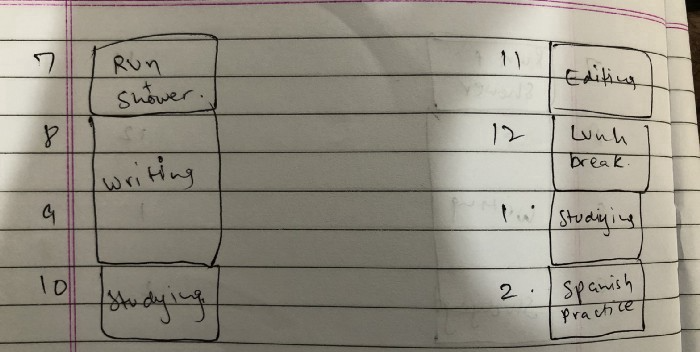
Here's why:
The procrastination that results from attempting to determine when to begin working is eliminated. Procrastination is a given if you choose when to begin working in real-time. Even if you may assume you'll start working in five minutes, it won't take you long to realize that five minutes have turned into an hour. But if you've already determined to start working at 2:00 the next day, your odds of procrastinating are greatly decreased, if not eliminated altogether.
You'll also see that you have a lot of time in a day when you plan your day out on paper and assign chores to each hour. Doing this daily will permanently eliminate the lack of time mindset.
5-4-3-2-1: Have breakfast with the frog!
“If it’s your job to eat a frog, it’s best to do it first thing in the morning. And If it’s your job to eat two frogs, it’s best to eat the biggest one first.”
Eating the frog means accomplishing the day's most difficult chore. It's better to schedule it first thing in the morning when time-blocking the night before. Why?
The day's most difficult task is also the one that causes the most postponement. Because of the stress it causes, the later you schedule it, the more time you risk wasting by procrastinating.
However, if you do it right away in the morning, you'll feel good all day. This is the reason it was set for the morning.
Mel Robbins' 5-second rule can help. Start counting backward 54321 and force yourself to start at 1. If you acquire the urge to work on a goal, you must act within 5 seconds or your brain will destroy it. If you're scheduled to eat your frog at 9, eat it at 8:59. Start working.
Micro-visualisation
You've heard of visualizing to enhance the future. Visualizing a bright future won't do much if you're not prepared to focus on the now and develop the necessary habits. Alexander said:
People don’t decide their futures. They decide their habits and their habits decide their future.
I visualize the next day's schedule every morning. My day looks like this
“I’ll start writing an article at 7:30 AM. Then, I’ll get dressed up and reach the medicine outpatient department by 9:30 AM. After my duty is over, I’ll have lunch at 2 PM, followed by a nap at 3 PM. Then, I’ll go to the gym at 4…”
etc.
This reinforces the day you planned the night before. This makes following your plan easy.
Set the timer.
It's the best iPhone productivity app. A timer is incredible for increasing productivity.
Set a timer for an hour or 40 minutes before starting work. Your call. I don't believe in techniques like the Pomodoro because I can focus for varied amounts of time depending on the time of day, how fatigued I am, and how cognitively demanding the activity is.
I work with a timer. A timer keeps you focused and prevents distractions. Your mind stays concentrated because of the timer. Timers generate accountability.
To pee, I'll pause my timer. When I sit down, I'll continue. Same goes for bottle refills. To use Twitter, I must pause the timer. This creates accountability and focuses work.
Connecting everything
If you do all 4, you won't be disappointed. Here's how:
Plan out your day's schedule the night before.
Next, envision in your mind's eye the same timetable in the morning.
Speak aloud 54321 when it's time to work: Eat the frog! In the morning, devour the largest frog.
Then set a timer to ensure that you remain focused on the task at hand.
You might also like

Edward Williams
3 years ago
I currently manage 4 profitable online companies. I find all the generic advice and garbage courses very frustrating. The only advice you need is this.

This is for young entrepreneurs, especially in tech.
People give useless success advice on TikTok and Reddit. Early risers, bookworms, etc. Entrepreneurship courses. Work hard and hustle.
False. These aren't successful traits.
I mean, organization is good. As someone who founded several businesses and now works at a VC firm, I find these tips to be clichés.
Based on founding four successful businesses and working with other successful firms, here's my best actionable advice:
1. Choose a sector or a niche and become an expert in it.
This is more generic than my next tip, but it's a must-do that's often overlooked. Become an expert in the industry or niche you want to enter. Discover everything.
Buy (future) competitors' products. Understand consumers' pain points. Market-test. Target keyword combos. Learn technical details.
The most successful businesses I've worked with were all formed by 9-5 employees. They knew the industry's pain points. They started a business targeting these pain points.
2. Choose a niche or industry crossroads to target.
How do you choose an industry or niche? What if your industry is too competitive?
List your skills and hobbies. Randomness is fine. Find an intersection between two interests or skills.
Say you build websites well. You like cars.
Web design is a *very* competitive industry. Cars and web design?
Instead of web design, target car dealers and mechanics. Build a few fake demo auto mechanic websites, then cold call shops with poor websites. Verticalize.
I've noticed a pattern:
Person works in a particular industry for a corporation.
Person gains expertise in the relevant industry.
Person quits their job and launches a small business to address a problem that their former employer was unwilling to address.
I originally posted this on Reddit and it seemed to have taken off so I decided to share it with you all.
Focus on the product. When someone buys from you, you convince them the product's value exceeds the price. It's not fair and favors the buyer.
Creating a superior product or service will win. Narrowing this helps you outcompete others.
You may be their only (lucky) option.

1eth1da
4 years ago
6 Rules to build a successful NFT Community in 2022

Too much NFT, Discord, and shitposting.
How do you choose?
How do you recruit more members to join your NFT project?
In 2021, a successful NFT project required:
Monkey/ape artwork
Twitter and Discord bot-filled
Roadmap overpromise
Goal was quick cash.
2022 and the years after will change that.
These are 6 Rules for a Strong NFT Community in 2022:
THINK LONG TERM
This relates to roadmap planning. Hype and dumb luck may drive NFT projects (ahem, goblins) but rarely will your project soar.
Instead, consider sustainability.
Plan your roadmap based on your team's abilities.
Do what you're already doing, but with NFTs, make it bigger and better.
You shouldn't copy a project's roadmap just because it was profitable.
This will lead to over-promising, team burnout, and an RUG NFT project.
OFFER VALUE
Building a great community starts with giving.
Why are musicians popular?
Because they offer entertainment for everyone, a random person becomes a fan, and more fans become a cult.
That's how you should approach your community.
TEAM UP
A great team helps.
An NFT project could have 3 or 2 people.
Credibility trumps team size.
Make sure your team can answer community questions, resolve issues, and constantly attend to them.
Don't overwork and burn out.
Your community will be able to recognize that you are trying too hard and give up on the project.
BUILD A GREAT PRODUCT
Bored Ape Yacht Club altered the NFT space.
Cryptopunks transformed NFTs.
Many others did, including Okay Bears.
What made them that way?
Because they answered a key question.
What is my NFT supposed to be?
Before planning art, this question must be answered.
NFTs can't be just jpegs.
What does it represent?
Is it a Metaverse-ready project?
What blockchain are you going to be using and why?
Set some ground rules for yourself. This helps your project's direction.
These questions will help you and your team set a direction for blockchain, NFT, and Web3 technology.
EDUCATE ON WEB3
The more the team learns about Web3 technology, the more they can offer their community.
Think tokens, metaverse, cross-chain interoperability and more.
BUILD A GREAT COMMUNITY
Several projects mistreat their communities.
They treat their community like "customers" and try to sell them NFT.
Providing Whitelists and giveaways aren't your only community-building options.
Think bigger.
Consider them family and friends, not wallets.
Consider them fans.
These are some tips to start your NFT project.

MartinEdic
3 years ago
Russia Through the Windows: It's Very Bad
And why we must keep arming Ukraine

Russian expatriates write about horrific news from home.
Read this from Nadin Brzezinski. She's not a native English speaker, so there are grammar errors, but her tale smells true.
Terrible truth.
There's much more that reveals Russia's grim reality.
Non-leadership. Millions of missing supplies are presumably sold for profit, leaving untrained troops without food or gear. Missile attacks pause because they run out. Fake schemes to hold talks as a way of stalling while they scramble for solutions.
Street men were mobilized. Millions will be ground up to please a crazed despot. Fear, wrath, and hunger pull apart civilization.
It's the most dystopian story, but Ukraine is worse. Destruction of a society, country, and civilization. Only the invaders' corruption and incompetence save the Ukrainians.
Rochester, NY. My suburb had many Soviet-era Ukrainian refugees. Their kids were my classmates. Fifty years later, many are still my friends. I loved their food and culture. My town has 20,000 Ukrainians.
Grieving but determined. They don't quit. They won't quit. Russians are eternal enemies.
It's the Russian people's willingness to tolerate corruption, abuse, and stupidity by their leaders. They are paying. 65000 dead. Ruined economy. No freedom to speak. Americans do not appreciate that freedom as we should.
It lets me write/publish.
Russian friends are shocked. Many are here because their parents escaped Russian anti-semitism and authoritarian oppression. A Russian cultural legacy says a strongman's methods are admirable.
A legacy of a slavery history disguised as serfdom. Peasants and Princes.
Read Tolstoy. Then Anna Karenina. The main characters are princes and counts, whose leaders are incompetent idiots with wealth and power.
Peasants who die in their wars due to incompetence are nameless ciphers.
Sound familiar?