



More on Society & Culture

Mike Meyer
2 months ago
Reality Distortion
Old power paradigm blocks new planetary paradigm

The difference between our reality and the media's reality is like a tale of two worlds. The greatest and worst of times, really.
Expanding information demands complex skills and understanding to separate important information from ignorance and crap. And that's just the start of determining the source's aim.
Trust who? We see people trust liars in public and then be destroyed by their decisions. Mistakes may be devastating.
Many give up and don't trust anyone. Reality is a choice, though. Same risks.
We must separate our needs and wants from reality. Needs and wants have rules. Greed and selfishness create an unlivable planet.
Culturally, we know this, but we ignore it as foolish. Selfish and greedy people obtain what they want, while others suffer.
We invade, plunder, rape, and burn. We establish civilizations by institutionalizing an exploitable underclass and denying its existence. These cultural lies promote greed and selfishness despite their destructiveness.
Controlling parts of society institutionalize these lies as fact. Many of each age are willing to gamble on greed because they were taught to see greed and selfishness as principles justified by prosperity.
Our cultural understanding recognizes the long-term benefits of collaboration and sharing. This older understanding generates an increasing tension between greedy people and those who see its planetary effects.
Survival requires distinguishing between global and regional realities. Simple, yet many can't do it. This is the first time human greed has had a global impact.
In the past, conflict stories focused on regional winners and losers. Losers lose, winners win, etc. Powerful people see potential decades of nuclear devastation as local, overblown, and not personally dangerous.
Mutually Assured Destruction (MAD) was a human choice that required people to acquiesce to irrational devastation. This prevented nuclear destruction. Most would refuse.
A dangerous “solution” relies on nuclear trigger-pullers not acting irrationally. Since then, we've collected case studies of sane people performing crazy things in experiments. We've been lucky, but the climate apocalypse could be different.
Climate disaster requires only continuing current behavior. These actions already cause global harm, but that's not a threat. These activities must be viewed differently.
Once grasped, denying planetary facts is hard to accept. Deniers can't think beyond regional power. Seeing planet-scale is unusual.
Decades of indoctrination defining any planetary perspective as un-American implies communal planetary assets are for plundering. The old paradigm limits any other view.
In the same way, the new paradigm sees the old regional power paradigm as a threat to planetary civilization and lifeforms. Insane!
While MAD relied on leaders not acting stupidly to trigger a nuclear holocaust, the delayed climatic holocaust needs correcting centuries of lunacy. We must stop allowing craziness in global leadership.
Nothing in our acknowledged past provides a paradigm for such. Only primitive people have failed to reach our level of sophistication.
Before European colonization, certain North American cultures built sophisticated regional nations but abandoned them owing to authoritarian cruelty and destruction. They were overrun by societies that saw no wrong in perpetual exploitation. David Graeber's The Dawn of Everything is an example of historical rediscovery, which is now crucial.
From the new paradigm's perspective, the old paradigm is irrational, yet it's too easy to see those in it as ignorant or malicious, if not both. These people are both, but the collapsing paradigm they promote is older or more ingrained than we think.
We can't shift that paradigm's view of a dead world. We must eliminate this mindset from our nations' leadership. No other way will preserve the earth.
Change is occurring. As always with tremendous transition, younger people are building the new paradigm.
The old paradigm's disintegration is insane. The ability to detect errors and abandon their sources is more important than age. This is gaining recognition.
The breakdown of the previous paradigm is not due to senile leadership, but to systemic problems that the current, conservative leadership cannot recognize.
Stop following the old paradigm.

Scott Galloway
17 days ago
Don't underestimate the foolish
ZERO GRACE/ZERO MALICE
Big companies and wealthy people make stupid mistakes too.
Your ancestors kept snakes and drank bad water. You (probably) don't because you've learnt from their failures via instinct+, the ultimate life-lessons streaming network in your head. Instincts foretell the future. If you approach a lion, it'll eat you. Our society's nuanced/complex decisions have surpassed instinct. Human growth depends on how we handle these issues. 80% of people believe they are above-average drivers, yet few believe they make many incorrect mistakes that make them risky. Stupidity hurts others like death. Basic Laws of Human Stupidity by Carlo Cipollas:
Everyone underestimates the prevalence of idiots in our society.
Any other trait a person may have has no bearing on how likely they are to be stupid.
A dumb individual is one who harms someone without benefiting themselves and may even lose money in the process.
Non-dumb people frequently underestimate how destructively powerful stupid people can be.
The most dangerous kind of person is a moron.
Professor Cippola defines stupid as bad for you and others. We underestimate the corporate world's and seemingly successful people's ability to make bad judgments that harm themselves and others. Success is an intoxication that makes you risk-aggressive and blurs your peripheral vision.
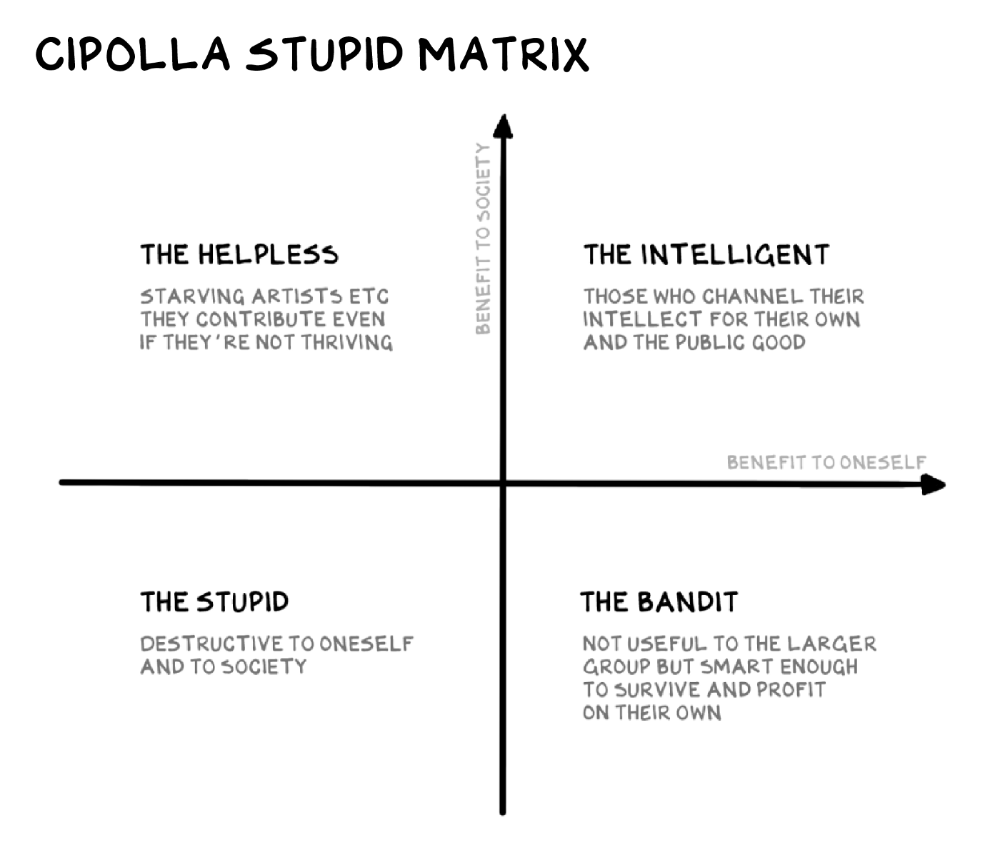
Stupid companies and decisions:
Big Dumber
Big-company bad ideas have more bulk and inertia. The world's most valuable company recently showed its board a VR headset. Jony Ive couldn't destroy Apple's terrible idea in 2015. Mr. Ive said that VR cut users off from the outer world, made them seem outdated, and lacked practical uses. Ives' design team doubted users would wear headsets for lengthy periods.
VR has cost tens of billions of dollars over a decade to prove nobody wants it. The next great SaaS startup will likely come from Florence, not Redmond or San Jose.
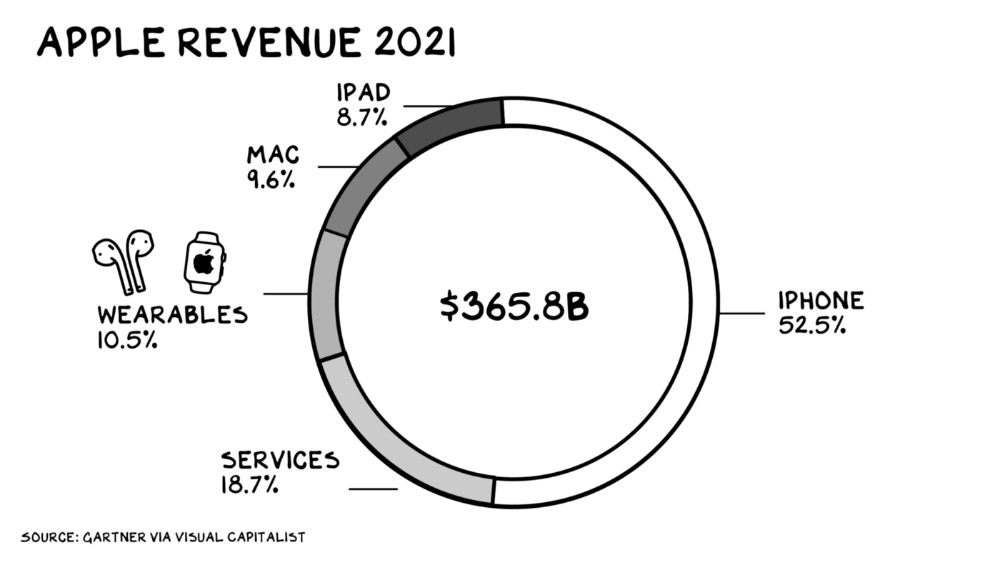
Apple Watch and Airpods have made the Cupertino company the world's largest jewelry maker. 10.5% of Apple's income, or $38 billion, comes from wearables in 2021. (seven times the revenue of Tiffany & Co.). Jewelry makes you more appealing and useful. Airpods and Apple Watch do both.
Headsets make you less beautiful and useful and promote isolation, loneliness, and unhappiness among American teenagers. My sons pretend they can't hear or see me when on their phones. VR headsets lack charisma.
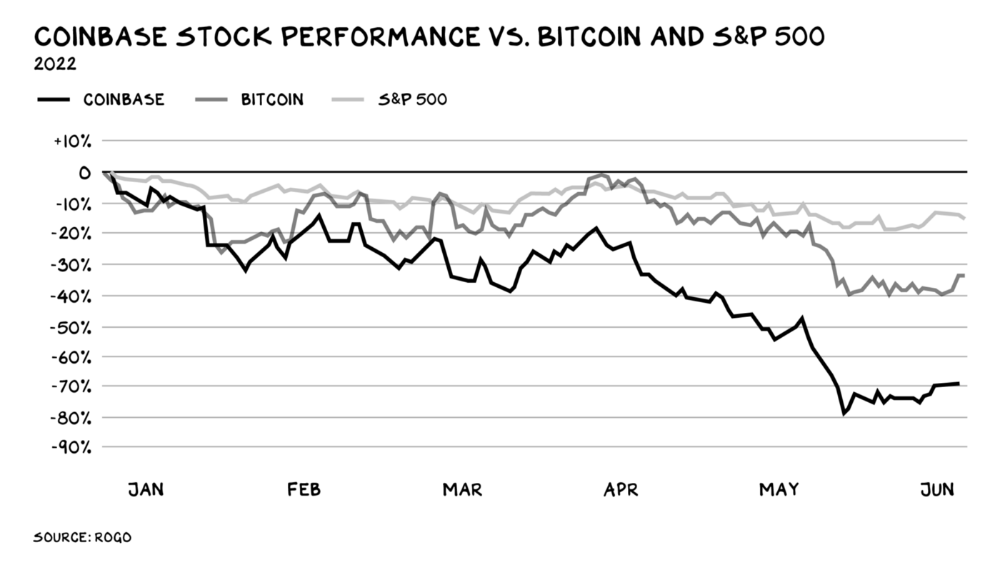
Coinbase disclosed a plan to generate division and tension within its workplace weeks after Apple was pitched $2,000 smokes. The crypto-trading platform is piloting a program that rates staff after every interaction. If a coworker says anything you don't like, you should tell them how to improve. Everyone gets a 110-point scorecard. Coworkers should evaluate a person's rating while deciding whether to listen to them. It's ridiculous.
Organizations leverage our superpower of cooperation. This encourages non-cooperation, period. Bridgewater's founder Ray Dalio designed the approach to promote extreme transparency. Dalio has 223 billion reasons his managerial style works. There's reason to suppose only a small group of people, largely traders, will endure a granular scorecard. Bridgewater has 20% first-year turnover. Employees cry in bathrooms, and sex scandals are settled by ignoring individuals with poor believability levels. Coinbase might take solace that the stock is 80% below its initial offering price.
Poor Stupid
Fools' ledgers are valuable. More valuable are lists of foolish rich individuals.
Robinhood built a $8 billion corporation on financial ignorance. The firm's median account value is $240, and its stock has dropped 75% since last summer. Investors, customers, and society lose. Stupid. Luna published a comparable list on the blockchain, grew to $41 billion in market cap, then plummeted.
A podcast presenter is recruiting dentists and small-business owners to invest in Elon Musk's Twitter takeover. Investors pay a 7% fee and 10% of the upside for the chance to buy Twitter at a 35% premium to the current price. The proposal legitimizes CNBC's Trade Like Chuck advertising (Chuck made $4,600 into $460,000 in two years). This is stupid because it adds to the Twitter deal's desperation. Mr. Musk made an impression when he urged his lawyers to develop a legal rip-cord (There are bots on the platform!) to abandon the share purchase arrangement (for less than they are being marketed by the podcaster). Rolls-Royce may pay for this list of the dumb affluent because it includes potential Cullinan buyers.
Worst company? Flowcarbon, founded by WeWork founder Adam Neumann, operates at the convergence of carbon and crypto to democratize access to offsets and safeguard the earth's natural carbon sinks. Can I get an ayahuasca Big Gulp?
Neumann raised $70 million with their yogababble drink. More than half of the consideration came from selling GNT. Goddess Nature Token. I hope the company gets an S-1. Or I'll start a decentralized AI Meta Renewable NFTs company. My Community Based Ebitda coin will fund the company. Possible.
Stupidity inside oneself
This weekend, I was in NYC with my boys. My 14-year-old disappeared. He's realized I'm not cool and is mad I let the charade continue. When out with his dad, he likes to stroll home alone and depart before me. Friends told me hell would return, but I was surprised by how fast the eye roll came.
Not so with my 11-year-old. We went to The Edge, a Hudson Yards observation platform where you can see the city from 100 storeys up for $38. This is hell's seventh ring. Leaning into your boys' interests is key to engaging them (dad tip). Neither loves Crossfit, WW2 history, or antitrust law.
We take selfies on the Thrilling Glass Floor he spots. Dad, there's a bar! Coke? I nod, he rushes to the bar, stops, runs back for money, and sprints back. Sitting on stone seats, drinking Atlanta Champagne, he turns at me and asks, Isn't this amazing? I'll never reach paradise.
Later that night, the lads are asleep and I've had two Zacapas and Cokes. I SMS some friends about my day and how I feel about sons/fatherhood/etc. How I did. They responded and approached. The next morning, I'm sober, have distance from my son, and feel ashamed by my texts. Less likely to impulsively share my emotions with others. Stupid again.
Scott Galloway
11 days ago
Attentive
From oil to attention.
Oil has been the most important commodity for a century. It's sparked wars. Pearl Harbor was a preemptive strike to guarantee Japanese access to Indonesian oil, and it made desert tribes rich. Oil's heyday is over. From oil to attention.
We talked about an information economy. In an age of abundant information, what's scarce? Attention. Scale of the world's largest enterprises, wealth of its richest people, and power of governments all stem from attention extraction, monetization, and custody.
Attention-grabbing isn't new. Humans have competed for attention and turned content into wealth since Aeschylus' Oresteia. The internal combustion engine, industrial revolutions in mechanization and plastics, and the emergence of a mobile Western lifestyle boosted oil. Digitization has put wells in pockets, on automobile dashboards, and on kitchen counters, drilling for attention.
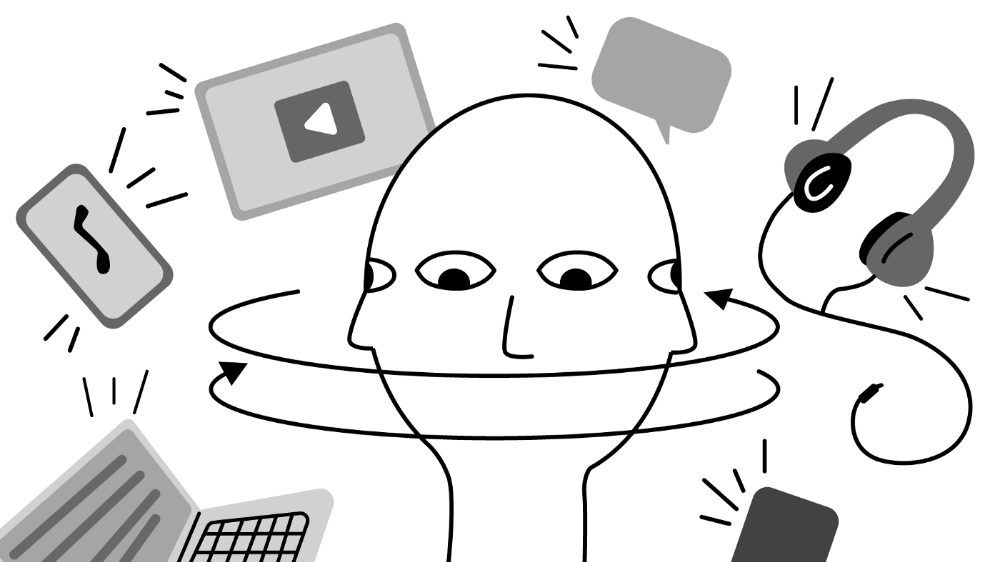
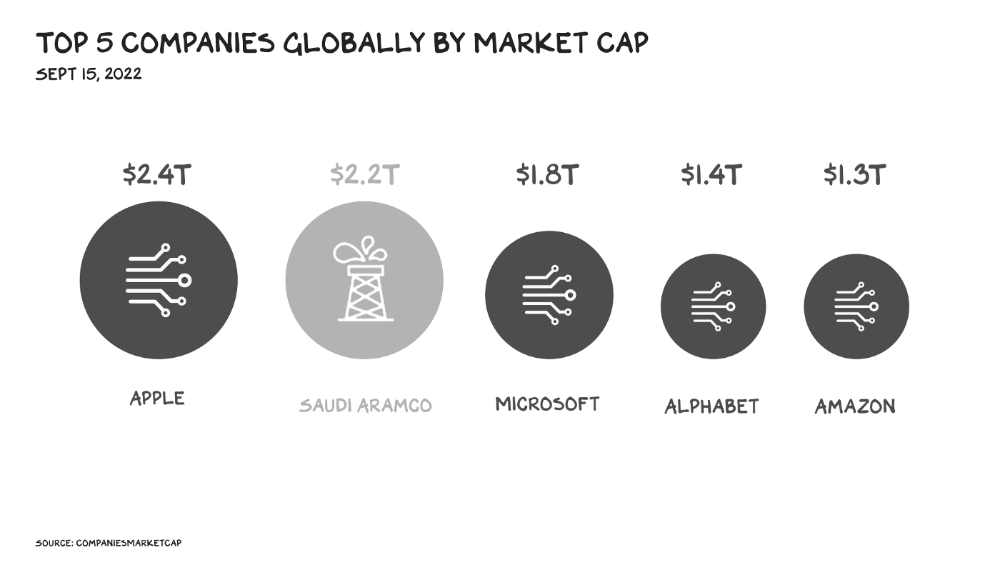
The most valuable firms are attention-seeking enterprises, not oil companies. Big Tech dominates the top 4. Tech and media firms are the sheikhs and wildcatters who capture our attention. Blood will flow as the oil economy rises.
Attention to Detail
More than IT and media companies compete for attention. Podcasting is a high-growth, low-barrier-to-entry chance for newbies to gain attention and (for around 1%) make money. Conferences are good for capturing in-person attention. Salesforce paid $30 billion for Slack's dominance of workplace attention, while Spotify is transforming music listening attention into a media platform.
Conferences, newsletters, and even music streaming are artisan projects. Even 130,000-person Comic Con barely registers on the attention economy's Richter scale. Big players have hundreds of millions of monthly users.
Supermajors
Even titans can be disrupted in the attention economy. TikTok is fracking king Chesapeake Energy, a rule-breaking insurgent with revolutionary extraction technologies. Attention must be extracted, processed, and monetized. Innovators disrupt the attention economy value chain.
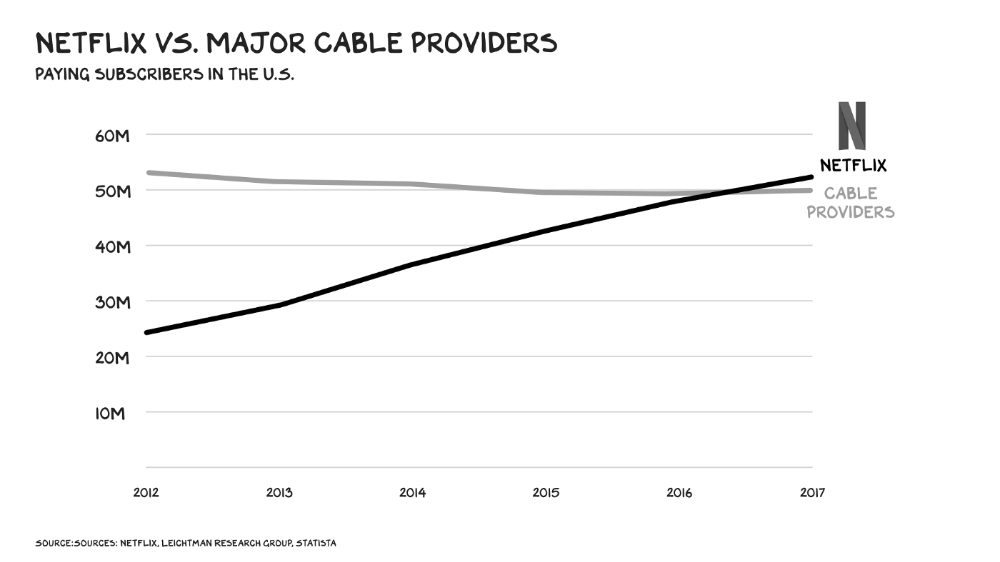
Attention pre-digital Entrepreneurs commercialized intriguing or amusing stuff like a newspaper or TV show through subscriptions and ads. Digital storage and distribution's limitless capacity drove the initial wave of innovation. Netflix became dominant by releasing old sitcoms and movies. More ad-free content gained attention. By 2016, Netflix was greater than cable TV. Linear scale, few network effects.
Social media introduced two breakthroughs. First, users produced and paid for content. Netflix's economics are dwarfed by TikTok and YouTube, where customers create the content drill rigs that the platforms monetize.
Next, social media businesses expanded content possibilities. Twitter, Facebook, and Reddit offer traditional content, but they transform user comments into more valuable (addictive) emotional content. By emotional resonance, I mean they satisfy a craving for acceptance or anger us. Attention and emotion are mined from comments/replies, piss-fights, and fast-brigaded craziness. Exxon has turned exhaust into heroin. Should we be so linked without a commensurate presence? You wouldn't say this in person. Anonymity allows fraudulent accounts and undesirable actors, which platforms accept to profit from more pollution.
FrackTok
A new entrepreneur emerged as ad-driven social media anger contaminated the water table. TikTok is remaking the attention economy. Short-form video platform relies on user-generated content, although delivery is narrower and less social.
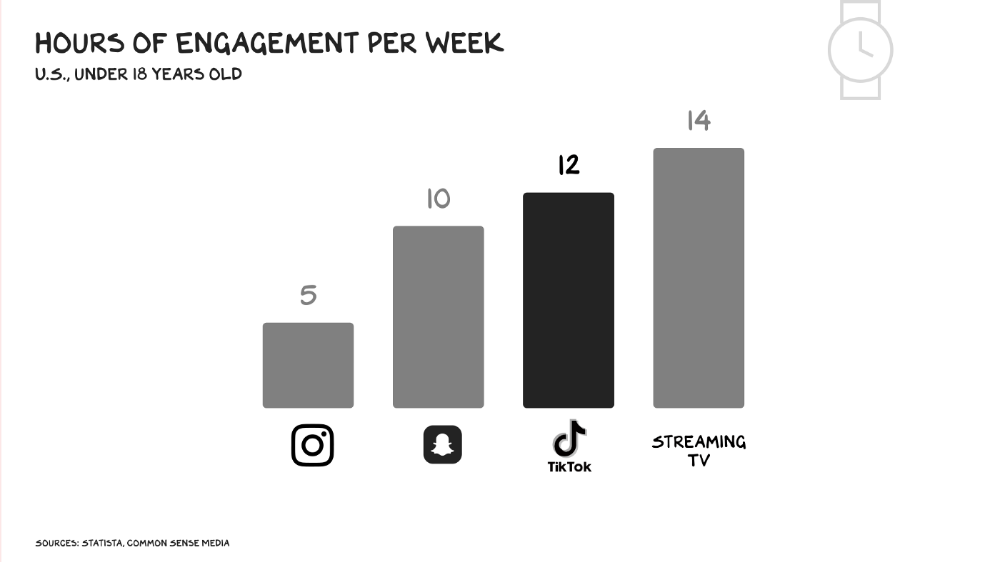
Netflix grew on endless options. Choice requires cognitive effort. TikTok is the least demanding platform since TV. App video plays when opened. Every video can be skipped with a swipe. An algorithm watches how long you watch, what you finish, and whether you like or follow to create a unique streaming network. You can follow creators and respond, but the app is passive. TikTok's attention economy recombination makes it apex predator. The app has more users than Facebook and Instagram combined. Among teens, it's overtaking the passive king, TV.
Externalities
Now we understand fossil fuel externalities. A carbon-based economy has harmed the world. Fracking brought large riches and rebalanced the oil economy, but at a cost: flammable water, earthquakes, and chemical leaks.
TikTok has various concerns associated with algorithmically generated content and platforms. A Wall Street Journal analysis discovered new accounts listed as belonging to 13- to 15-year-olds would swerve into rabbitholes of sex- and drug-related films in mere days. TikTok has a unique externality: Chinese Communist Party ties. Our last two presidents realized the relationship's perils. Concerned about platform's propaganda potential.
No evidence suggests the CCP manipulated information to harm American interests. A headjack implanted on America's youth, who spend more time on TikTok than any other network, connects them to a neural network that may be modified by the CCP. If the product and ownership can't be separated, the app should be banned. Putting restrictions near media increases problems. We should have a reciprocal approach with China regarding media firms. Ban TikTok
It was a conference theme. I anticipated Axel Springer CEO Mathias Döpfner to say, "We're watching them." (That's CEO protocol.) TikTok should be outlawed in every democracy as an espionage tool. Rumored regulations could lead to a ban, and FCC Commissioner Brendan Carr pushes for app store prohibitions. Why not restrict Chinese propaganda? Some disagree: Several renowned tech writers argued my TikTok diatribe last week distracted us from privacy and data reform. The situation isn't zero-sum. I've warned about Facebook and other tech platforms for years. Chewing gum while walking is possible.
The Future
Is TikTok the attention-economy titans' final evolution? The attention economy acts like it. No original content. CNN+ was unplugged, Netflix is losing members and has lost 70% of its market cap, and households are canceling cable and streaming subscriptions in historic numbers. Snap Originals closed in August after YouTube Originals in January.
Everyone is outTik-ing the Tok. Netflix debuted Fast Laughs, Instagram Reels, YouTube Shorts, Snap Spotlight, Roku The Buzz, Pinterest Watch, and Twitter is developing a TikTok-like product. I think they should call it Vine. Just a thought.
Meta's internal documents show that users spend less time on Instagram Reels than TikTok. Reels engagement is dropping, possibly because a third of the videos were generated elsewhere (usually TikTok, complete with watermark). Meta has tried to downrank these videos, but they persist. Users reject product modifications. Kim Kardashian and Kylie Jenner posted a meme urging Meta to Make Instagram Instagram Again, resulting in 312,000 signatures. Mark won't hear the petition. Meta is the fastest follower in social (see Oculus and legless hellscape fever nightmares). Meta's stock is at a five-year low, giving those who opposed my demands to break it up a compelling argument.
Blue Pill
TikTok's short-term dominance in attention extraction won't be stopped by anyone who doesn't hear Hail to the Chief every time they come in. Will TikTok still be a supermajor in five years? If not, YouTube will likely rule and protect Kings Landing.
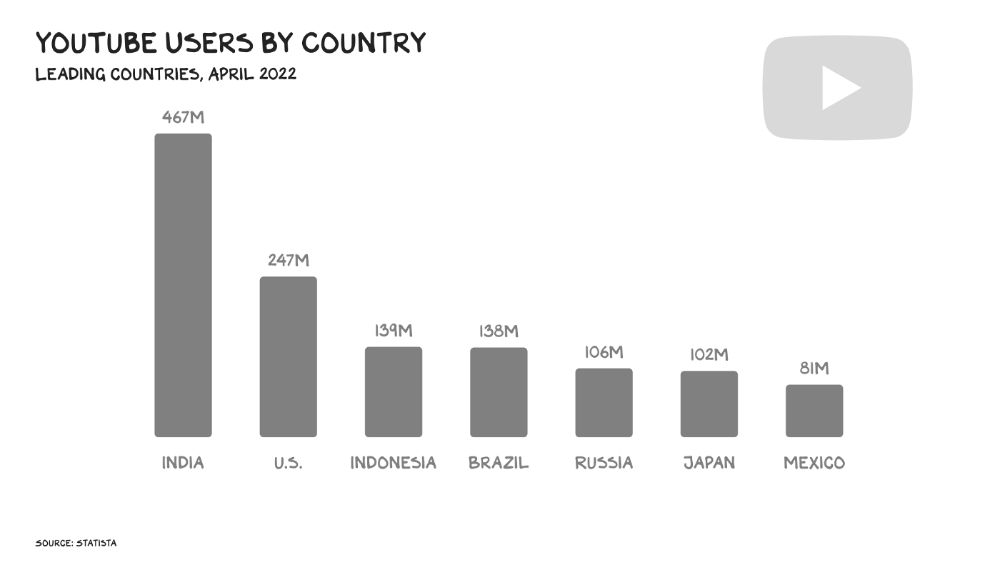
56% of Americans regularly watch YouTube. Compared to Facebook and TikTok, 95% of teens use Instagram. YouTube users upload more than 500 hours of video per minute, a number that's likely higher today. Last year, the platform garnered $29 billion in advertising income, equivalent to Netflix's total.
Business and biology both value diversity. Oil can be found in the desert, under the sea, or in the Arctic. Each area requires a specific ability. Refiners turn crude into gas, lubricants, and aspirin. YouTube's variety is unmatched. One-second videos to 12-hour movies. Others are studio-produced. (My Bill Maher appearance was edited for YouTube.)
You can dispute in the comment section or just stream videos. YouTube is used for home improvement, makeup advice, music videos, product reviews, etc. You can load endless videos on a topic or creator, subscribe to your favorites, or let the suggestion algo take over. YouTube relies on user content, but it doesn't wait passively. Strategic partners advise 12,000 creators. According to a senior director, if a YouTube star doesn’t post once week, their manager is “likely to know why.”
YouTube's kevlar is its middle, especially for creators. Like TikTok, users can start with low-production vlogs and selfie videos. As your following expands, so does the scope of your production, bringing longer videos, broadcast-quality camera teams and performers, and increasing prices. MrBeast, a YouTuber, is an example. MrBeast made gaming videos and YouTube drama comments.
Donaldson's YouTube subscriber base rose. MrBeast invests earnings to develop impressive productions. His most popular video was a $3.5 million Squid Game reenactment (the cost of an episode of Mad Men). 300 million people watched. TikTok's attention-grabbing tech is too limiting for this type of material. Now, Donaldson is focusing on offline energy with a burger restaurant and cloud kitchen enterprise.
Steps to Take
Rapid wealth growth has externalities. There is no free lunch. OK, maybe caffeine. The externalities are opaque, and the parties best suited to handle them early are incentivized to construct weapons of mass distraction to postpone and obfuscate while achieving economic security for themselves and their families. The longer an externality runs unchecked, the more damage it causes and the more it costs to fix. Vanessa Pappas, TikTok's COO, didn't shine before congressional hearings. Her comms team over-consulted her and said ByteDance had no headquarters because it's scattered. Being full of garbage simply promotes further anger against the company and the awkward bond it's built between the CCP and a rising generation of American citizens.
This shouldn't distract us from the (still existent) harm American platforms pose to our privacy, teenagers' mental health, and civic dialogue. Leaders of American media outlets don't suffer from immorality but amorality, indifference, and dissonance. Money rain blurs eyesight.
Autocratic governments that undermine America's standing and way of life are immoral. The CCP has and will continue to use all its assets to harm U.S. interests domestically and abroad. TikTok should be spun to Western investors or treated the way China treats American platforms: kicked out.
So rich,
You might also like

The woman
2 months ago
I received a $2k bribe to replace another developer in an interview
I can't believe they’d even think it works!

Developers are usually interviewed before being hired, right? Every organization wants candidates who meet their needs. But they also want to avoid fraud.
There are cheaters in every field. Only two come to mind for the hiring process:
Lying on a resume.
Cheating on an online test.
Recently, I observed another one. One of my coworkers invited me to replace another developer during an online interview! I was astonished, but it’s not new.
The specifics
My ex-colleague recently texted me. No one from your former office will ever approach you after a year unless they need something.
Which was the case. My coworker said his wife needed help as a programmer. I was glad someone asked for my help, but I'm still a junior programmer.
Then he informed me his wife was selected for a fantastic job interview. He said he could help her with the online test, but he needed someone to help with the online interview.
Okay, I guess. Preparing for an online interview is beneficial. But then he said she didn't need to be ready. She needed someone to take her place.
I told him it wouldn't work. Every remote online interview I've ever seen required an open camera.
What followed surprised me. She'd ask to turn off the camera, he said.
I asked why.
He told me if an applicant is unwell, the interviewer may consider an off-camera interview. His wife will say she's sick and prefers no camera.
The plan left me speechless. I declined politely. He insisted and promised $2k if she got the job.
I felt insulted and told him if he persisted, I'd inform his office. I was furious. Later, I apologized and told him to stop.
I'm not sure what they did after that
I'm not sure if they found someone or listened to me. They probably didn't. How would she do the job if she even got it?
It's an internship, he said. With great pay, though. What should an intern do?
I suggested she do the interview alone. Even if she failed, she'd gain confidence and valuable experience.
Conclusion
Many interviewees cheat. My profession is vital to me, thus I'd rather improve my abilities and apply honestly. It's part of my identity.
Am I truthful? Most professionals are not. They fabricate their CVs. Often.
When you support interview cheating, you encourage more cheating! When someone cheats, another qualified candidate may not obtain the job.
One day, that could be you or me.

Thomas Huault
1 month ago
A Mean Reversion Trading Indicator Inspired by Classical Mechanics Is The Kinetic Detrender
DATA MINING WITH SUPERALGORES
Old pots produce the best soup.
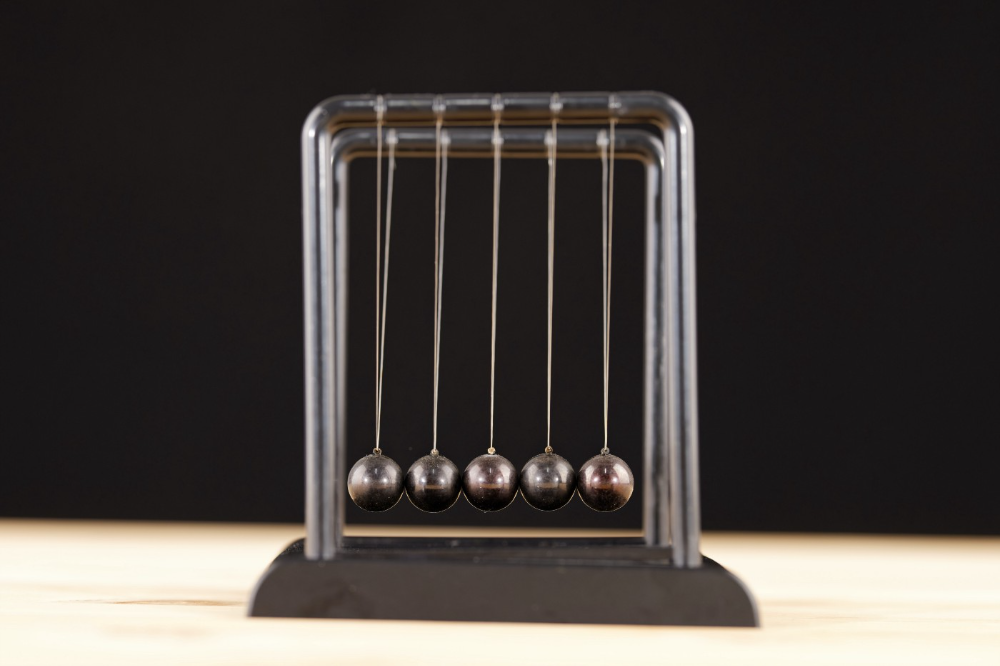
Science has always inspired indicator design. From physics to signal processing, many indicators use concepts from mechanical engineering, electronics, and probability. In Superalgos' Data Mining section, we've explored using thermodynamics and information theory to construct indicators and using statistical and probabilistic techniques like reduced normal law to take advantage of low probability events.
An asset's price is like a mechanical object revolving around its moving average. Using this approach, we could design an indicator using the oscillator's Total Energy. An oscillator's energy is finite and constant. Since we don't expect the price to follow the harmonic oscillator, this energy should deviate from the perfect situation, and the maximum of divergence may provide us valuable information on the price's moving average.
Definition of the Harmonic Oscillator in Few Words
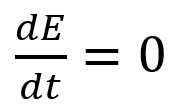
Sinusoidal function describes a harmonic oscillator. The time-constant energy equation for a harmonic oscillator is:
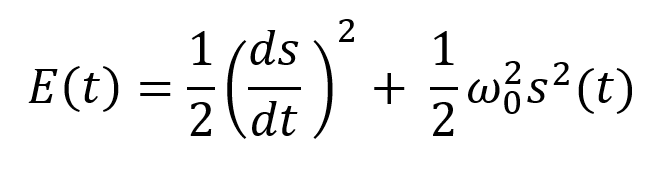
With
Time saves energy.
In a mechanical harmonic oscillator, total energy equals kinetic energy plus potential energy. The formula for energy is the same for every kind of harmonic oscillator; only the terms of total energy must be adapted to fit the relevant units. Each oscillator has a velocity component (kinetic energy) and a position to equilibrium component (potential energy).
The Price Oscillator and the Energy Formula
Considering the harmonic oscillator definition, we must specify kinetic and potential components for our price oscillator. We define oscillator velocity as the rate of change and equilibrium position as the price's distance from its moving average.
Price kinetic energy:
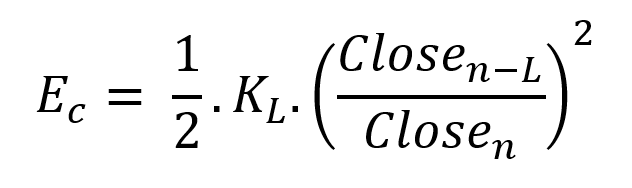
It's like:
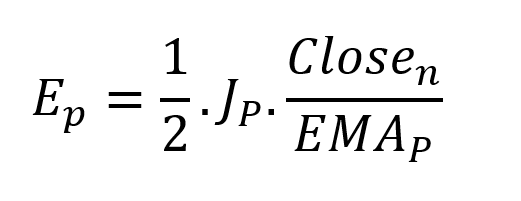
With
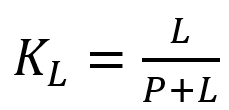
and
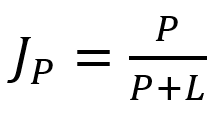
L is the number of periods for the rate of change calculation and P for the close price EMA calculation.
Total price oscillator energy =

Given that an asset's price can theoretically vary at a limitless speed and be endlessly far from its moving average, we don't expect this formula's outcome to be constrained. We'll normalize it using Z-Score for convenience of usage and readability, which also allows probabilistic interpretation.
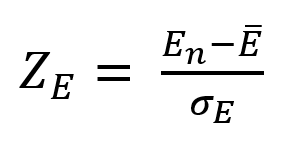
Over 20 periods, we'll calculate E's moving average and standard deviation.
We calculated Z on BTC/USDT with L = 10 and P = 21 using Knime Analytics.
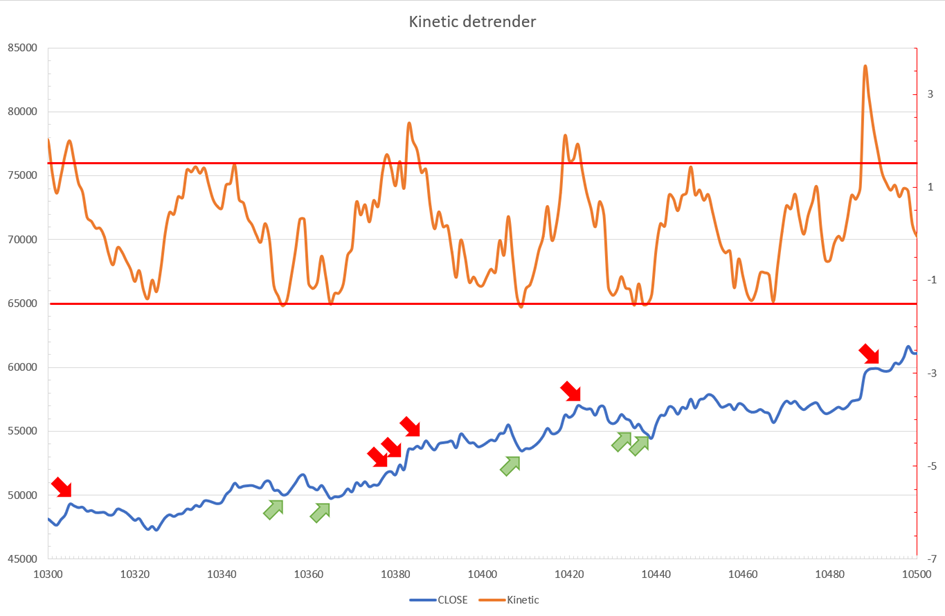
The graph is detrended. We added two horizontal lines at +/- 1.6 to construct a 94.5% probability zone based on reduced normal law tables. Price cycles to its moving average oscillate clearly. Red and green arrows illustrate where the oscillator crosses the top and lower limits, corresponding to the maximum/minimum price oscillation. Since the results seem noisy, we may apply a non-lagging low-pass or multipole filter like Butterworth or Laguerre filters and employ dynamic bands at a multiple of Z's standard deviation instead of fixed levels.
Kinetic Detrender Implementation in Superalgos
The Superalgos Kinetic detrender features fixed upper and lower levels and dynamic volatility bands.
The code is pretty basic and does not require a huge amount of code lines.
It starts with the standard definitions of the candle pointer and the constant declaration :
let candle = record.current
let len = 10
let P = 21
let T = 20
let up = 1.6
let low = 1.6
Upper and lower dynamic volatility band constants are up and low.
We proceed to the initialization of the previous value for EMA :
if (variable.prevEMA === undefined) {
    variable.prevEMA = candle.close
}
And the calculation of EMA with a function (it is worth noticing the function is declared at the end of the code snippet in Superalgos) :
variable.ema = calculateEMA(P, candle.close, variable.prevEMA)
//EMA calculation
function calculateEMA(periods, price, previousEMA) {
    let k = 2 / (periods + 1)
    return price * k + previousEMA * (1 - k)
}
The rate of change is calculated by first storing the right amount of close price values and proceeding to the calculation by dividing the current close price by the first member of the close price array:
variable.allClose.push(candle.close)
if (variable.allClose.length > len) {
    variable.allClose.splice(0, 1)
}
if (variable.allClose.length === len) {
    variable.roc = candle.close / variable.allClose[0]
} else {
    variable.roc = 1
}
Finally, we get energy with a single line:
variable.E = 1 / 2 * len * variable.roc + 1 / 2 * P * candle.close / variable.emaThe Z calculation reuses code from Z-Normalization-based indicators:
variable.allE.push(variable.E)
if (variable.allE.length > T) {
    variable.allE.splice(0, 1)
}
variable.sum = 0
variable.SQ = 0
if (variable.allE.length === T) {
    for (var i = 0; i < T; i++) {
        variable.sum += variable.allE[i]
    }
    variable.MA = variable.sum / T
for (var i = 0; i < T; i++) {
        variable.SQ += Math.pow(variable.allE[i] - variable.MA, 2)
    }
    variable.sigma = Math.sqrt(variable.SQ / T)
variable.Z = (variable.E - variable.MA) / variable.sigma
} else {
    variable.Z = 0
}
variable.allZ.push(variable.Z)
if (variable.allZ.length > T) {
    variable.allZ.splice(0, 1)
}
variable.sum = 0
variable.SQ = 0
if (variable.allZ.length === T) {
    for (var i = 0; i < T; i++) {
        variable.sum += variable.allZ[i]
    }
    variable.MAZ = variable.sum / T
for (var i = 0; i < T; i++) {
        variable.SQ += Math.pow(variable.allZ[i] - variable.MAZ, 2)
    }
    variable.sigZ = Math.sqrt(variable.SQ / T)
} else {
    variable.MAZ = variable.Z
    variable.sigZ = variable.MAZ * 0.02
}
variable.upper = variable.MAZ + up * variable.sigZ
variable.lower = variable.MAZ - low * variable.sigZ
We also update the EMA value.
variable.prevEMA = variable.EMA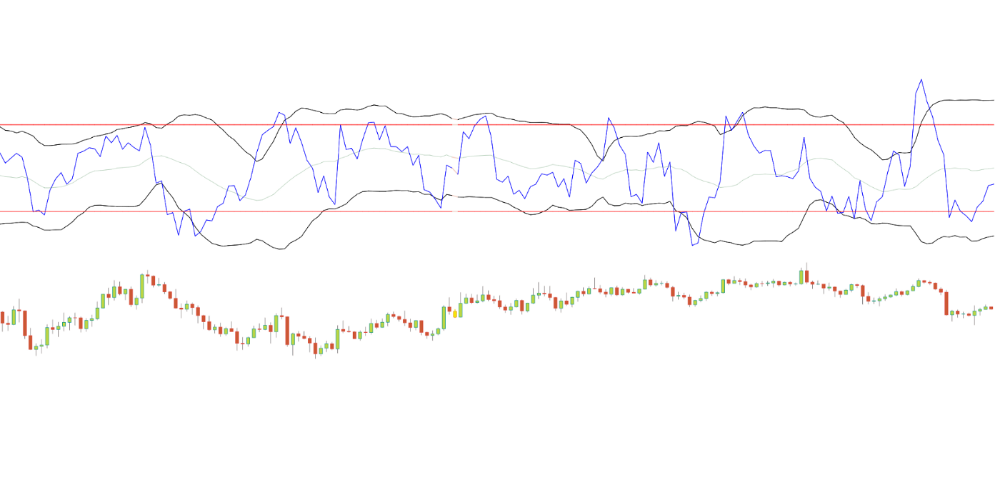
Conclusion
We showed how to build a detrended oscillator using simple harmonic oscillator theory. Kinetic detrender's main line oscillates between 2 fixed levels framing 95% of the values and 2 dynamic levels, leading to auto-adaptive mean reversion zones.
Superalgos' Normalized Momentum data mine has the Kinetic detrender indication.
All the material here can be reused and integrated freely by linking to this article and Superalgos.
This post is informative and not financial advice. Seek expert counsel before trading. Risk using this material.

Antonio Neto
3 months ago
Should you skip the minimum viable product?
Are MVPs outdated and have no place in modern product culture?
Frank Robinson coined "MVP" in 2001. In the same year as the Agile Manifesto, the first Scrum experiment began. MVPs are old.
The concept was created to solve the waterfall problem at the time.
The market was still sour from the .com bubble. The tech industry needed a new approach. Product and Agile gained popularity because they weren't waterfall.
More than 20 years later, waterfall is dead as dead can be, but we are still talking about MVPs. Does that make sense?
What is an MVP?
Minimum viable product. You probably know that, so I'll be brief:
[…] The MVP fits your company and customer. It's big enough to cause adoption, satisfaction, and sales, but not bloated and risky. It's the product with the highest ROI/risk. […] — Frank Robinson, SyncDev
MVP is a complete product. It's not a prototype. It's your product's first iteration, which you'll improve. It must drive sales and be user-friendly.
At the MVP stage, you should know your product's core value, audience, and price. We are way deep into early adoption territory.
What about all the things that come before?
Modern product discovery
Eric Ries popularized the term with The Lean Startup in 2011. (Ries would work with the concept since 2008, but wide adoption came after the book was released).
Ries' definition of MVP was similar to Robinson's: "Test the market" before releasing anything. Ries never mentioned money, unlike Jobs. His MVP's goal was learning.
“Remove any feature, process, or effort that doesn't directly contribute to learning” — Eric Ries, The Lean Startup
Product has since become more about "what" to build than building it. What started as a learning tool is now a discovery discipline: fake doors, prototyping, lean inception, value proposition canvas, continuous interview, opportunity tree... These are cheap, effective learning tools.
Over time, companies realized that "maximum ROI divided by risk" started with discovery, not the MVP. MVPs are still considered discovery tools. What is the problem with that?
Time to Market vs Product Market Fit
Waterfall's Time to Market is its biggest flaw. Since projects are sliced horizontally rather than vertically, when there is nothing else to be done, it’s not because the product is ready, it’s because no one cares to buy it anymore.
MVPs were originally conceived as a way to cut corners and speed Time to Market by delivering more customer requests after they paid.
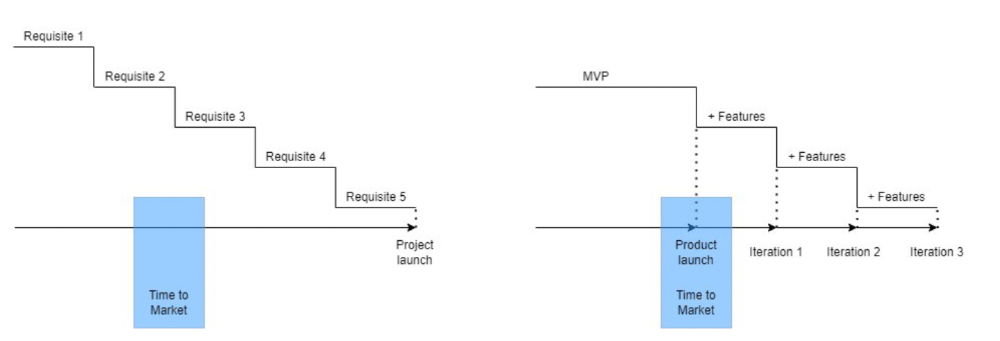
Original product development was waterfall-like.
Time to Market defines an optimal, specific window in which value should be delivered. It's impossible to predict how long or how often this window will be open.
Product Market Fit makes this window a "state." You don’t achieve Product Market Fit, you have it… and you may lose it.
Take, for example, Snapchat. They had a great time to market, but lost product-market fit later. They regained product-market fit in 2018 and have grown since.
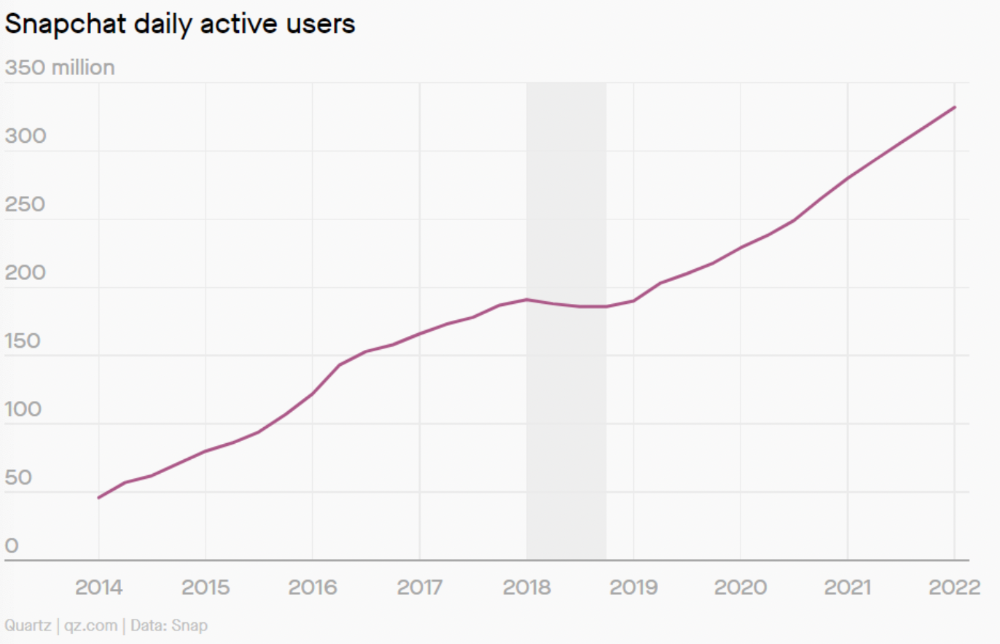
An MVP couldn't handle this. What should Snapchat do? Launch Snapchat 2 and see what the market was expecting differently from the last time? MVPs are a snapshot in time that may be wrong in two weeks.
MVPs are mini-projects. Instead of spending a lot of time and money on waterfall, you spend less but are still unsure of the results.
MVPs aren't always wrong. When releasing your first product version, consider an MVP.
Minimum viable product became less of a thing on its own and more interchangeable with Alpha Release or V.1 release over time.
Modern discovery technics are more assertive and predictable than the MVP, but clarity comes only when you reach the market.
MVPs aren't the starting point, but they're the best way to validate your product concept.