


Framework to Evaluate Metaverse and Web3
Everywhere we turn, there's a new metaverse or Web3 debut. Microsoft recently announced a $68.7 BILLION cash purchase of Activision.
Like AI in 2013 and blockchain in 2014, NFT growth in 2021 feels like this year's metaverse and Web3 growth. We are all bombarded with information, conflicting signals, and a sensation of FOMO.
How can we evaluate the metaverse and Web3 in a noisy, new world? My framework for evaluating upcoming technologies and themes is shown below. I hope you will also find them helpful.
Understand the “pipes” in a new space.
Whatever people say, Metaverse and Web3 will have to coexist with the current Internet. Companies who host, move, and store data over the Internet have a lot of intriguing use cases in Metaverse and Web3, whether in infrastructure, data analytics, or compliance. Hence the following point.
## Understand the apps layer and their infrastructure.
Gaming, crypto exchanges, and NFT marketplaces would not exist today if not for technology that enables rapid app creation. Yes, according to Chainalysis and other research, 30–40% of Ethereum is self-hosted, with the rest hosted by large cloud providers. For Microsoft to acquire Activision makes strategic sense. It's not only about the games, but also the infrastructure that supports them.
Follow the money
Understanding how money and wealth flow in a complex and dynamic environment helps build clarity. Unless you are exceedingly wealthy, you have limited ability to significantly engage in the Web3 economy today. Few can just buy 10 ETH and spend it in one day. You must comprehend who benefits from the process, and how that 10 ETH circulates now and possibly tomorrow. Major holders and players control supply and liquidity in any market. Today, most Web3 apps are designed to increase capital inflow so existing significant holders can utilize it to create a nascent Web3 economy. When you see a new Metaverse or Web3 application, remember how money flows.
What is the use case?
What does the app do? If there is no clear use case with clear makers and consumers solving a real problem, then the euphoria soon fades, and the only stakeholders who remain enthused are those who have too much to lose.
Time is a major competition that is often overlooked.
We're only busier, but each day is still 24 hours. Using new apps may mean that time is lost doing other things. The user must be eager to learn. Metaverse and Web3 vs. our time? I don't think we know the answer yet (at least for working adults whose cost of time is higher).
I don't think we know the answer yet (at least for working adults whose cost of time is higher).
People and organizations need security and transparency.
For new technologies or apps to be widely used, they must be safe, transparent, and trustworthy. What does secure Metaverse and Web3 mean? This is an intriguing subject for both the business and public sectors. Cloud adoption grew in part due to improved security and data protection regulations.
The following frameworks can help analyze and understand new technologies and emerging technological topics, unless you are a significant investment fund with the financial ability to gamble on numerous initiatives and essentially form your own “index fund”.
I write on VC, startups, and leadership.
More on https://www.linkedin.com/in/joycejshen/ and https://joyceshen.substack.com/
This writing is my own opinion and does not represent investment advice.
More on Web3 & Crypto

Rishi Dean
3 years ago
Coinbase's web3 app
Use popular Ethereum dapps with Coinbase’s new dapp wallet and browser
Tl;dr: This post highlights the ability to access web3 directly from your Coinbase app using our new dapp wallet and browser.
Decentralized autonomous organizations (DAOs) and decentralized finance (DeFi) have gained popularity in the last year (DAOs). The total value locked (TVL) of DeFi investments on the Ethereum blockchain has grown to over $110B USD, while NFTs sales have grown to over $30B USD in the last 12 months (LTM). New innovative real-world applications are emerging every day.
Today, a small group of Coinbase app users can access Ethereum-based dapps. Buying NFTs on Coinbase NFT and OpenSea, trading on Uniswap and Sushiswap, and borrowing and lending on Curve and Compound are examples.
Our new dapp wallet and dapp browser enable you to access and explore web3 directly from your Coinbase app.
Web3 in the Coinbase app
Users can now access dapps without a recovery phrase. This innovative dapp wallet experience uses Multi-Party Computation (MPC) technology to secure your on-chain wallet. This wallet's design allows you and Coinbase to share the 'key.' If you lose access to your device, the key to your dapp wallet is still safe and Coinbase can help recover it.
Set up your new dapp wallet by clicking the "Browser" tab in the Android app's navigation bar. Once set up, the Coinbase app's new dapp browser lets you search, discover, and use Ethereum-based dapps.
Looking forward
We want to enable everyone to seamlessly and safely participate in web3, and today’s launch is another step on that journey. We're rolling out the new dapp wallet and browser in the US on Android first to a small subset of users and plan to expand soon. Stay tuned!

Shan Vernekar
3 years ago
How the Ethereum blockchain's transactions are carried out
Overview
Ethereum blockchain is a network of nodes that validate transactions. Any network node can be queried for blockchain data for free. To write data as a transition requires processing and writing to each network node's storage. Fee is paid in ether and is also called as gas.
We'll examine how user-initiated transactions flow across the network and into the blockchain.
Flow of transactions
A user wishes to move some ether from one external account to another. He utilizes a cryptocurrency wallet for this (like Metamask), which is a browser extension.
The user enters the desired transfer amount and the external account's address. He has the option to choose the transaction cost he is ready to pay.
Wallet makes use of this data, signs it with the user's private key, and writes it to an Ethereum node. Services such as Infura offer APIs that enable writing data to nodes. One of these services is used by Metamask. An example transaction is shown below. Notice the “to” address and value fields.
var rawTxn = {
    nonce: web3.toHex(txnCount),
    gasPrice: web3.toHex(100000000000),
    gasLimit: web3.toHex(140000),
    to: '0x633296baebc20f33ac2e1c1b105d7cd1f6a0718b',
    value: web3.toHex(0),
    data: '0xcc9ab24952616d6100000000000000000000000000000000000000000000000000000000'
};
The transaction is written to the target Ethereum node's local TRANSACTION POOL. It informed surrounding nodes of the new transaction, and those nodes reciprocated. Eventually, this transaction is received by and written to each node's local TRANSACTION pool.
The miner who finds the following block first adds pending transactions (with a higher gas cost) from the nearby TRANSACTION POOL to the block.
The transactions written to the new block are verified by other network nodes.
A block is added to the main blockchain after there is consensus and it is determined to be genuine. The local blockchain is updated with the new node by additional nodes as well.
Block mining begins again next.
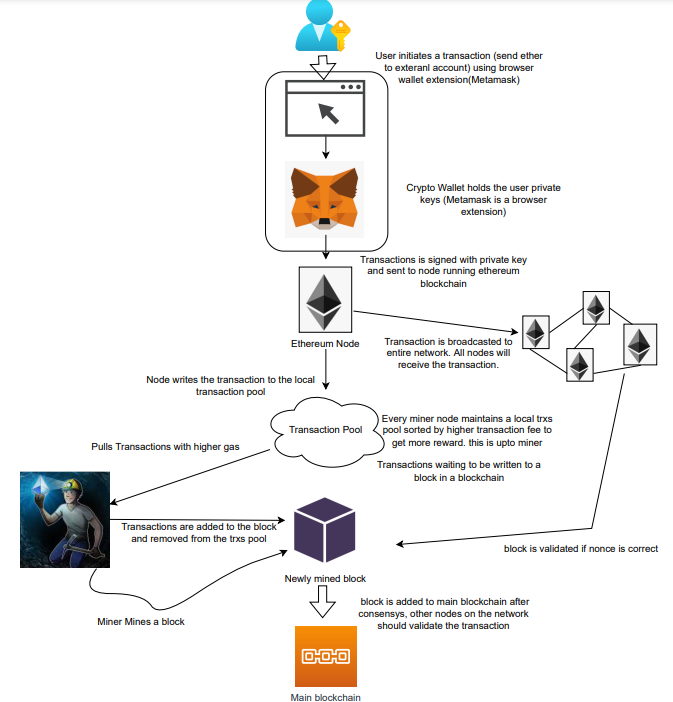
The image above shows how transactions go via the network and what's needed to submit them to the main block chain.
References
ethereum.org/transactions How Ethereum transactions function, their data structure, and how to send them via app. ethereum.org

Amelie Carver
3 years ago
Web3 Needs More Writers to Educate Us About It
WRITE FOR THE WEB3
Why web3’s messaging is lost and how crypto winter is growing growth seeds

People interested in crypto, blockchain, and web3 typically read Bitcoin and Ethereum's white papers. It's a good idea. Documents produced for developers and academia aren't always the ideal resource for beginners.
Given the surge of extremely technical material and the number of fly-by-nights, rug pulls, and other scams, it's little wonder mainstream audiences regard the blockchain sector as an expensive sideshow act.
What's the solution?
Web3 needs more than just builders.
After joining TikTok, I followed Amy Suto of SutoScience. Amy switched from TV scriptwriting to IT copywriting years ago. She concentrates on web3 now. Decentralized autonomous organizations (DAOs) are seeking skilled copywriters for web3.
Amy has found that web3's basics are easy to grasp; you don't need technical knowledge. There's a paradigm shift in knowing the basics; be persistent and patient.
Apple is positioning itself as a data privacy advocate, leveraging web3's zero-trust ethos on data ownership.
Finn Lobsien, who writes about web3 copywriting for the Mirror and Twitter, agrees: acronyms and abstractions won't do.
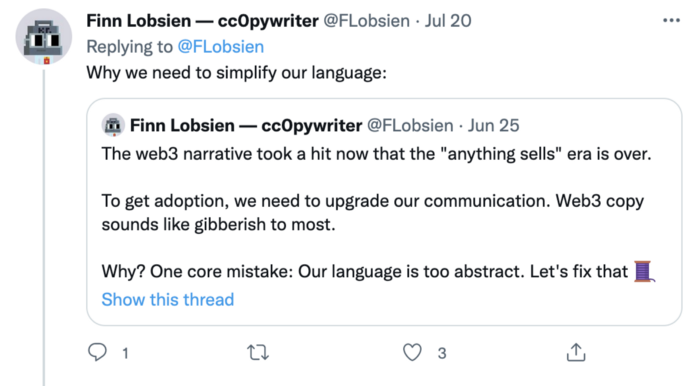
Web3 preached to the choir. Curious newcomers have only found whitepapers and scams when trying to learn why the community loves it. No wonder people resist education and buy-in.
Due to the gender gap in crypto (Crypto Bro is not just a stereotype), it attracts people singing to the choir or trying to cash in on the next big thing.
Last year, the industry was booming, so writing wasn't necessary. Now that the bear market has returned (for everyone, but especially web3), holding readers' attention is a valuable skill.
White papers and the Web3
Why does web3 rely so much on non-growth content?
Businesses must polish and improve their messaging moving into the 2022 recession. The 2021 tech boom provided such a sense of affluence and (unsustainable) growth that no one needed great marketing material. The market found them.
This was especially true for web3 and the first-time crypto believers. Obviously. If they knew which was good.
White papers help. White papers are highly technical texts that walk a reader through a product's details. How Does a White Paper Help Your Business and That White Paper Guy discuss them.
They're meant for knowledgeable readers. Investors and the technical (academic/developer) community read web3 white papers. White papers are used when a product is extremely technical or difficult to assist an informed reader to a conclusion. Web3 uses them most often for ICOs (initial coin offerings).

White papers for web3 education help newcomers learn about the web3 industry's components. It's like sending a first-grader to the Annotated Oxford English Dictionary to learn to read. It's a reference, not a learning tool, for words.
Newcomers can use platforms that teach the basics. These included Coinbase's Crypto Basics tutorials or Cryptochicks Academy, founded by the mother of Ethereum's inventor to get more women utilizing and working in crypto.
Discord and Web3 communities
Discord communities are web3's opposite. Discord communities involve personal communications and group involvement.
Online audience growth begins with community building. User personas prefer 1000 dedicated admirers over 1 million lukewarm followers, and the language is much more easygoing. Discord groups are renowned for phishing scams, compromised wallets, and incorrect information, especially since the crypto crisis.
White papers and Discord increase industry insularity. White papers are complicated, and Discord has a high risk threshold.
Web3 and writing ads
Copywriting is emotional, but white papers are logical. It uses the brain's quick-decision centers. It's meant to make the reader invest immediately.
Not bad. People think sales are sleazy, but they can spot the poor things.
Ethical copywriting helps you reach the correct audience. People who gain a following on Medium are likely to have copywriting training and a readership (or three) in mind when they publish. Tim Denning and Sinem Günel know how to identify a target audience and make them want to learn more.
In a fast-moving market, copywriting is less about long-form content like sales pages or blogs, but many organizations do. Instead, the copy is concise, individualized, and high-value. Tweets, email marketing, and IM apps (Discord, Telegram, Slack to a lesser extent) keep engagement high.
What does web3's messaging lack? As DAOs add stricter copyrighting, narrative and connecting tales seem to be missing.
Web3 is passionate about constructing the next internet. Now, they can connect their passion to a specific audience so newcomers understand why.
You might also like

Niharikaa Kaur Sodhi
3 years ago
The Only Paid Resources I Turn to as a Solopreneur

4 Pricey Tools That Are Valuable
I pay based on ROI (return on investment).
If a $20/month tool or $500 online course doubles my return, I'm in.
Investing helps me build wealth.
Canva Pro
I initially refused to pay.
My course content needed updating a few months ago. My Google Docs text looked cleaner and more professional in Canva.
I've used it to:
product cover pages
eBook covers
Product page infographics
See my Google Sheets vs. Canva product page graph.
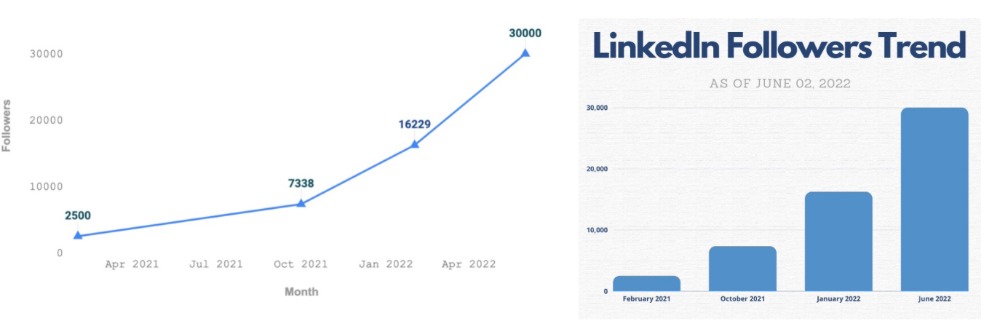
Google Sheets vs Canva
Yesterday, I used it to make a LinkedIn video thumbnail. It took less than 5 minutes and improved my video.

In 30 hours, the video had 39,000 views.
Here's more.
HypeFury
Hypefury rocks!
It builds my brand as I sleep. What else?
Because I'm traveling this weekend, I planned tweets for 10 days. It took me 80 minutes.
So while I travel or am absent, my content mill keeps producing.
Also I like:
I can reach hundreds of people thanks to auto-DMs. I utilize it to advertise freebies; for instance, leave an emoji remark to receive my checklist. And they automatically receive a message in their DM.
Scheduled Retweets: By appearing in a different time zone, they give my tweet a second chance.
It helps me save time and expand my following, so that's my favorite part.
It’s also super neat:
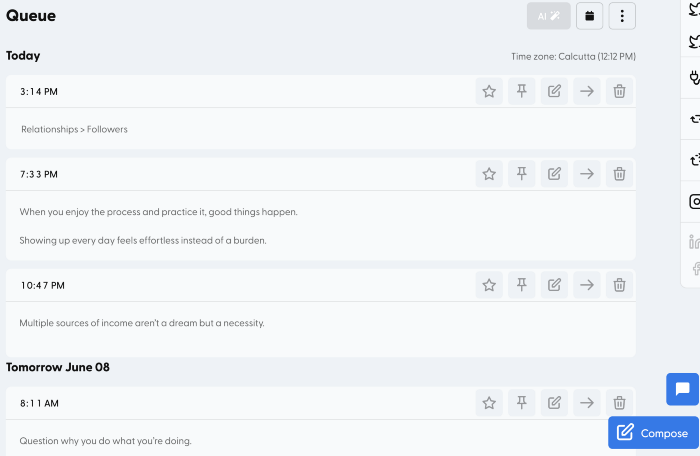
Zoom Pro
My course involves weekly and monthly calls for alumni.
Google Meet isn't great for group calls. The interface isn't great.
Zoom Pro is expensive, and the monthly payments suck, but it's necessary.
It gives my students a smooth experience.
Previously, we'd do 40-minute meetings and then reconvene.
Zoom's free edition limits group calls to 40 minutes.
This wouldn't be a good online course if I paid hundreds of dollars.
So I felt obligated to help.
YouTube Premium
My laptop has an ad blocker.
I bought an iPad recently.
When you're self-employed and work from home, the line between the two blurs. My bed is only 5 steps away!
When I read or watched videos on my laptop, I'd slide into work mode. Only option was to view on phone, which is awkward.
YouTube premium handles it. No more advertisements and I can listen on the move.
3 Expensive Tools That Aren't Valuable
Marketing strategies are sometimes aimed to make you feel you need 38474 cool features when you don’t.
Certain tools are useless.
I found it useless.
Depending on your needs. As a writer and creator, I get no return.
They could for other jobs.
Shield Analytics
It tracks LinkedIn stats, like:
follower growth
trend chart for impressions
Engagement, views, and comment stats for posts
and much more.
Middle-tier creator costs $12/month.
I got a 25% off coupon but canceled my free trial before writing this. It's not worth the discount.
Why?
LinkedIn provides free analytics. See:
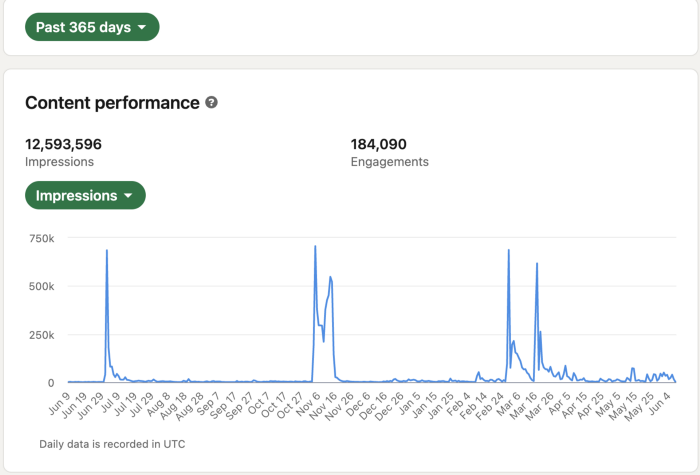
Not thorough and won't show top posts.
I don't need to see my top posts because I love experimenting with writing.
Slack Premium
Slack was my classroom. Slack provided me a premium trial during the prior cohort.
I skipped it.
Sure, voice notes are better than a big paragraph. I didn't require pro features.
Marketing methods sometimes make you think you need 38474 amazing features. Don’t fall for it.
Calendly Pro
This may be worth it if you get many calls.
I avoid calls. During my 9-5, I had too many pointless calls.
I don't need:
ability to schedule calls for 15, 30, or 60 minutes: I just distribute each link separately.
I have a Gumroad consultation page with a payment option.
follow-up emails: I hardly ever make calls, so
I just use one calendar, therefore I link to various calendars.
I'll admit, the integrations are cool. Not for me.
If you're a coach or consultant, the features may be helpful. Or book meetings.
Conclusion
Investing is spending to make money.
Use my technique — put money in tools that help you make money. This separates it from being an investment instead of an expense.
Try free versions of these tools before buying them since everyone else is.

Yuga Labs
3 years ago
Yuga Labs (BAYC and MAYC) buys CryptoPunks and Meebits and gives them commercial rights
Yuga has acquired the CryptoPunks and Meebits NFT IP from Larva Labs. These include 423 CryptoPunks and 1711 Meebits.
We set out to create in the NFT space because we admired CryptoPunks and the founders' visionary work. A lot of their work influenced how we built BAYC and NFTs. We're proud to lead CryptoPunks and Meebits into the future as part of our broader ecosystem.
"Yuga Labs invented the modern profile picture project and are the best in the world at operating these projects. They are ideal CrytoPunk and Meebit stewards. We are confident that in their hands, these projects will thrive in the emerging decentralized web.”
–The founders of Larva Labs, CryptoPunks, and Meebits
This deal grew out of discussions between our partner Guy Oseary and the Larva Labs founders. One call led to another, and now we're here. This does not mean Matt and John will join Yuga. They'll keep running Larva Labs and creating awesome projects that help shape the future of web3.
Next steps
Here's what we plan to do with CryptoPunks and Meebits now that we own the IP. Owners of CryptoPunks and Meebits will soon receive commercial rights equal to those of BAYC and MAYC holders. Our legal teams are working on new terms and conditions for both collections, which we hope to share with the community soon. We expect a wide range of third-party developers and community creators to incorporate CryptoPunks and Meebits into their web3 projects. We'll build the brand alongside them.
We don't intend to cram these NFT collections into the BAYC club model. We see BAYC as the hub of the Yuga universe, and CryptoPunks as a historical collection. We will work to improve the CryptoPunks and Meebits collections as good stewards. We're not in a hurry. We'll consult the community before deciding what to do next.
For us, NFTs are about culture. We're deeply invested in the BAYC community, and it's inspiring to see them grow, collaborate, and innovate. We're excited to see what CryptoPunks and Meebits do with IP rights. Our goal has always been to create a community-owned brand that goes beyond NFTs, and now we can include CryptoPunks and Meebits.

Joe Procopio
3 years ago
Provide a product roadmap that can withstand startup velocities
This is how to build a car while driving.

Building a high-growth startup is compared to building a car while it's speeding down the highway.
How to plan without going crazy? Or, without losing team, board, and investor buy-in?
I just delivered our company's product roadmap for the rest of the year. Complete. Thorough. Page-long. I'm optimistic about its chances of surviving as everything around us changes, from internal priorities to the global economy.
It's tricky. This isn't the first time I've created a startup roadmap. I didn't invent a document. It took time to deliver a document that will be relevant for months.
Goals matter.
Although they never change, goals are rarely understood.
This is the third in a series about a startup's unique roadmapping needs. Velocity is the intensity at which a startup must produce to survive.
A high-growth startup moves at breakneck speed, which I alluded to when I said priorities and economic factors can change daily or weekly.
At that speed, a startup's roadmap must be flexible, bend but not break, and be brief and to the point. I can't tell you how many startups and large companies develop a product roadmap every quarter and then tuck it away.
Big, wealthy companies can do this. It's suicide for a startup.
The drawer thing happens because startup product roadmaps are often valid for a short time. The roadmap is a random list of features prioritized by different company factions and unrelated to company goals.
It's not because the goals changed that a roadmap is shelved or ignored. Because the company's goals were never communicated or documented in the context of its product.
In the previous post, I discussed how to turn company goals into a product roadmap. In this post, I'll show you how to make a one-page startup roadmap.
In a future post, I'll show you how to follow this roadmap. This roadmap helps you track company goals, something a roadmap must do.
Be vague for growth, but direct for execution.
Here's my plan. The real one has more entries and more content in each.

Let's discuss smaller boxes.
Product developers and engineers know that the further out they predict, the more wrong they'll be. When developing the product roadmap, this rule is ignored. Then it bites us three, six, or nine months later when we haven't even started.
Why do we put everything in a product roadmap like a project plan?
Yes, I know. We use it when the product roadmap isn't goal-based.
A goal-based roadmap begins with a document that outlines each goal's idea, execution, growth, and refinement.
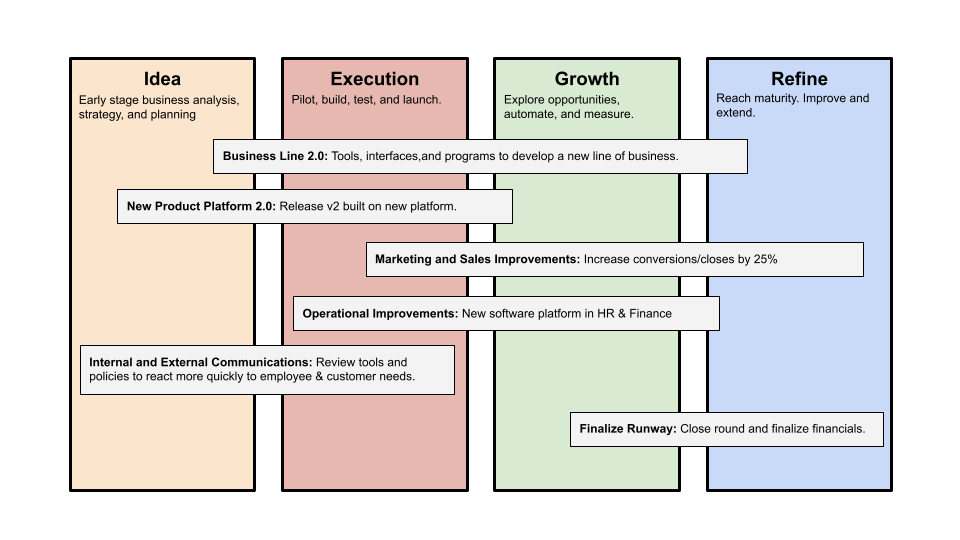
Once the goals are broken down into epics, initiatives, projects, and programs, only the idea and execution phases should be modeled. Any goal growth or refinement items should be vague and loosely mapped.
Why? First, any idea or execution-phase goal will result in growth initiatives that are unimaginable today. Second, internal priorities and external factors will change, but the goals won't. Locking items into calendar slots reduces flexibility and forces deviation from the single source of truth.
No soothsayers. Predicting the future is pointless; just prepare.
A map is useless if you don't know where you're going.
As we speed down the road, the car and the road will change. Goals define the destination.
This quarter and next quarter's roadmap should be set. After that, you should track destination milestones, not how to get there.
When you do that, even the most critical investors will understand the roadmap and buy in. When you track progress at the end of the quarter and revise your roadmap, the destination won't change.