



More on Productivity

Dr Mehmet Yildiz
3 years ago
How I train my brain daily for clarity and productivity.
I use a conceptual and practical system I developed decades ago as an example.
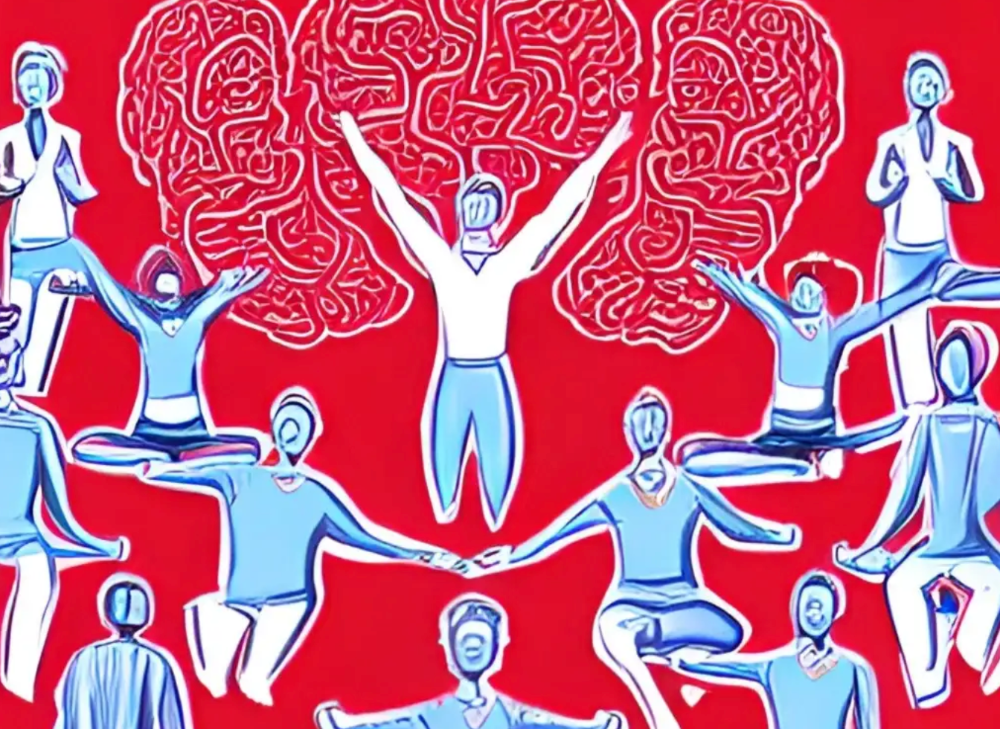
Since childhood, I've been interested in the brain-mind connection, so I developed a system using scientific breakthroughs, experiments, and the experiences of successful people in my circles.
This story provides a high-level overview of a custom system to inform and inspire readers. Creating a mind gym was one of my best personal and professional investments.
Such a complex system may not be possible for everyone or appear luxurious at first. However, the process and approach may help you find more accessible and viable solutions.
Visualizing the brain as a muscle, I learned to stimulate it with physical and mental exercises, applying a new mindset and behavioral changes.
My methods and practices may not work for others because we're all different. I focus on the approach's principles and highlights so you can create your own program.
Some create a conceptual and practical system intuitively, and others intellectually. Both worked. I see intellect and intuition as higher selves.
The mental tools I introduce are based on lifestyle changes and can be personalized by anyone, barring physical constraints or underlying health conditions.
Some people can't meditate despite wanting to due to mental constraints. This story lacks exceptions.
People's systems may vary. Many have used my tools successfully. All have scientific backing because their benefits attracted scientists. None are unethical or controversial.
My focus is cognition, which is the neocortex's ability. These practices and tools can affect the limbic and reptilian brain regions.
A previous article discussed brain health's biological aspects. This article focuses on psychology.
Thinking, learning, and remembering are cognitive abilities. Cognitive abilities determine our health and performance.
Cognitive health is the ability to think, concentrate, learn, and remember. Cognitive performance boosting involves various tools and processes. My system and protocols address cognitive health and performance.
As a biological organ, the brain's abilities decline with age, especially if not used regularly. Older people have more neurodegenerative disorders like dementia.
As aging is inevitable, I focus on creating cognitive reserves to remain mentally functional as we age and face mental decline or cognitive impairment.
My protocols focus on neurogenesis, or brain growth and maintenance. Neurons and connections can grow at any age.
Metacognition refers to knowing our cognitive abilities, like thinking about thinking and learning how to learn.
In the following sections, I provide an overview of my system, mental tools, and protocols.
This system summarizes my 50-year career. Some may find it too abstract, so I give examples.
First, explain the system. Section 2 introduces activities. Third, how to measure and maintain mental growth.
1 — Developed a practical mental gym.
The mental gym is a metaphor for the physical fitness gym to improve our mental muscles.
This concept covers brain and mind functionality. Integrated biological and psychological components.
I'll describe my mental gym so my other points make sense. My mental gym has physical and mental tools.
Mindfulness, meditation, visualization, self-conversations, breathing exercises, expressive writing, working in a flow state, reading, music, dance, isometric training, barefoot walking, cold/heat exposure, CBT, and social engagements are regular tools.
Dancing, walking, and thermogenesis are body-related tools. As the brain is part of the body and houses the mind, these tools can affect mental abilities such as attention, focus, memory, task switching, and problem-solving.
Different people may like different tools. I chose these tools based on my needs, goals, and lifestyle. They're just examples. You can choose tools that fit your goals and personality.
2 — Performed tasks regularly.
These tools gave me clarity. They became daily hobbies. Some I did alone, others with others.
Some examples: I meditate daily. Even though my overactive mind made daily meditation difficult at first, I now enjoy it. Meditation three times a day sharpens my mind.
Self-talk is used for self-therapy and creativity. Self-talk was initially difficult, but neurogenesis rewired my brain to make it a habit.
Cold showers, warm baths with Epsom salts, fasting, barefoot walks on the beach or grass, dancing, calisthenics, trampoline hopping, and breathing exercises increase my mental clarity, creativity, and productivity.
These exercises can increase BDNF, which promotes nervous system growth. They improve mental capacity and performance by increasing blood flow and brain oxygenation.
I use weekly and occasional activities like dry saunas, talking with others, and community activities.
These activities stimulate the brain and mind, improving performance and cognitive capacity.
3 — Measured progress, set growth goals.
Measuring progress helps us stay on track. Without data, it's hard to stay motivated. When we face inevitable setbacks, we may abandon our dreams.
I created a daily checklist for a spreadsheet with macros. I tracked how often and long I did each activity.
I measured my progress objectively and subjectively. In the progress spreadsheet, I noted my meditation hours and subjective feelings.
In another column, I used good, moderate, and excellent to get qualitative data. It took time and effort. Later, I started benefiting from this automated structure.
Creating a page for each activity, such as meditation, self-talk, cold showers, walking, expressive writing, personal interactions, etc., gave me empirical data I could analyze, modify, and graph to show progress.
Colored charts showed each area's strengths and weaknesses.
Strengths motivate me to continue them. Identifying weaknesses helped me improve them.
As the system matured, data recording became a habit and took less time. I saw the result immediately because I automated the charts when I entered daily data. Early time investment paid off later.
Mind Gym Benefits, Effective Use, and Progress Measuring
This concept helped me move from comfort to risk. I accept things as they are.
Turnarounds were made. I stopped feeling "Fight-Flight-Freeze" and maintained self-control.
I tamed my overactive amygdala by strengthening my brain. Stress and anxiety decreased. With these shifts, I accepted criticism and turned envy into admiration. Clarity improved.
When the cognitive part of the brain became stronger and the primitive part was tamed, managing thoughts and emotions became easier. My AQ increased. I learned to tolerate people, physical, mental, and emotional obstacles.
Accessing vast information sources in my subconscious mind through an improved RAS allowed me to easily tap into my higher self and recognize flaws in my lower self.
Summary
The brain loves patterns and routines, so habits help. Observing, developing, and monitoring habits mindfully can be beneficial. Mindfulness helps us achieve this goal systematically.
As body and mind are connected, we must consider both when building habits. Consistent and joyful practices can strengthen neurons and neural connections.
Habits help us accomplish more with less effort. Regularly using mental tools and processes can improve our cognitive health and performance as we age.
Creating daily habits to improve cognitive abilities can sharpen our minds and boost our well-being.
Some apps monitor our activities and behavior to help build habits. If you can't replicate my system, try these apps. Some smartwatches and fitness devices include them.
Set aside time each day for mental activities you enjoy. Regular scheduling and practice can strengthen brain regions and form habits. Once you form habits, tasks become easy.
Improving our minds is a lifelong journey. It's easier and more sustainable to increase our efforts daily, weekly, monthly, or annually.
Despite life's ups and downs, many want to remain calm and cheerful.
This valuable skill is unrelated to wealth or fame. It's about our mindset, fueled by our biological and psychological needs.
Here are some lessons I've learned about staying calm and composed despite challenges and setbacks.
1 — Tranquillity starts with observing thoughts and feelings.
2 — Clear the mental clutter and emotional entanglements with conscious breathing and gentle movements.
3 — Accept situations and events as they are with no resistance.
4 — Self-love can lead to loving others and increasing compassion.
5 — Count your blessings and cultivate gratitude.
Clear thinking can bring joy and satisfaction. It's a privilege to wake up with a healthy body and clear mind, ready to connect with others and serve them.
Thank you for reading my perspectives. I wish you a healthy and happy life.

Simon Egersand
4 years ago
Working from home for more than two years has taught me a lot.
Since the pandemic, I've worked from home. It’s been +2 years (wow, time flies!) now, and during this time I’ve learned a lot. My 4 remote work lessons.
I work in a remote distributed team. This team setting shaped my experience and teachings.
Isolation ("I miss my coworkers")
The most obvious point. I miss going out with my coworkers for coffee, weekend chats, or just company while I work. I miss being able to go to someone's desk and ask for help. On a remote world, I must organize a meeting, share my screen, and avoid talking over each other in Zoom - sigh!
Social interaction is more vital for my health than I believed.
Online socializing stinks
My company used to come together every Friday to play Exploding Kittens, have food and beer, and bond over non-work things.
Different today. Every Friday afternoon is for fun, but it's not the same. People with screen weariness miss meetings, which makes sense. Sometimes you're too busy on Slack to enjoy yourself.
We laugh in meetings, but it's not the same as face-to-face.
Digital social activities can't replace real-world ones
Improved Work-Life Balance, if You Let It
At the outset of the pandemic, I recognized I needed to take better care of myself to survive. After not leaving my apartment for a few days and feeling miserable, I decided to walk before work every day. This turned into a passion for exercise, and today I run or go to the gym before work. I use my commute time for healthful activities.
Working from home makes it easier to keep working after hours. I sometimes forget the time and find myself writing coding at dinnertime. I said, "One more test." This is a disadvantage, therefore I keep my office schedule.
Spend your commute time properly and keep to your office schedule.
Remote Pair Programming Is Hard
As a software developer, I regularly write code. My team sometimes uses pair programming to write code collaboratively. One person writes code while another watches, comments, and asks questions. I won't list them all here.
Internet pairing is difficult. My team struggles with this. Even with Tuple, it's challenging. I lose attention when I get a notification or check my computer.
I miss a pen and paper to rapidly sketch down my thoughts for a colleague or a whiteboard for spirited talks with others. Best answers are found through experience.
Real-life pair programming beats the best remote pair programming tools.
Lessons Learned
Here are 4 lessons I've learned working remotely for 2 years.
-
Socializing is more vital to my health than I anticipated.
-
Digital social activities can't replace in-person ones.
-
Spend your commute time properly and keep your office schedule.
-
Real-life pair programming beats the best remote tools.
Conclusion
Our era is fascinating. Remote labor has existed for years, but software companies have just recently had to adapt. Companies who don't offer remote work will lose talent, in my opinion.
We're still figuring out the finest software development approaches, programming language features, and communication methods since the 1960s. I can't wait to see what advancements assist us go into remote work.
I'll certainly work remotely in the next years, so I'm interested to see what I've learnt from this post then.
This post is a summary of this one.

The woman
3 years ago
I received a $2k bribe to replace another developer in an interview
I can't believe they’d even think it works!

Developers are usually interviewed before being hired, right? Every organization wants candidates who meet their needs. But they also want to avoid fraud.
There are cheaters in every field. Only two come to mind for the hiring process:
Lying on a resume.
Cheating on an online test.
Recently, I observed another one. One of my coworkers invited me to replace another developer during an online interview! I was astonished, but it’s not new.
The specifics
My ex-colleague recently texted me. No one from your former office will ever approach you after a year unless they need something.
Which was the case. My coworker said his wife needed help as a programmer. I was glad someone asked for my help, but I'm still a junior programmer.
Then he informed me his wife was selected for a fantastic job interview. He said he could help her with the online test, but he needed someone to help with the online interview.
Okay, I guess. Preparing for an online interview is beneficial. But then he said she didn't need to be ready. She needed someone to take her place.
I told him it wouldn't work. Every remote online interview I've ever seen required an open camera.
What followed surprised me. She'd ask to turn off the camera, he said.
I asked why.
He told me if an applicant is unwell, the interviewer may consider an off-camera interview. His wife will say she's sick and prefers no camera.
The plan left me speechless. I declined politely. He insisted and promised $2k if she got the job.
I felt insulted and told him if he persisted, I'd inform his office. I was furious. Later, I apologized and told him to stop.
I'm not sure what they did after that
I'm not sure if they found someone or listened to me. They probably didn't. How would she do the job if she even got it?
It's an internship, he said. With great pay, though. What should an intern do?
I suggested she do the interview alone. Even if she failed, she'd gain confidence and valuable experience.
Conclusion
Many interviewees cheat. My profession is vital to me, thus I'd rather improve my abilities and apply honestly. It's part of my identity.
Am I truthful? Most professionals are not. They fabricate their CVs. Often.
When you support interview cheating, you encourage more cheating! When someone cheats, another qualified candidate may not obtain the job.
One day, that could be you or me.
You might also like

Navdeep Yadav
3 years ago
31 startup company models (with examples)
Many people find the internet's various business models bewildering.
This article summarizes 31 startup e-books.
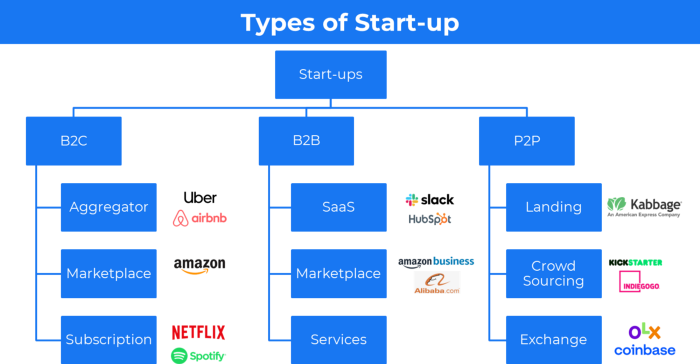
1. Using the freemium business model (free plus premium),
The freemium business model offers basic software, games, or services for free and charges for enhancements.
Examples include Slack, iCloud, and Google Drive
Provide a rudimentary, free version of your product or service to users.
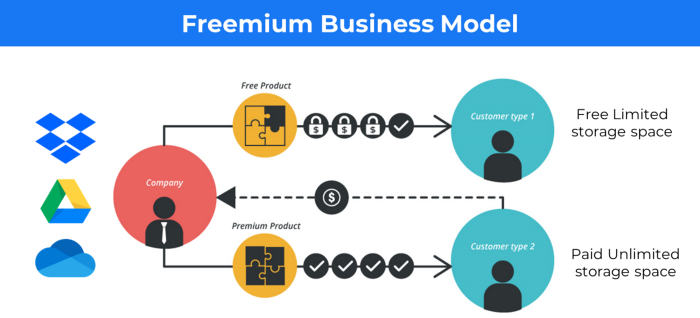
Google Drive and Dropbox offer 15GB and 2GB of free space but charge for more.
Freemium business model details (Click here)
2. The Business Model of Subscription
Subscription business models sell a product or service for recurring monthly or yearly revenue.
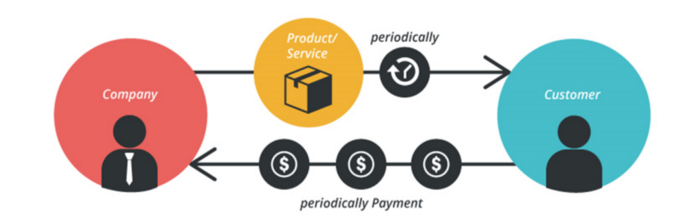
Examples: Tinder, Netflix, Shopify, etc
It's the next step to Freemium if a customer wants to pay monthly for premium features.
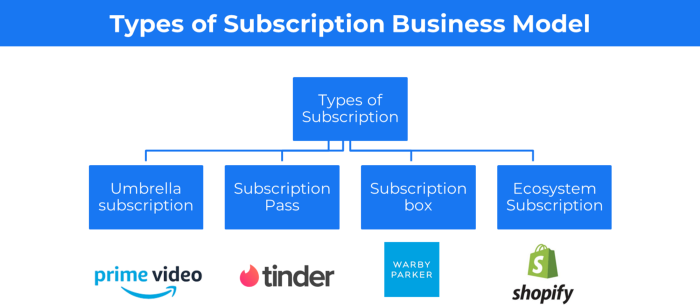
Subscription Business Model (Click here)
3. A market-based business strategy
It's an e-commerce site or app where third-party sellers sell products or services.
Examples are Amazon and Fiverr.
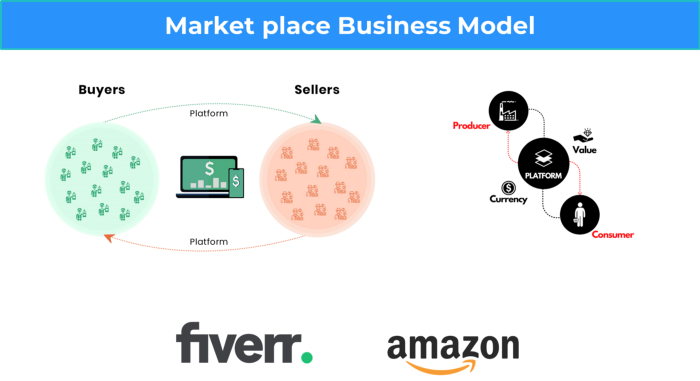
On Amazon's marketplace, a third-party vendor sells a product.
Freelancers on Fiverr offer specialized skills like graphic design.
Marketplace's business concept is explained.
4. Business plans using aggregates
In the aggregator business model, the service is branded.
Uber, Airbnb, and other examples
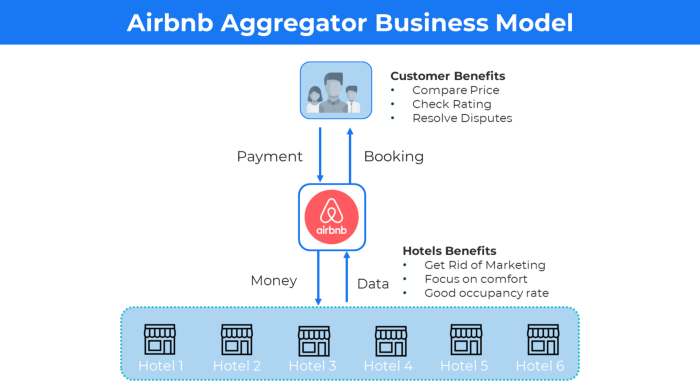
Marketplace and Aggregator business models differ.
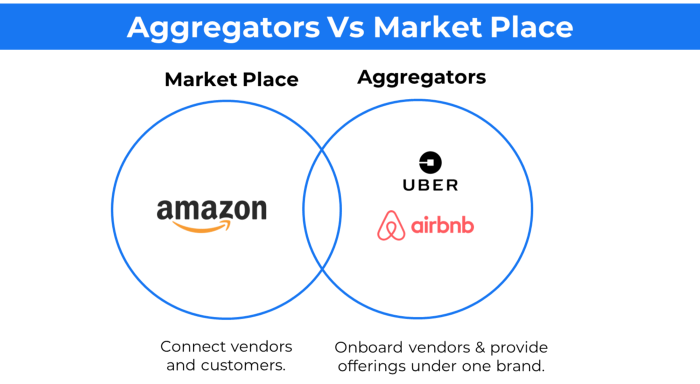
Amazon and Fiverr link merchants and customers and take a 10-20% revenue split.
Uber and Airbnb-style aggregator Join these businesses and provide their products.
5. The pay-as-you-go concept of business
This is a consumption-based pricing system. Cloud companies use it.
Example: Amazon Web Service and Google Cloud Platform (GCP) (AWS)
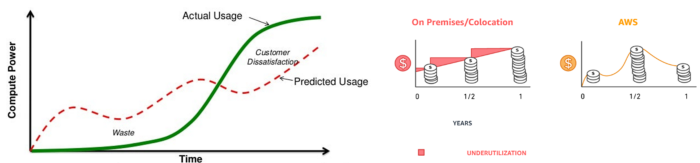
AWS, an Amazon subsidiary, offers over 200 pay-as-you-go cloud services.
“In short, the more you use the more you pay”
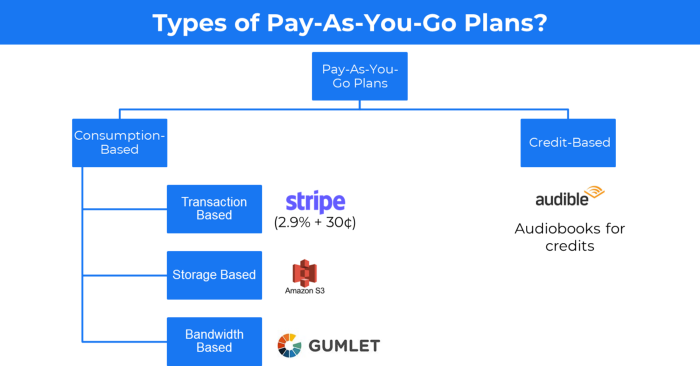
When it's difficult to divide clients into pricing levels, pay-as-you is employed.
6. The business model known as fee-for-service (FFS)
FFS charges fixed and variable fees for each successful payment.
For instance, PayU, Paypal, and Stripe
Stripe charges 2.9% + 30 per payment.
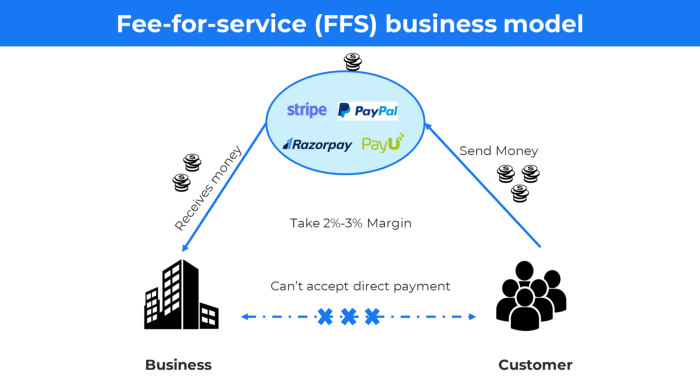
These firms offer a payment gateway to take consumer payments and deposit them to a business account.
Fintech business model
7. EdTech business strategy
In edtech, you generate money by selling material or teaching as a service.
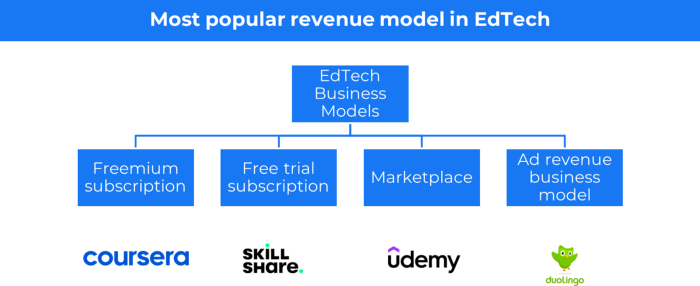
edtech business models
Freemium When course content is free but certification isn't, e.g. Coursera
FREE TRIAL SkillShare offers free trials followed by monthly or annual subscriptions.
Self-serving marketplace approach where you pick what to learn.
Ad-revenue model The company makes money by showing adverts to its huge user base.
Lock-in business strategy
Lock in prevents customers from switching to a competitor's brand or offering.
It uses switching costs or effort to transmit (soft lock-in), improved brand experience, or incentives.
Apple, SAP, and other examples
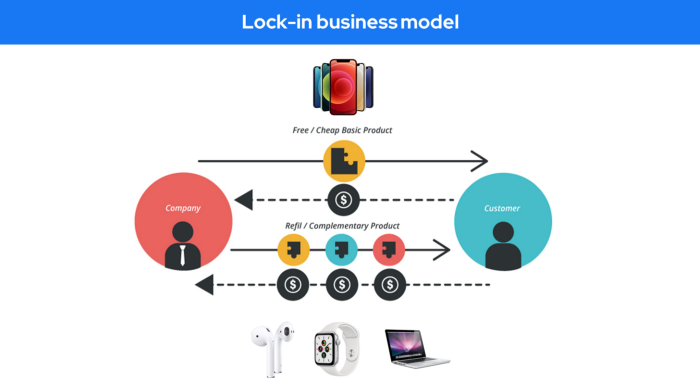
Apple offers an iPhone and then locks you in with extra hardware (Watch, Airpod) and platform services (Apple Store, Apple Music, cloud, etc.).
9. Business Model for API Licensing
APIs let third-party apps communicate with your service.
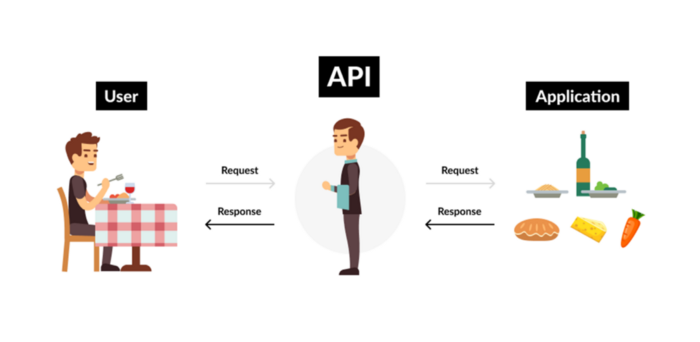
Uber and Airbnb use Google Maps APIs for app navigation.
Examples are Google Map APIs (Map), Sendgrid (Email), and Twilio (SMS).
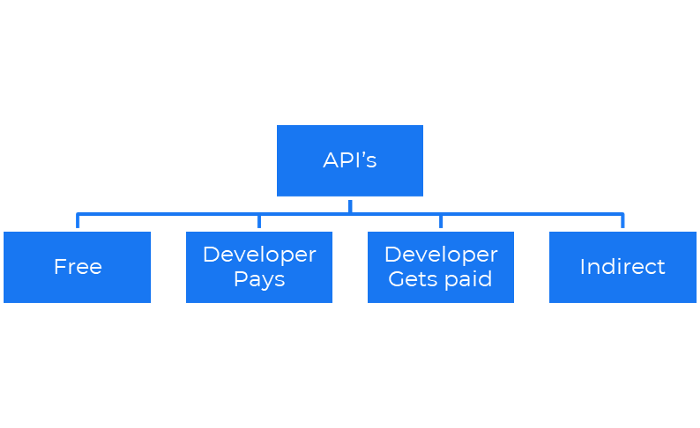
Business models for APIs
Free: The simplest API-driven business model that enables unrestricted API access for app developers. Google Translate and Facebook are two examples.
Developer Pays: Under this arrangement, service providers such as AWS, Twilio, Github, Stripe, and others must be paid by application developers.
The developer receives payment: These are the compensated content producers or developers who distribute the APIs utilizing their work. For example, Amazon affiliate programs
10. Open-source enterprise
Open-source software can be inspected, modified, and improved by anybody.
For instance, use Firefox, Java, or Android.

Google paid Mozilla $435,702 million to be their primary search engine in 2018.
Open-source software profits in six ways.
Paid assistance The Project Manager can charge for customization because he is quite knowledgeable about the codebase.
A full database solution is available as a Software as a Service (MongoDB Atlas), but there is a fee for the monitoring tool.
Open-core design R studio is a better GUI substitute for open-source applications.
sponsors of GitHub Sponsorships benefit the developers in full.
demands for paid features Earn Money By Developing Open Source Add-Ons for Current Products
Open-source business model
11. The business model for data
If the software or algorithm collects client data to improve or monetize the system.
Open AI GPT3 gets smarter with use.
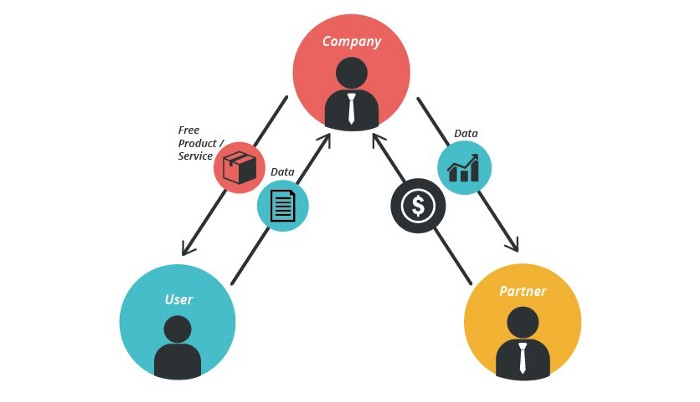
Foursquare allows users to exchange check-in locations.
Later, they compiled large datasets to enable retailers like Starbucks launch new outlets.
12. Business Model Using Blockchain
Blockchain is a distributed ledger technology that allows firms to deploy smart contracts without a central authority.
Examples include Alchemy, Solana, and Ethereum.
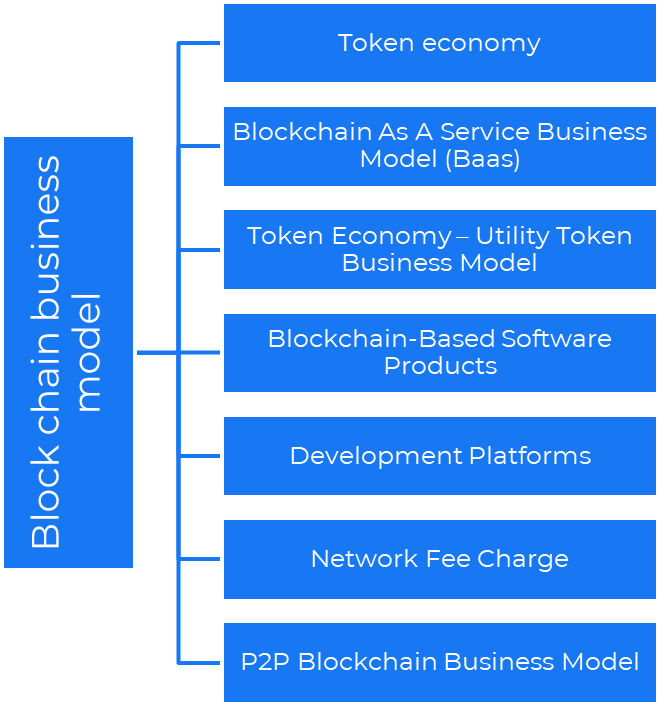
Business models using blockchain
Economy of tokens or utility When a business uses a token business model, it issues some kind of token as one of the ways to compensate token holders or miners. For instance, Solana and Ethereum
Bitcoin Cash P2P Business Model Peer-to-peer (P2P) blockchain technology permits direct communication between end users. as in IPFS
Enterprise Blockchain as a Service (Baas) BaaS focuses on offering ecosystem services similar to those offered by Amazon (AWS) and Microsoft (Azure) in the web 3 sector. Example: Ethereum Blockchain as a Service with Bitcoin (EBaaS).
Blockchain-Based Aggregators With AWS for blockchain, you can use that service by making an API call to your preferred blockchain. As an illustration, Alchemy offers nodes for many blockchains.
13. The free-enterprise model
In the freeterprise business model, free professional accounts are led into the funnel by the free product and later become B2B/enterprise accounts.
For instance, Slack and Zoom
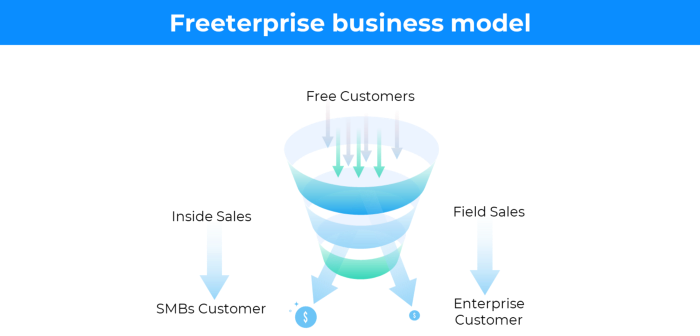
Freeterprise companies flourish through collaboration.
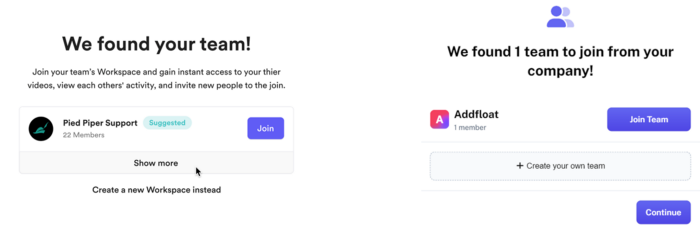
Start with a free professional account to build an enterprise.
14. Business plan for razor blades
It's employed in hardware where one piece is sold at a loss and profits are made through refills or add-ons.
Gillet razor & blades, coffee machine & beans, HP printer & cartridge, etc.
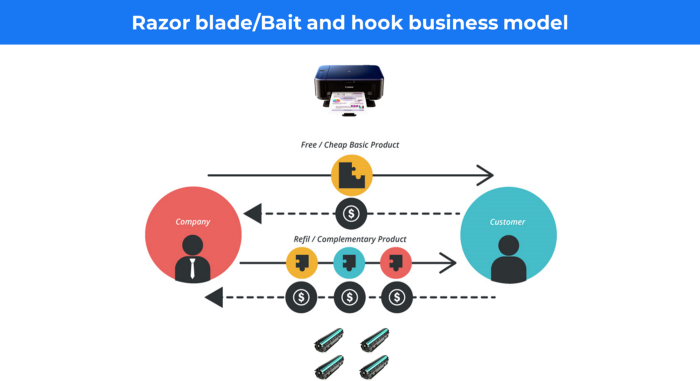
Sony sells the Playstation console at a loss but makes up for it by selling games and charging for online services.
Advantages of the Razor-Razorblade Method
lowers the risk a customer will try a product. enables buyers to test the goods and services without having to pay a high initial investment.
The product's ongoing revenue stream has the potential to generate sales that much outweigh the original investments.
Razor blade business model
15. The business model of direct-to-consumer (D2C)
In D2C, the company sells directly to the end consumer through its website using a third-party logistic partner.
Examples include GymShark and Kylie Cosmetics.
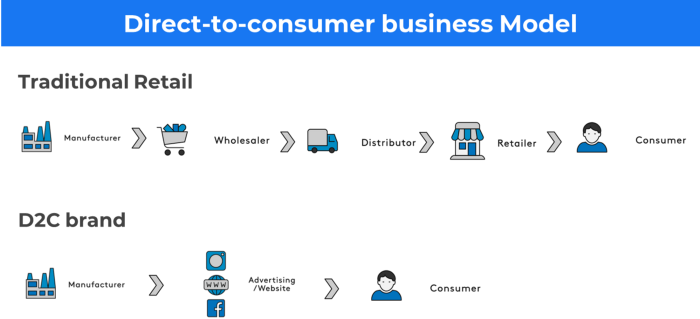
D2C brands can only expand via websites, marketplaces (Amazon, eBay), etc.
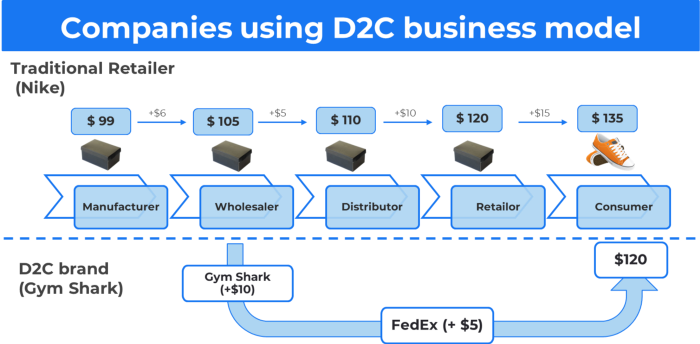
D2C benefits
Lower reliance on middlemen = greater profitability
You now have access to more precise demographic and geographic customer data.
Additional space for product testing
Increased customisation throughout your entire product line-Inventory Less
16. Business model: White Label vs. Private Label
Private label/White label products are made by a contract or third-party manufacturer.
Most amazon electronics are made in china and white-labeled.
Amazon supplements and electronics.
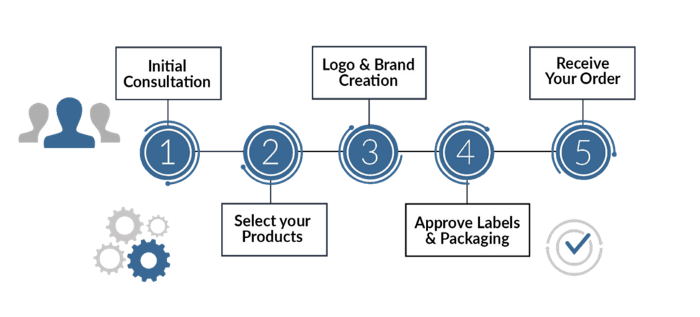
Contract manufacturers handle everything after brands select product quantities on design labels.
17. The franchise model
The franchisee uses the franchisor's trademark, branding, and business strategy (company).
For instance, KFC, Domino's, etc.
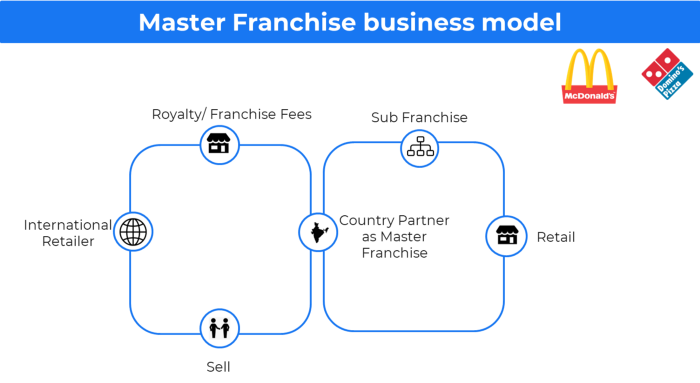
Subway, Domino, Burger King, etc. use this business strategy.
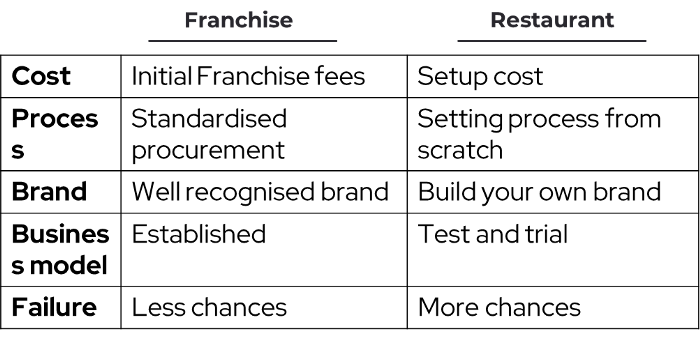
Many people pick a franchise because opening a restaurant is risky.
18. Ad-based business model
Social media and search engine giants exploit search and interest data to deliver adverts.
Google, Meta, TikTok, and Snapchat are some examples.
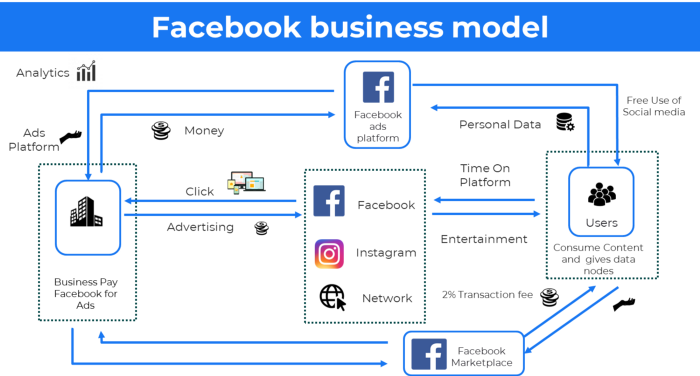
Users don't pay for the service or product given, e.g. Google users don't pay for searches.
In exchange, they collected data and hyper-personalized adverts to maximize revenue.
19. Business plan for octopuses
Each business unit functions separately but is connected to the main body.
Instance: Oyo
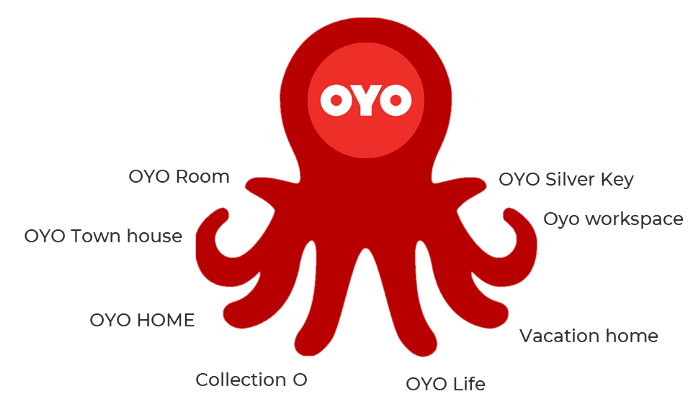
OYO is Asia's Airbnb, operating hotels, co-working, co-living, and vacation houses.
20, Transactional business model, number
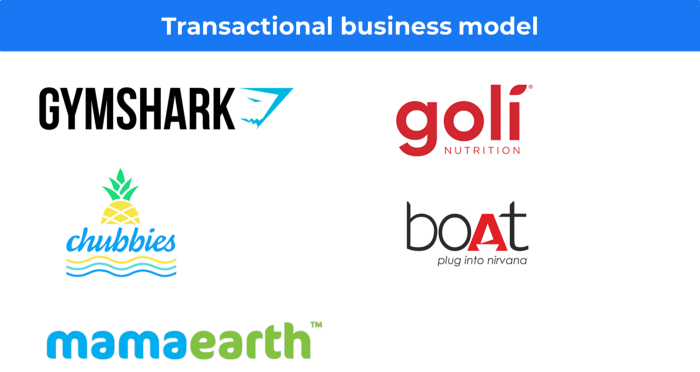
Sales to customers produce revenue.
E-commerce sites and online purchases employ SSL.
Goli is an ex-GymShark.
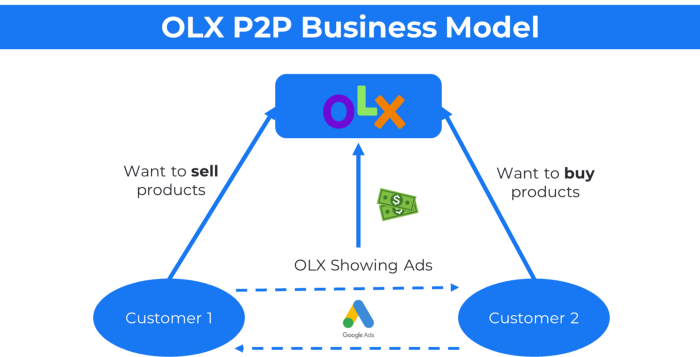
21. The peer-to-peer (P2P) business model
In P2P, two people buy and sell goods and services without a third party or platform.
Consider OLX.
22. P2P lending as a manner of operation
In P2P lending, one private individual (P2P Lender) lends/invests or borrows money from another (P2P Borrower).
Instance: Kabbage
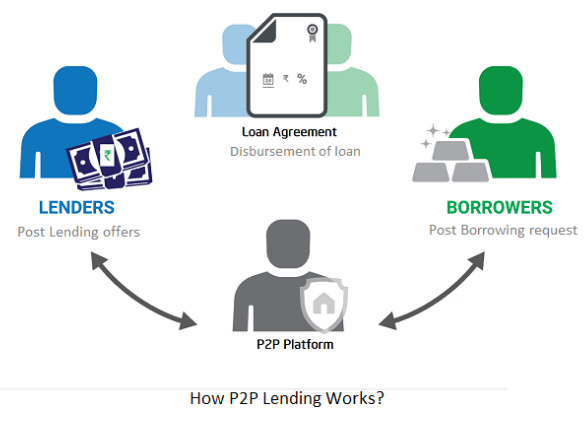
Social lending lets people lend and borrow money directly from each other without an intermediary financial institution.
23. A business model for brokers
Brokerages charge a commission or fee for their services.
Examples include eBay, Coinbase, and Robinhood.
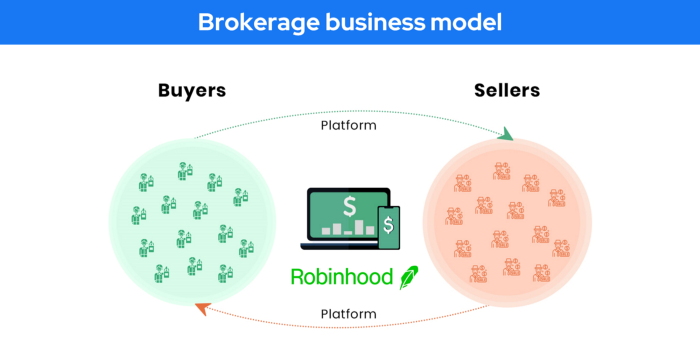
Brokerage businesses are common in Real estate, finance, and online and operate on this model.
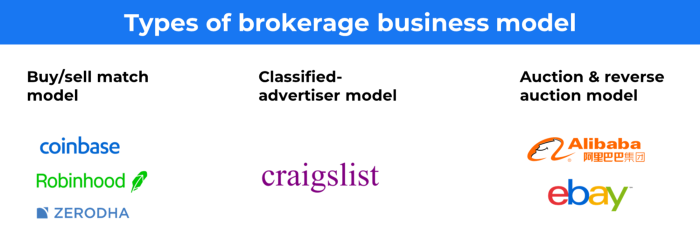
Buy/sell similar models Examples include financial brokers, insurance brokers, and others who match purchase and sell transactions and charge a commission.
These brokers charge an advertiser a fee based on the date, place, size, or type of an advertisement. This is known as the classified-advertiser model. For instance, Craiglist
24. Drop shipping as an industry
Dropshipping allows stores to sell things without holding physical inventories.
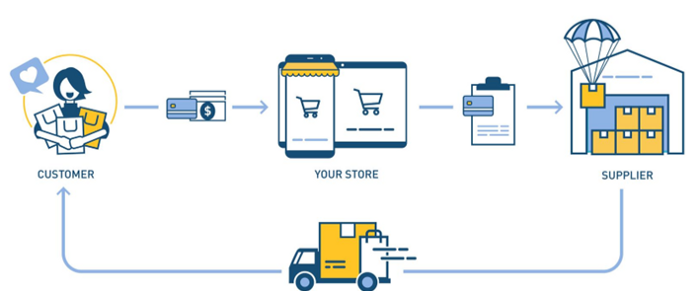
When a customer orders, use a third-party supplier and logistic partners.
Retailer product portfolio and customer experience Fulfiller The consumer places the order.
Dropshipping advantages
Less money is needed (Low overhead-No Inventory or warehousing)
Simple to start (costs under $100)
flexible work environment
New product testing is simpler
25. Business Model for Space as a Service
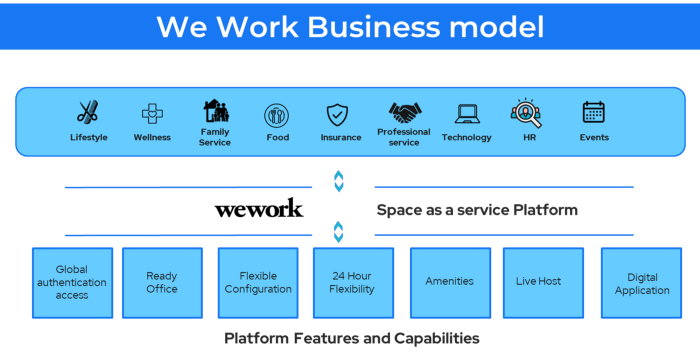
It's centered on a shared economy that lets millennials live or work in communal areas without ownership or lease.
Consider WeWork and Airbnb.
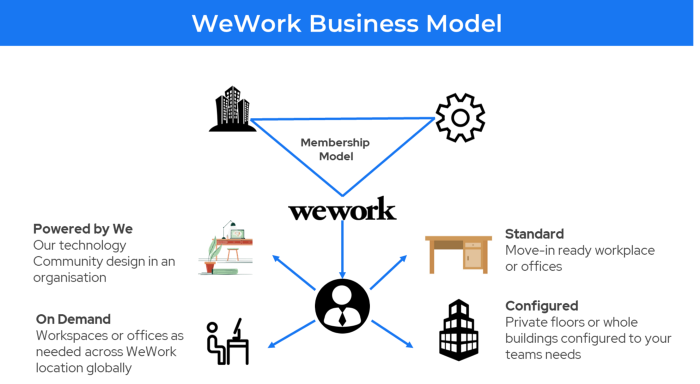
WeWork helps businesses with real estate, legal compliance, maintenance, and repair.
26. The business model for third-party logistics (3PL)
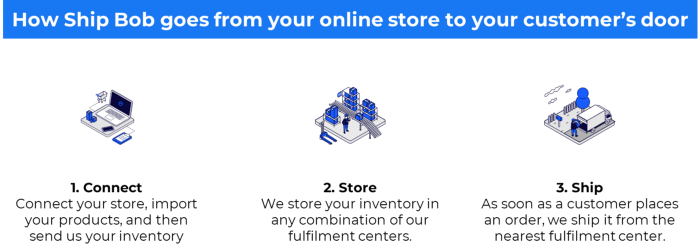
In 3PL, a business outsources product delivery, warehousing, and fulfillment to an external logistics company.
Examples include Ship Bob, Amazon Fulfillment, and more.

3PL partners warehouse, fulfill, and return inbound and outbound items for a charge.
Inbound logistics involves bringing products from suppliers to your warehouse.
Outbound logistics refers to a company's production line, warehouse, and customer.
27. The last-mile delivery paradigm as a commercial strategy
Last-mile delivery is the collection of supply chain actions that reach the end client.
Examples include Rappi, Gojek, and Postmates.
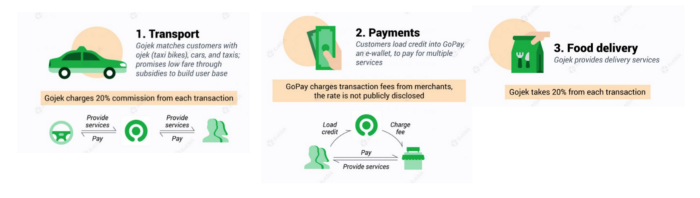
Last-mile is tied to on-demand and has a nighttime peak.
28. The use of affiliate marketing
Affiliate marketing involves promoting other companies' products and charging commissions.
Examples include Hubspot, Amazon, and Skillshare.
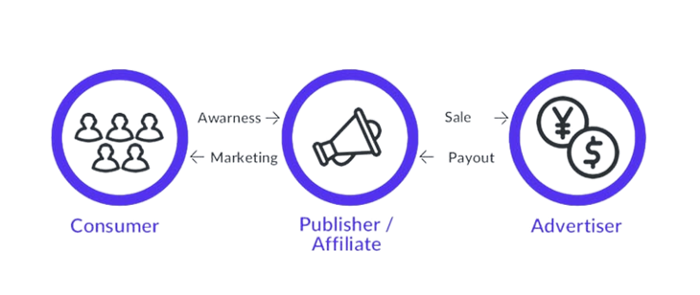
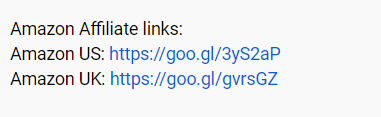
Your favorite youtube channel probably uses these short amazon links to get 5% of sales.
Affiliate marketing's benefits
In exchange for a success fee or commission, it enables numerous independent marketers to promote on its behalf.
Ensure system transparency by giving the influencers a specific tracking link and an online dashboard to view their profits.
Learn about the newest bargains and have access to promotional materials.
29. The business model for virtual goods
This is an in-app purchase for an intangible product.
Examples include PubG, Roblox, Candy Crush, etc.
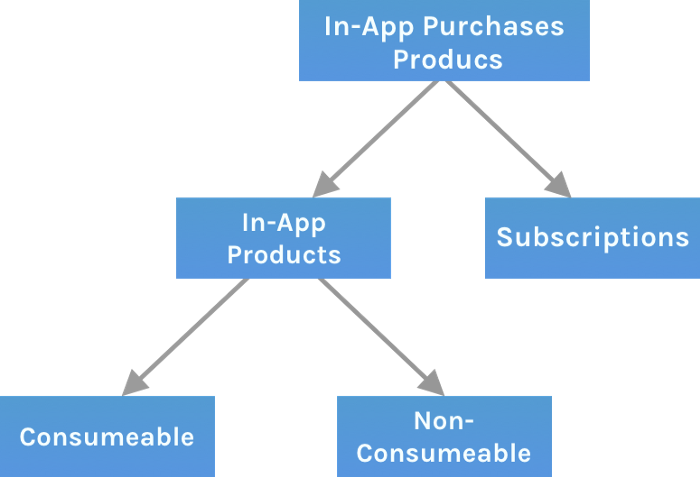
Consumables are like gaming cash that runs out. Non-consumable products provide a permanent advantage without repeated purchases.
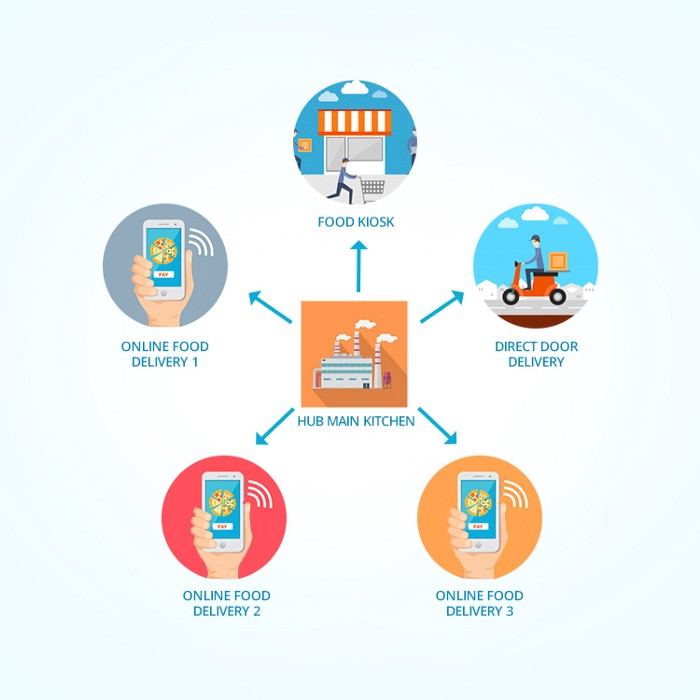
30. Business Models for Cloud Kitchens
Ghost, Dark, Black Box, etc.
Delivery-only restaurant.
These restaurants don't provide dine-in, only delivery.
For instance, NextBite and Faasos
31. Crowdsourcing as a Business Model
Crowdsourcing = Using the crowd as a platform's source.
In crowdsourcing, you get support from people around the world without hiring them.
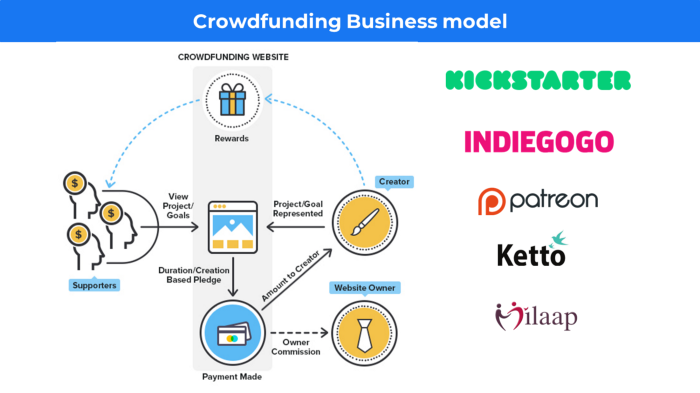
Crowdsourcing sites
Open-Source Software gives access to the software's source code so that developers can edit or enhance it. Examples include Firefox browsers and Linux operating systems.
Crowdfunding The oculus headgear would be an example of crowdfunding in essence, with no expectations.

Sammy Abdullah
3 years ago
R&D, S&M, and G&A expense ratios for SaaS
SaaS spending is 40/40/20. 40% of operating expenses should be R&D, 40% sales and marketing, and 20% G&A. We wanted to see the statistics behind the rules of thumb. Since October 2017, 73 SaaS startups have gone public. Perhaps the rule of thumb should be 30/50/20. The data is below.
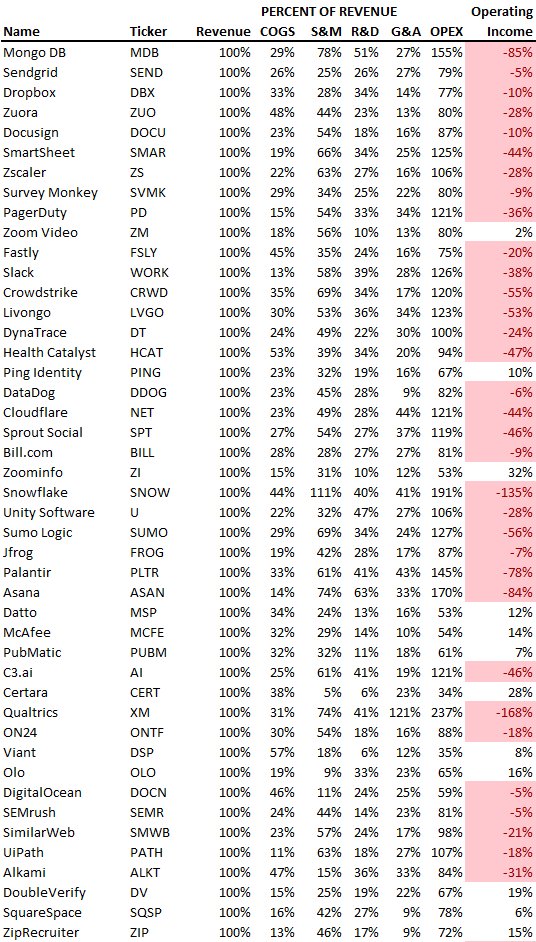
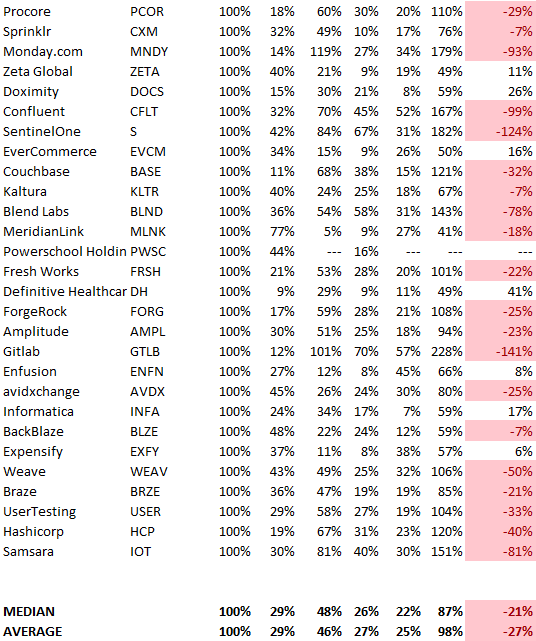
30/50/20. R&D accounts for 26% of opex, sales and marketing 48%, and G&A 22%. We think R&D/S&M/G&A should be 30/50/20.
There are outliers. There are exceptions to rules of thumb. Dropbox spent 45% on R&D whereas Zoom spent 13%. Zoom spent 73% on S&M, Dropbox 37%, and Bill.com 28%. Snowflake spent 130% of revenue on S&M, while their EBITDA margin is -192%.
G&A shouldn't stand out. Minimize G&A spending. Priorities should be product development and sales. Cloudflare, Sendgrid, Snowflake, and Palantir spend 36%, 34%, 37%, and 43% on G&A.
Another myth is that COGS is 20% of revenue. Median and averages are 29%.
Where is the profitability? Data-driven operating income calculations were simplified (Revenue COGS R&D S&M G&A). 20 of 73 IPO businesses reported operational income. Median and average operating income margins are -21% and -27%.
As long as you're growing fast, have outstanding retention, and marquee clients, you can burn cash since recurring income that doesn't churn is a valuable annuity.
The data was compelling overall. 30/50/20 is the new 40/40/20 for more established SaaS enterprises, unprofitability is alright as long as your business is expanding, and COGS can be somewhat more than 20% of revenue.

Nitin Sharma
3 years ago
Web3 Terminology You Should Know
The easiest online explanation.

Web3 is growing. Crypto companies are growing.
Instagram, Adidas, and Stripe adopted cryptocurrency.

Bitcoin and other cryptocurrencies made web3 famous.
Most don't know where to start. Cryptocurrency, DeFi, etc. are investments.
Since we don't understand web3, I'll help you today.
Let’s go.
1. Web3
It is the third generation of the web, and it is built on the decentralization idea which means no one can control it.
There are static webpages that we can only read on the first generation of the web (i.e. Web 1.0).
Web 2.0 websites are interactive. Twitter, Medium, and YouTube.
Each generation controlled the website owner. Simply put, the owner can block us. However, data breaches and selling user data to other companies are issues.
They can influence the audience's mind since they have control.
Assume Twitter's CEO endorses Donald Trump. Result? Twitter would have promoted Donald Trump with tweets and graphics, enhancing his chances of winning.
We need a decentralized, uncontrollable system.
And then there’s Web3.0 to consider. As Bitcoin and Ethereum values climb, so has its popularity. Web3.0 is uncontrolled web evolution. It's good and bad.
Dapps, DeFi, and DAOs are here. It'll all be explained afterwards.
2. Cryptocurrencies:
No need to elaborate.
Bitcoin, Ethereum, Cardano, and Dogecoin are cryptocurrencies. It's digital money used for payments and other uses.
Programs must interact with cryptocurrencies.
3. Blockchain:
Blockchain facilitates bitcoin transactions, investments, and earnings.
This technology governs Web3. It underpins the web3 environment.
Let us delve much deeper.
Blockchain is simple. However, the name expresses the meaning.
Blockchain is a chain of blocks.
Let's use an image if you don't understand.
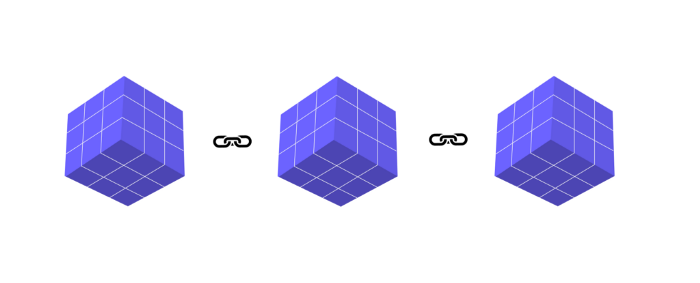
The graphic above explains blockchain. Think Blockchain. The block stores related data.
Here's more.
4. Smart contracts
Programmers and developers must write programs. Smart contracts are these blockchain apps.
That’s reasonable.
Decentralized web3.0 requires immutable smart contracts or programs.
5. NFTs
Blockchain art is NFT. Non-Fungible Tokens.
Explaining Non-Fungible Token may help.
Two sorts of tokens:
These tokens are fungible, meaning they can be changed. Think of Bitcoin or cash. The token won't change if you sell one Bitcoin and acquire another.
Non-Fungible Token: Since these tokens cannot be exchanged, they are exclusive. For instance, music, painting, and so forth.
Right now, Companies and even individuals are currently developing worthless NFTs.
The concept of NFTs is much improved when properly handled.
6. Dapp
Decentralized apps are Dapps. Instagram, Twitter, and Medium apps in the same way that there is a lot of decentralized blockchain app.
Curve, Yearn Finance, OpenSea, Axie Infinity, etc. are dapps.
7. DAOs
DAOs are member-owned and governed.
Consider it a company with a core group of contributors.
8. DeFi
We all utilize centrally regulated financial services. We fund these banks.
If you have $10,000 in your bank account, the bank can invest it and retain the majority of the profits.
We only get a penny back. Some banks offer poor returns. To secure a loan, we must trust the bank, divulge our information, and fill out lots of paperwork.
DeFi was built for such issues.
Decentralized banks are uncontrolled. Staking, liquidity, yield farming, and more can earn you money.
Web3 beginners should start with these resources.