Integrity
Write
Loading...
Theresa W. Carey

Theresa W. Carey

3 years ago

How Payment for Order Flow (PFOF) Works

What is PFOF?

PFOF is a brokerage firm's compensation for directing orders to different parties for trade execution. The brokerage firm receives fractions of a penny per share for directing the order to a market maker.

Each optionable stock could have thousands of contracts, so market makers dominate options trades. Order flow payments average less than $0.50 per option contract.

Order Flow Payments (PFOF) Explained

The proliferation of exchanges and electronic communication networks has complicated equity and options trading (ECNs) Ironically, Bernard Madoff, the Ponzi schemer, pioneered pay-for-order-flow.

In a December 2000 study on PFOF, the SEC said, "Payment for order flow is a method of transferring trading profits from market making to brokers who route customer orders to specialists for execution."

Given the complexity of trading thousands of stocks on multiple exchanges, market making has grown. Market makers are large firms that specialize in a set of stocks and options, maintaining an inventory of shares and contracts for buyers and sellers. Market makers are paid the bid-ask spread. Spreads have narrowed since 2001, when exchanges switched to decimals. A market maker's ability to play both sides of trades is key to profitability.

Benefits, requirements

A broker receives fees from a third party for order flow, sometimes without a client's knowledge. This invites conflicts of interest and criticism. Regulation NMS from 2005 requires brokers to disclose their policies and financial relationships with market makers.

Your broker must tell you if it's paid to send your orders to specific parties. This must be done at account opening and annually. The firm must disclose whether it participates in payment-for-order-flow and, upon request, every paid order. Brokerage clients can request payment data on specific transactions, but the response takes weeks.

Order flow payments save money. Smaller brokerage firms can benefit from routing orders through market makers and getting paid. This allows brokerage firms to send their orders to another firm to be executed with other orders, reducing costs. The market maker or exchange benefits from additional share volume, so it pays brokerage firms to direct traffic.

Retail investors, who lack bargaining power, may benefit from order-filling competition. Arrangements to steer the business in one direction invite wrongdoing, which can erode investor confidence in financial markets and their players.

Pay-for-order-flow criticism

It has always been controversial. Several firms offering zero-commission trades in the late 1990s routed orders to untrustworthy market makers. During the end of fractional pricing, the smallest stock spread was $0.125. Options spreads widened. Traders found that some of their "free" trades cost them a lot because they weren't getting the best price.

The SEC then studied the issue, focusing on options trades, and nearly decided to ban PFOF. The proliferation of options exchanges narrowed spreads because there was more competition for executing orders. Options market makers said their services provided liquidity. In its conclusion, the report said, "While increased multiple-listing produced immediate economic benefits to investors in the form of narrower quotes and effective spreads, these improvements have been muted with the spread of payment for order flow and internalization." 

The SEC allowed payment for order flow to continue to prevent exchanges from gaining monopoly power. What would happen to trades if the practice was outlawed was also unclear. SEC requires brokers to disclose financial arrangements with market makers. Since then, the SEC has watched closely.

2020 Order Flow Payment

Rule 605 and Rule 606 show execution quality and order flow payment statistics on a broker's website. Despite being required by the SEC, these reports can be hard to find. The SEC mandated these reports in 2005, but the format and reporting requirements have changed over the years, most recently in 2018.

Brokers and market makers formed a working group with the Financial Information Forum (FIF) to standardize order execution quality reporting. Only one retail brokerage (Fidelity) and one market maker remain (Two Sigma Securities). FIF notes that the 605/606 reports "do not provide the level of information that allows a retail investor to gauge how well a broker-dealer fills a retail order compared to the NBBO (national best bid or offer’) at the time the order was received by the executing broker-dealer."

In the first quarter of 2020, Rule 606 reporting changed to require brokers to report net payments from market makers for S&P 500 and non-S&P 500 equity trades and options trades. Brokers must disclose payment rates per 100 shares by order type (market orders, marketable limit orders, non-marketable limit orders, and other orders).

Richard Repetto, Managing Director of New York-based Piper Sandler & Co., publishes a report on Rule 606 broker reports. Repetto focused on Charles Schwab, TD Ameritrade, E-TRADE, and Robinhood in Q2 2020. Repetto reported that payment for order flow was higher in the second quarter than the first due to increased trading activity, and that options paid more than equities.

Repetto says PFOF contributions rose overall. Schwab has the lowest options rates, while TD Ameritrade and Robinhood have the highest. Robinhood had the highest equity rating. Repetto assumes Robinhood's ability to charge higher PFOF reflects their order flow profitability and that they receive a fixed rate per spread (vs. a fixed rate per share by the other brokers).

Robinhood's PFOF in equities and options grew the most quarter-over-quarter of the four brokers Piper Sandler analyzed, as did their implied volumes. All four brokers saw higher PFOF rates.

TD Ameritrade took the biggest income hit when cutting trading commissions in fall 2019, and this report shows they're trying to make up the shortfall by routing orders for additional PFOF. Robinhood refuses to disclose trading statistics using the same metrics as the rest of the industry, offering only a vague explanation on their website.

Summary

Payment for order flow has become a major source of revenue as brokers offer no-commission equity (stock and ETF) orders. For retail investors, payment for order flow poses a problem because the brokerage may route orders to a market maker for its own benefit, not the investor's.

Infrequent or small-volume traders may not notice their broker's PFOF practices. Frequent traders and those who trade larger quantities should learn about their broker's order routing system to ensure they're not losing out on price improvement due to a broker prioritizing payment for order flow.


This post is a summary. Read full article here

More on Economics & Investing

Adam Hayes

Adam Hayes

3 years ago

Bernard Lawrence "Bernie" Madoff, the largest Ponzi scheme in history

Madoff who?

Bernie Madoff ran the largest Ponzi scheme in history, defrauding thousands of investors over at least 17 years, and possibly longer. He pioneered electronic trading and chaired Nasdaq in the 1990s. On April 14, 2021, he died while serving a 150-year sentence for money laundering, securities fraud, and other crimes.

Understanding Madoff

Madoff claimed to generate large, steady returns through a trading strategy called split-strike conversion, but he simply deposited client funds into a single bank account and paid out existing clients. He funded redemptions by attracting new investors and their capital, but the market crashed in late 2008. He confessed to his sons, who worked at his firm, on Dec. 10, 2008. Next day, they turned him in. The fund reported $64.8 billion in client assets.

Madoff pleaded guilty to 11 federal felony counts, including securities fraud, wire fraud, mail fraud, perjury, and money laundering. Ponzi scheme became a symbol of Wall Street's greed and dishonesty before the financial crisis. Madoff was sentenced to 150 years in prison and ordered to forfeit $170 billion, but no other Wall Street figures faced legal ramifications.

Bernie Madoff's Brief Biography

Bernie Madoff was born in Queens, New York, on April 29, 1938. He began dating Ruth (née Alpern) when they were teenagers. Madoff told a journalist by phone from prison that his father's sporting goods store went bankrupt during the Korean War: "You watch your father, who you idolize, build a big business and then lose everything." Madoff was determined to achieve "lasting success" like his father "whatever it took," but his career had ups and downs.

Early Madoff investments

At 22, he started Bernard L. Madoff Investment Securities LLC. First, he traded penny stocks with $5,000 he earned installing sprinklers and as a lifeguard. Family and friends soon invested with him. Madoff's bets soured after the "Kennedy Slide" in 1962, and his father-in-law had to bail him out.

Madoff felt he wasn't part of the Wall Street in-crowd. "We weren't NYSE members," he told Fishman. "It's obvious." According to Madoff, he was a scrappy market maker. "I was happy to take the crumbs," he told Fishman, citing a client who wanted to sell eight bonds; a bigger firm would turn it down.

Recognition

Success came when he and his brother Peter built electronic trading capabilities, or "artificial intelligence," that attracted massive order flow and provided market insights. "I had all these major banks coming down, entertaining me," Madoff told Fishman. "It was mind-bending."

By the late 1980s, he and four other Wall Street mainstays processed half of the NYSE's order flow. Controversially, he paid for much of it, and by the late 1980s, Madoff was making in the vicinity of $100 million a year.  He was Nasdaq chairman from 1990 to 1993.

Madoff's Ponzi scheme

It is not certain exactly when Madoff's Ponzi scheme began. He testified in court that it began in 1991, but his account manager, Frank DiPascali, had been at the firm since 1975.

Why Madoff did the scheme is unclear. "I had enough money to support my family's lifestyle. "I don't know why," he told Fishman." Madoff could have won Wall Street's respect as a market maker and electronic trading pioneer.

Madoff told Fishman he wasn't solely responsible for the fraud. "I let myself be talked into something, and that's my fault," he said, without saying who convinced him. "I thought I could escape eventually. I thought it'd be quick, but I couldn't."

Carl Shapiro, Jeffry Picower, Stanley Chais, and Norm Levy have been linked to Bernard L. Madoff Investment Securities LLC for years. Madoff's scheme made these men hundreds of millions of dollars in the 1960s and 1970s.

Madoff told Fishman, "Everyone was greedy, everyone wanted to go on." He says the Big Four and others who pumped client funds to him, outsourcing their asset management, must have suspected his returns or should have. "How can you make 15%-18% when everyone else is making less?" said Madoff.

How Madoff Got Away with It for So Long

Madoff's high returns made clients look the other way. He deposited their money in a Chase Manhattan Bank account, which merged to become JPMorgan Chase & Co. in 2000. The bank may have made $483 million from those deposits, so it didn't investigate.

When clients redeemed their investments, Madoff funded the payouts with new capital he attracted by promising unbelievable returns and earning his victims' trust. Madoff created an image of exclusivity by turning away clients. This model let half of Madoff's investors profit. These investors must pay into a victims' fund for defrauded investors.

Madoff wooed investors with his philanthropy. He defrauded nonprofits, including the Elie Wiesel Foundation for Peace and Hadassah. He approached congregants through his friendship with J. Ezra Merkin, a synagogue officer. Madoff allegedly stole $1 billion to $2 billion from his investors.

Investors believed Madoff for several reasons:

  • His public portfolio seemed to be blue-chip stocks.
  • His returns were high (10-20%) but consistent and not outlandish. In a 1992 interview with Madoff, the Wall Street Journal reported: "[Madoff] insists the returns were nothing special, given that the S&P 500-stock index returned 16.3% annually from 1982 to 1992. 'I'd be surprised if anyone thought matching the S&P over 10 years was remarkable,' he says.
  • "He said he was using a split-strike collar strategy. A collar protects underlying shares by purchasing an out-of-the-money put option.

SEC inquiry

The Securities and Exchange Commission had been investigating Madoff and his securities firm since 1999, which frustrated many after he was prosecuted because they felt the biggest damage could have been prevented if the initial investigations had been rigorous enough.

Harry Markopolos was a whistleblower. In 1999, he figured Madoff must be lying in an afternoon. The SEC ignored his first Madoff complaint in 2000.

Markopolos wrote to the SEC in 2005: "The largest Ponzi scheme is Madoff Securities. This case has no SEC reward, so I'm turning it in because it's the right thing to do."

Many believed the SEC's initial investigations could have prevented Madoff's worst damage.

Markopolos found irregularities using a "Mosaic Method." Madoff's firm claimed to be profitable even when the S&P fell, which made no mathematical sense given what he was investing in. Markopolos said Madoff Securities' "undisclosed commissions" were the biggest red flag (1 percent of the total plus 20 percent of the profits).

Markopolos concluded that "investors don't know Bernie Madoff manages their money." Markopolos learned Madoff was applying for large loans from European banks (seemingly unnecessary if Madoff's returns were high).

The regulator asked Madoff for trading account documentation in 2005, after he nearly went bankrupt due to redemptions. The SEC drafted letters to two of the firms on his six-page list but didn't send them. Diana Henriques, author of "The Wizard of Lies: Bernie Madoff and the Death of Trust," documents the episode.

In 2008, the SEC was criticized for its slow response to Madoff's fraud.

Confession, sentencing of Bernie Madoff

Bernard L. Madoff Investment Securities LLC reported 5.6% year-to-date returns in November 2008; the S&P 500 fell 39%. As the selling continued, Madoff couldn't keep up with redemption requests, and on Dec. 10, he confessed to his sons Mark and Andy, who worked at his firm. "After I told them, they left, went to a lawyer, who told them to turn in their father, and I never saw them again. 2008-12-11: Bernie Madoff arrested.

Madoff insists he acted alone, but several of his colleagues were jailed. Mark Madoff died two years after his father's fraud was exposed. Madoff's investors committed suicide. Andy Madoff died of cancer in 2014.

2009 saw Madoff's 150-year prison sentence and $170 billion forfeiture. Marshals sold his three homes and yacht. Prisoner 61727-054 at Butner Federal Correctional Institution in North Carolina.

Madoff's lawyers requested early release on February 5, 2020, claiming he has a terminal kidney disease that may kill him in 18 months. Ten years have passed since Madoff's sentencing.

Bernie Madoff's Ponzi scheme aftermath

The paper trail of victims' claims shows Madoff's complexity and size. Documents show Madoff's scam began in the 1960s. His final account statements show $47 billion in "profit" from fake trades and shady accounting.

Thousands of investors lost their life savings, and multiple stories detail their harrowing loss.

Irving Picard, a New York lawyer overseeing Madoff's bankruptcy, has helped investors. By December 2018, Picard had recovered $13.3 billion from Ponzi scheme profiteers.

A Madoff Victim Fund (MVF) was created in 2013 to help compensate Madoff's victims, but the DOJ didn't start paying out the $4 billion until late 2017. Richard Breeden, a former SEC chair who oversees the fund, said thousands of claims were from "indirect investors"

Breeden and his team had to reject many claims because they weren't direct victims. Breeden said he based most of his decisions on one simple rule: Did the person invest more than they withdrew? Breeden estimated 11,000 "feeder" investors.

Breeden wrote in a November 2018 update for the Madoff Victim Fund, "We've paid over 27,300 victims 56.65% of their losses, with thousands more to come." In December 2018, 37,011 Madoff victims in the U.S. and around the world received over $2.7 billion. Breeden said the fund expected to make "at least one more significant distribution in 2019"


This post is a summary. Read full article here

Sofien Kaabar, CFA

Sofien Kaabar, CFA

3 years ago

How to Make a Trading Heatmap

Python Heatmap Technical Indicator

Heatmaps provide an instant overview. They can be used with correlations or to predict reactions or confirm the trend in trading. This article covers RSI heatmap creation.

The Market System

Market regime:

  • Bullish trend: The market tends to make higher highs, which indicates that the overall trend is upward.

  • Sideways: The market tends to fluctuate while staying within predetermined zones.

  • Bearish trend: The market has the propensity to make lower lows, indicating that the overall trend is downward.

Most tools detect the trend, but we cannot predict the next state. The best way to solve this problem is to assume the current state will continue and trade any reactions, preferably in the trend.

If the EURUSD is above its moving average and making higher highs, a trend-following strategy would be to wait for dips before buying and assuming the bullish trend will continue.

Indicator of Relative Strength

J. Welles Wilder Jr. introduced the RSI, a popular and versatile technical indicator. Used as a contrarian indicator to exploit extreme reactions. Calculating the default RSI usually involves these steps:

  • Determine the difference between the closing prices from the prior ones.

  • Distinguish between the positive and negative net changes.

  • Create a smoothed moving average for both the absolute values of the positive net changes and the negative net changes.

  • Take the difference between the smoothed positive and negative changes. The Relative Strength RS will be the name we use to describe this calculation.

  • To obtain the RSI, use the normalization formula shown below for each time step.

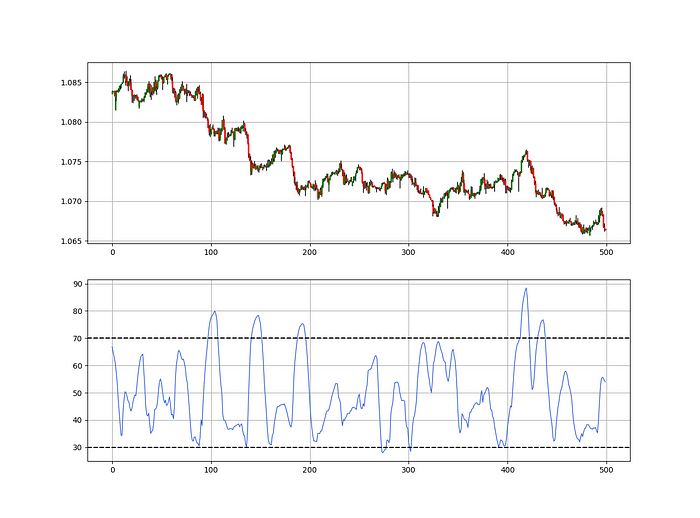
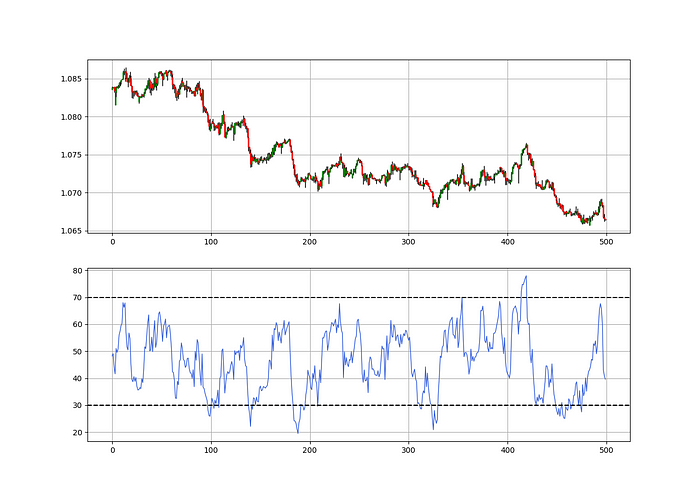
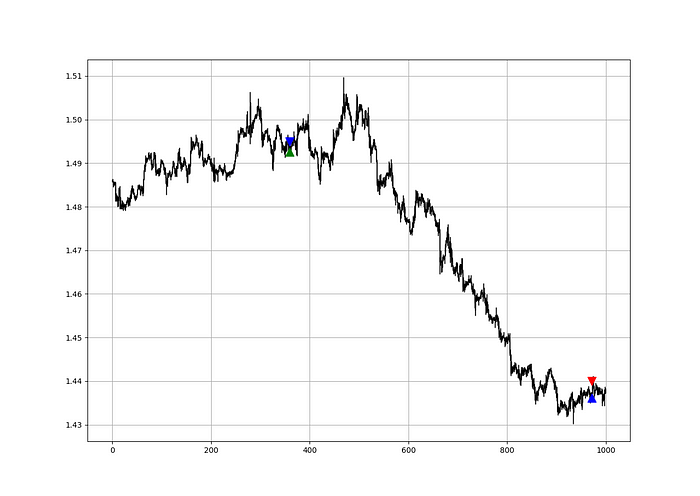
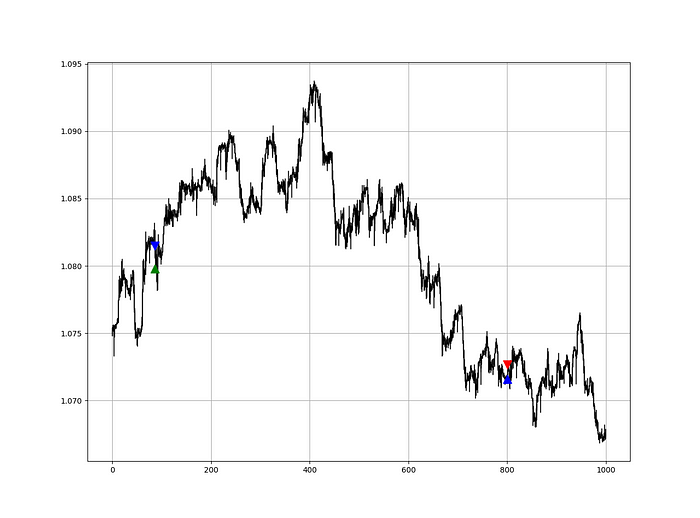
GBPUSD in the first panel with the 13-period RSI in the second panel.

The 13-period RSI and black GBPUSD hourly values are shown above. RSI bounces near 25 and pauses around 75. Python requires a four-column OHLC array for RSI coding.

import numpy as np
def add_column(data, times):
    
    for i in range(1, times + 1):
    
        new = np.zeros((len(data), 1), dtype = float)
        
        data = np.append(data, new, axis = 1)
    return data
def delete_column(data, index, times):
    
    for i in range(1, times + 1):
    
        data = np.delete(data, index, axis = 1)
    return data
def delete_row(data, number):
    
    data = data[number:, ]
    
    return data
def ma(data, lookback, close, position): 
    
    data = add_column(data, 1)
    
    for i in range(len(data)):
           
            try:
                
                data[i, position] = (data[i - lookback + 1:i + 1, close].mean())
            
            except IndexError:
                
                pass
            
    data = delete_row(data, lookback)
    
    return data
def smoothed_ma(data, alpha, lookback, close, position):
    
    lookback = (2 * lookback) - 1
    
    alpha = alpha / (lookback + 1.0)
    
    beta  = 1 - alpha
    
    data = ma(data, lookback, close, position)
    data[lookback + 1, position] = (data[lookback + 1, close] * alpha) + (data[lookback, position] * beta)
    for i in range(lookback + 2, len(data)):
        
            try:
                
                data[i, position] = (data[i, close] * alpha) + (data[i - 1, position] * beta)
        
            except IndexError:
                
                pass
            
    return data
def rsi(data, lookback, close, position):
    
    data = add_column(data, 5)
    
    for i in range(len(data)):
        
        data[i, position] = data[i, close] - data[i - 1, close]
     
    for i in range(len(data)):
        
        if data[i, position] > 0:
            
            data[i, position + 1] = data[i, position]
            
        elif data[i, position] < 0:
            
            data[i, position + 2] = abs(data[i, position])
            
    data = smoothed_ma(data, 2, lookback, position + 1, position + 3)
    data = smoothed_ma(data, 2, lookback, position + 2, position + 4)
    data[:, position + 5] = data[:, position + 3] / data[:, position + 4]
    
    data[:, position + 6] = (100 - (100 / (1 + data[:, position + 5])))
    data = delete_column(data, position, 6)
    data = delete_row(data, lookback)
    return data

Make sure to focus on the concepts and not the code. You can find the codes of most of my strategies in my books. The most important thing is to comprehend the techniques and strategies.

My weekly market sentiment report uses complex and simple models to understand the current positioning and predict the future direction of several major markets. Check out the report here:

Using the Heatmap to Find the Trend

RSI trend detection is easy but useless. Bullish and bearish regimes are in effect when the RSI is above or below 50, respectively. Tracing a vertical colored line creates the conditions below. How:

  • When the RSI is higher than 50, a green vertical line is drawn.

  • When the RSI is lower than 50, a red vertical line is drawn.

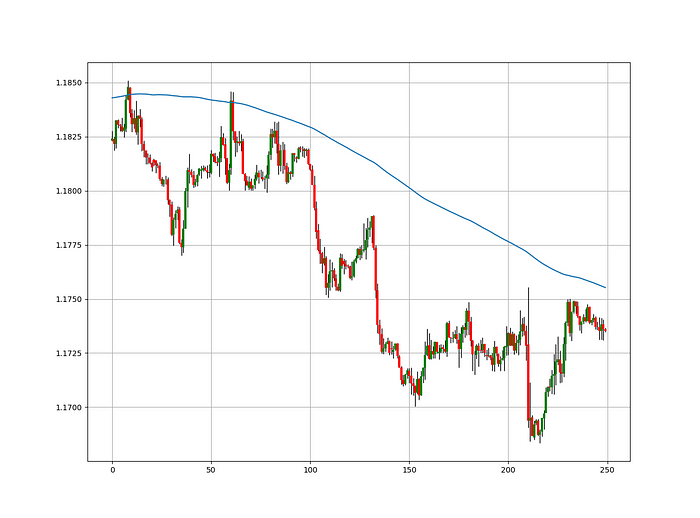
Zooming out yields a basic heatmap, as shown below.

100-period RSI heatmap.

Plot code:

def indicator_plot(data, second_panel, window = 250):
    fig, ax = plt.subplots(2, figsize = (10, 5))
    sample = data[-window:, ]
    for i in range(len(sample)):
        ax[0].vlines(x = i, ymin = sample[i, 2], ymax = sample[i, 1], color = 'black', linewidth = 1)  
        if sample[i, 3] > sample[i, 0]:
            ax[0].vlines(x = i, ymin = sample[i, 0], ymax = sample[i, 3], color = 'black', linewidth = 1.5)  
        if sample[i, 3] < sample[i, 0]:
            ax[0].vlines(x = i, ymin = sample[i, 3], ymax = sample[i, 0], color = 'black', linewidth = 1.5)  
        if sample[i, 3] == sample[i, 0]:
            ax[0].vlines(x = i, ymin = sample[i, 3], ymax = sample[i, 0], color = 'black', linewidth = 1.5)  
    ax[0].grid() 
    for i in range(len(sample)):
        if sample[i, second_panel] > 50:
            ax[1].vlines(x = i, ymin = 0, ymax = 100, color = 'green', linewidth = 1.5)  
        if sample[i, second_panel] < 50:
            ax[1].vlines(x = i, ymin = 0, ymax = 100, color = 'red', linewidth = 1.5)  
    ax[1].grid()
indicator_plot(my_data, 4, window = 500)

100-period RSI heatmap.

Call RSI on your OHLC array's fifth column. 4. Adjusting lookback parameters reduces lag and false signals. Other indicators and conditions are possible.

Another suggestion is to develop an RSI Heatmap for Extreme Conditions.

Contrarian indicator RSI. The following rules apply:

  • Whenever the RSI is approaching the upper values, the color approaches red.

  • The color tends toward green whenever the RSI is getting close to the lower values.

Zooming out yields a basic heatmap, as shown below.

13-period RSI heatmap.

Plot code:

import matplotlib.pyplot as plt
def indicator_plot(data, second_panel, window = 250):
    fig, ax = plt.subplots(2, figsize = (10, 5))
    sample = data[-window:, ]
    for i in range(len(sample)):
        ax[0].vlines(x = i, ymin = sample[i, 2], ymax = sample[i, 1], color = 'black', linewidth = 1)  
        if sample[i, 3] > sample[i, 0]:
            ax[0].vlines(x = i, ymin = sample[i, 0], ymax = sample[i, 3], color = 'black', linewidth = 1.5)  
        if sample[i, 3] < sample[i, 0]:
            ax[0].vlines(x = i, ymin = sample[i, 3], ymax = sample[i, 0], color = 'black', linewidth = 1.5)  
        if sample[i, 3] == sample[i, 0]:
            ax[0].vlines(x = i, ymin = sample[i, 3], ymax = sample[i, 0], color = 'black', linewidth = 1.5)  
    ax[0].grid() 
    for i in range(len(sample)):
        if sample[i, second_panel] > 90:
            ax[1].vlines(x = i, ymin = 0, ymax = 100, color = 'red', linewidth = 1.5)  
        if sample[i, second_panel] > 80 and sample[i, second_panel] < 90:
            ax[1].vlines(x = i, ymin = 0, ymax = 100, color = 'darkred', linewidth = 1.5)  
        if sample[i, second_panel] > 70 and sample[i, second_panel] < 80:
            ax[1].vlines(x = i, ymin = 0, ymax = 100, color = 'maroon', linewidth = 1.5)  
        if sample[i, second_panel] > 60 and sample[i, second_panel] < 70:
            ax[1].vlines(x = i, ymin = 0, ymax = 100, color = 'firebrick', linewidth = 1.5) 
        if sample[i, second_panel] > 50 and sample[i, second_panel] < 60:
            ax[1].vlines(x = i, ymin = 0, ymax = 100, color = 'grey', linewidth = 1.5) 
        if sample[i, second_panel] > 40 and sample[i, second_panel] < 50:
            ax[1].vlines(x = i, ymin = 0, ymax = 100, color = 'grey', linewidth = 1.5) 
        if sample[i, second_panel] > 30 and sample[i, second_panel] < 40:
            ax[1].vlines(x = i, ymin = 0, ymax = 100, color = 'lightgreen', linewidth = 1.5)
        if sample[i, second_panel] > 20 and sample[i, second_panel] < 30:
            ax[1].vlines(x = i, ymin = 0, ymax = 100, color = 'limegreen', linewidth = 1.5) 
        if sample[i, second_panel] > 10 and sample[i, second_panel] < 20:
            ax[1].vlines(x = i, ymin = 0, ymax = 100, color = 'seagreen', linewidth = 1.5)  
        if sample[i, second_panel] > 0 and sample[i, second_panel] < 10:
            ax[1].vlines(x = i, ymin = 0, ymax = 100, color = 'green', linewidth = 1.5)
    ax[1].grid()
indicator_plot(my_data, 4, window = 500)

13-period RSI heatmap.

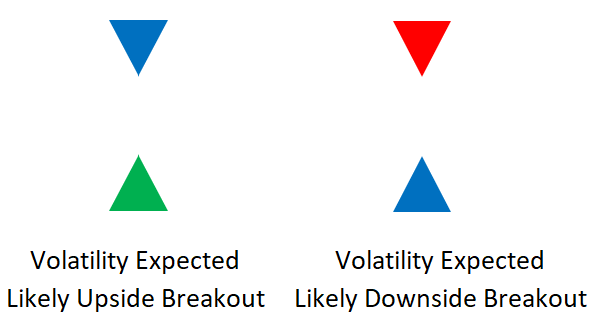
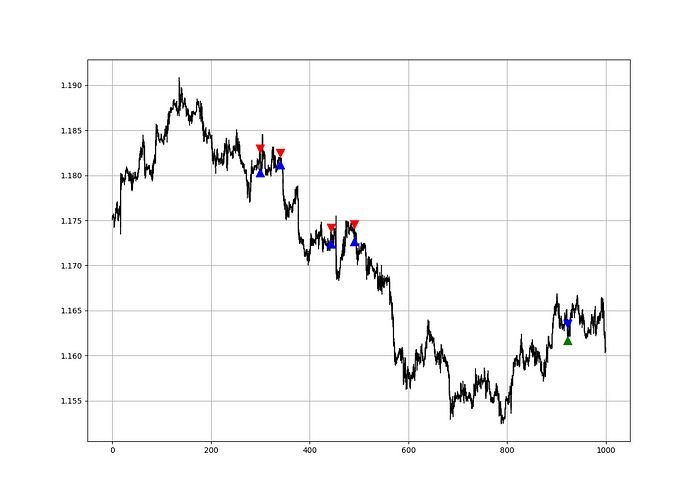
Dark green and red areas indicate imminent bullish and bearish reactions, respectively. RSI around 50 is grey.

Summary

To conclude, my goal is to contribute to objective technical analysis, which promotes more transparent methods and strategies that must be back-tested before implementation.

Technical analysis will lose its reputation as subjective and unscientific.

When you find a trading strategy or technique, follow these steps:

  • Put emotions aside and adopt a critical mindset.

  • Test it in the past under conditions and simulations taken from real life.

  • Try optimizing it and performing a forward test if you find any potential.

  • Transaction costs and any slippage simulation should always be included in your tests.

  • Risk management and position sizing should always be considered in your tests.

After checking the above, monitor the strategy because market dynamics may change and make it unprofitable.

Trevor Stark

Trevor Stark

3 years ago

Economics is complete nonsense.

Mainstream economics haven't noticed.

Photo by Hans Eiskonen on Unsplash

What come to mind when I say the word "economics"?

Probably GDP, unemployment, and inflation.

If you've ever watched the news or listened to an economist, they'll use data like these to defend a political goal.

The issue is that these statistics are total bunk.

I'm being provocative, but I mean it:

  • The economy is not measured by GDP.

  • How many people are unemployed is not counted in the unemployment rate.

  • Inflation is not measured by the CPI.

All orthodox economists' major economic statistics are either wrong or falsified.

Government institutions create all these stats. The administration wants to reassure citizens the economy is doing well.

GDP does not reflect economic expansion.

GDP measures a country's economic size and growth. It’s calculated by the BEA, a government agency.

The US has the world's largest (self-reported) GDP, growing 2-3% annually.

If GDP rises, the economy is healthy, say economists.

Why is the GDP flawed?

GDP measures a country's yearly spending.

The government may adjust this to make the economy look good.

GDP = C + G + I + NX

C = Consumer Spending

G = Government Spending

I = Investments (Equipment, inventories, housing, etc.)

NX = Exports minus Imports

GDP is a country's annual spending.

The government can print money to boost GDP. The government has a motive to increase and manage GDP.

Because government expenditure is part of GDP, printing money and spending it on anything will raise GDP.

They've done this. Since 1950, US government spending has grown 8% annually, faster than GDP.

In 2022, government spending accounted for 44% of GDP. It's the highest since WWII. In 1790-1910, it was 3% of GDP.

Who cares?

The economy isn't only spending. Focus on citizens' purchasing power or quality of life.

Since GDP just measures spending, the government can print money to boost GDP.

Even if Americans are poorer than last year, economists can say GDP is up and everything is fine.

How many people are unemployed is not counted in the unemployment rate.

The unemployment rate measures a country's labor market. If unemployment is high, people aren't doing well economically.

The BLS estimates the (self-reported) unemployment rate as 3-4%.

Why is the unemployment rate so high?

The US government surveys 100k persons to measure unemployment. They extrapolate this data for the country.

They come into 3 categories:

  • Employed

People with jobs are employed … duh.

  • Unemployed

People who are “jobless, looking for a job, and available for work” are unemployed

  • Not in the labor force

The “labor force” is the employed + the unemployed.

The unemployment rate is the percentage of unemployed workers.

Problem is unemployed definition. You must actively seek work to be considered unemployed.

You're no longer unemployed if you haven't interviewed in 4 weeks.

This shit makes no goddamn sense.

Why does this matter?

You can't interview if there are no positions available. You're no longer unemployed after 4 weeks.

In 1994, the BLS redefined "unemployed" to exclude discouraged workers.

If you haven't interviewed in 4 weeks, you're no longer counted in the unemployment rate.

Unemployment Data Including “Long-term Discouraged Workers” (Source)

If unemployment were measured by total unemployed, it would be 25%.

Because the government wants to keep the unemployment rate low, they modify the definition.

If every US resident was unemployed and had no job interviews, economists would declare 0% unemployment. Excellent!

Inflation is not measured by the CPI.

The BLS measures CPI. This month was the highest since 1981.

CPI measures the cost of a basket of products across time. Food, energy, shelter, and clothes are included.

A 9.1% CPI means the basket of items is 9.1% more expensive.

What is the CPI problem?

Here's a more detailed explanation of CPI's flaws.

In summary, CPI is manipulated to be understated.

Housing costs are understated to manipulate CPI. Housing accounts for 33% of the CPI because it's the biggest expense for most people.

This signifies it's the biggest CPI weight.

Rather than using actual house prices, the Bureau of Labor Statistics essentially makes shit up. You can read more about the process here.

Surprise! It’s bullshit

The BLS stated Shelter's price rose 5.5% this month.

House prices are up 11-21%. (Source 1Source 2Source 3)

Rents are up 14-26%. (Source 1Source 2)

Why is this important?

If CPI included housing prices, it would be 12-15 percent this month, not 9.1 percent.

9% inflation is nuts. Your money's value halves every 7 years at 9% inflation.

Worse is 15% inflation. Your money halves every 4 years at 15% inflation.

If everyone realized they needed to double their wage every 4-5 years to stay wealthy, there would be riots.

Inflation drains our money's value so the government can keep printing it.

The Solution

Most individuals know the existing system doesn't work, but can't explain why.

People work hard yet lag behind. The government lies about the economy's data.

In reality:

  • GDP has been down since 2008

  • 25% of Americans are unemployed

  • Inflation is actually 15%

People might join together to vote out kleptocratic politicians if they knew the reality.

Having reliable economic data is the first step.

People can't understand the situation without sufficient information. Instead of immigrants or billionaires, people would blame liar politicians.

Here’s the vision:

A decentralized, transparent, and global dashboard that tracks economic data like GDP, unemployment, and inflation for every country on Earth.

Government incentives influence economic statistics.

ShadowStats has already started this effort, but the calculations must be transparent, decentralized, and global to be effective.

If interested, email me at trevorstark02@gmail.com.

Here are some links to further your research:

  1. MIT Billion Prices Project

  2. 1729 Decentralized Inflation Dashboard Project

  3. Balaji Srinivasan on “Fiat Information VS. Crypto Information”

You might also like

INTΞGRITY team

INTΞGRITY team

3 years ago

Privacy Policy

Effective date: August 31, 2022

This Privacy Statement describes how INTΞGRITY ("we," or "us") collects, uses, and discloses your personal information. This Privacy Statement applies when you use our websites, mobile applications, and other online products and services that link to this Privacy Statement (collectively, our "Services"), communicate with our customer care team, interact with us on social media, or otherwise interact with us.

This Privacy Policy may be modified from time to time. If we make modifications, we will update the date at the top of this policy and, in certain instances, we may give you extra notice (such as adding a statement to our website or providing you with a notification). We encourage you to routinely review this Privacy Statement to remain informed about our information practices and available options.

INFORMATION COLLECTION

The Data You Provide to Us

We collect information that you directly supply to us. When you register an account, fill out a form, submit or post material through our Services, contact us via third-party platforms, request customer assistance, or otherwise communicate with us, you provide us with information directly. We may collect your name, display name, username, bio, email address, company information, your published content, including your avatar image, photos, posts, responses, and any other information you voluntarily give.

In certain instances, we may collect the information you submit about third parties. We will use your information to fulfill your request and will not send emails to your contacts unrelated to your request unless they separately opt to receive such communications or connect with us in some other way.

We do not collect payment details via the Services.

Automatically Collected Information When You Communicate with Us

In certain cases, we automatically collect the following information:

We gather data regarding your behavior on our Services, such as your reading history and when you share links, follow users, highlight posts, and like posts.

Device and Usage Information: We gather information about the device and network you use to access our Services, such as your hardware model, operating system version, mobile network, IP address, unique device identifiers, browser type, and app version. We also collect information regarding your activities on our Services, including access times, pages viewed, links clicked, and the page you visited immediately prior to accessing our Services.

Information Obtained Through Cookies and Comparable Tracking Technologies: We collect information about you through tracking technologies including cookies and web beacons. Cookies are little data files kept on your computer's hard disk or device's memory that assist us in enhancing our Services and your experience, determining which areas and features of our Services are the most popular, and tracking the number of visitors. Web beacons (also known as "pixel tags" or "clear GIFs") are electronic pictures that we employ on our Services and in our communications to assist with cookie delivery, session tracking, and usage analysis. We also partner with third-party analytics providers who use cookies, web beacons, device identifiers, and other technologies to collect information regarding your use of our Services and other websites and applications, including your IP address, web browser, mobile network information, pages viewed, time spent on pages or in mobile apps, and links clicked. INTΞGRITY and others may use your information to, among other things, analyze and track data, evaluate the popularity of certain content, present content tailored to your interests on our Services, and better comprehend your online activities. See Your Options for additional information on cookies and how to disable them.

Information Obtained from Outside Sources

We acquire information from external sources. We may collect information about you, for instance, through social networks, accounting service providers, and data analytics service providers. In addition, if you create or log into your INTΞGRITY account via a third-party platform (such as Apple, Facebook, Google, or Twitter), we will have access to certain information from that platform, including your name, lists of friends or followers, birthday, and profile picture, in accordance with the authorization procedures determined by that platform.

We may derive information about you or make assumptions based on the data we gather. We may deduce your location based on your IP address or your reading interests based on your reading history, for instance.

USAGE OF INFORMATION

We use the information we collect to deliver, maintain, and enhance our Services, including publishing and distributing user-generated content, and customizing the posts you see. Additionally, we utilize collected information to: create and administer your INTΞGRITY account;

Send transaction-related information, including confirmations, receipts, and user satisfaction surveys;

Send you technical notices, security alerts, and administrative and support messages;

Respond to your comments and queries and offer support;

Communicate with you about new INTΞGRITY content, goods, services, and features, as well as other news and information that we believe may be of interest to you (see Your Choices for details on how to opt out of these communications at any time);

Monitor and evaluate usage, trends, and activities associated with our Services;

Detect, investigate, and prevent security incidents and other harmful, misleading, fraudulent, or illegal conduct, and safeguard INTΞGRITY’s and others' rights and property;

Comply with our legal and financial requirements; and Carry out any other purpose specified to you at the time the information was obtained.

SHARING OF INFORMATION

We share personal information where required by law or as otherwise specified in this policy:

Personal information is shared with other Service users. If you use our Services to publish content, make comments, or send private messages, for instance, certain information about you, such as your name, photo, bio, and other account information you may supply, as well as information about your activity on our Services, will be available to others (e.g., your followers and who you follow, recent posts, likes, highlights, and responses).

We share personal information with vendors, service providers, and consultants who require access to such information to perform services on our behalf, such as companies that assist us with web hosting, storage, and other infrastructure, analytics, fraud prevention, and security, customer service, communications, and marketing.

We may release personally identifiable information if we think that doing so is in line with or required by any relevant law or legal process, including authorized demands from public authorities to meet national security or law enforcement obligations. If we intend to disclose your personal information in response to a court order, we will provide you with prior notice so that you may contest the disclosure (for example, by seeking court intervention), unless we are prohibited by law or believe that doing so could endanger others or lead to illegal conduct. We shall object to inappropriate legal requests for information regarding users of our Services.

If we believe your actions are inconsistent with our user agreements or policies, if we suspect you have violated the law, or if we believe it is necessary to defend the rights, property, and safety of INTΞGRITY, our users, the public, or others, we may disclose your personal information.

We share personal information with our attorneys and other professional advisers when necessary for obtaining counsel or otherwise protecting and managing our business interests.

We may disclose personal information in conjunction with or during talks for any merger, sale of corporate assets, financing, or purchase of all or part of our business by another firm.

Personal information is transferred between and among INTΞGRITY, its current and future parents, affiliates, subsidiaries, and other companies under common ownership and management.

We will only share your personal information with your permission or at your instruction.

We also disclose aggregated or anonymized data that cannot be used to identify you.

IMPLEMENTATIONS FROM THIRD PARTIES

Some of the content shown on our Services is not hosted by INTΞGRITY. Users are able to publish content hosted by a third party but embedded in our pages ("Embed"). When you interact with an Embed, it can send information to the hosting third party just as if you had visited the hosting third party's website directly. When you load an INTΞGRITY post page with a YouTube video Embed and view the video, for instance, YouTube collects information about your behavior, such as your IP address and how much of the video you watch. INTΞGRITY has no control over the information that third parties acquire via Embeds or what they do with it. This Privacy Statement does not apply to data gathered via Embeds. Before interacting with the Embed, it is recommended that you review the privacy policy of the third party hosting the Embed, which governs any information the Embed gathers.

INFORMATION TRANSFER TO THE UNITED STATES AND OTHER NATIONS

INTΞGRITY’s headquarters are located in the United States, and we have operations and service suppliers in other nations. Therefore, we and our service providers may transmit, store, or access your personal information in jurisdictions that may not provide a similar degree of data protection to your home jurisdiction. For instance, we transfer personal data to Amazon Web Services, one of our service providers that processes personal information on our behalf in numerous data centers throughout the world, including those indicated above. We shall take measures to guarantee that your personal information is adequately protected in the jurisdictions where it is processed.

YOUR SETTINGS

Account Specifics

You can access, modify, delete, and export your account information at any time by login into the Services and visiting the Settings page. Please be aware that if you delete your account, we may preserve certain information on you as needed by law or for our legitimate business purposes.

Cookies

The majority of web browsers accept cookies by default. You can often configure your browser to delete or refuse cookies if you wish. Please be aware that removing or rejecting cookies may impact the accessibility and performance of our services.

Communications

You may opt out of getting certain messages from us, such as digests, newsletters, and activity notifications, by following the instructions contained within those communications or by visiting the Settings page of your account. Even if you opt out, we may still send you emails regarding your account or our ongoing business relationships.

Mobile Push Notifications

We may send push notifications to your mobile device with your permission. You can cancel these messages at any time by modifying your mobile device's notification settings.

YOUR CALIFORNIA PRIVACY RIGHTS

The California Consumer Privacy Act, or "CCPA" (Cal. Civ. Code 1798.100 et seq. ), grants California residents some rights regarding their personal data. If you are a California resident, you are subject to this clause.

We have collected the following categories of personal information over the past year: identifiers, commercial information, internet or other electronic network activity information, and conclusions. Please refer to the section titled "Collection of Information" for specifics regarding the data points we gather and the sorts of sources from which we acquire them. We collect personal information for the business and marketing purposes outlined in the section on Use of Information. In the past 12 months, we have shared the following types of personal information to the following groups of recipients for business purposes:

Category of Personal Information: Identifiers
Categories of Recipients: Analytics Providers, Communication Providers, Custom Service Providers, Fraud Prevention and Security Providers, Infrastructure Providers, Marketing Providers, Payment Processors

Category of Personal Information: Commercial Information
Categories of Recipients: Analytics Providers, Infrastructure Providers, Payment Processors

Category of Personal Information: Internet or Other Electronic Network Activity Information
Categories of Recipients: Analytics Providers, Infrastructure Providers

Category of Personal Information: Inferences
Categories of Recipients: Analytics Providers, Infrastructure Providers

INTΞGRITY does not sell personally identifiable information.

You have the right, subject to certain limitations: (1) to request more information about the categories and specific pieces of personal information we collect, use, and disclose about you; (2) to request the deletion of your personal information; (3) to opt out of any future sales of your personal information; and (4) to not be discriminated against for exercising these rights. You may submit these requests by email to hello@int3grity.com. We shall not treat you differently if you exercise your rights under the CCPA.

If we receive your request from an authorized agent, we may request proof that you have granted the agent a valid power of attorney or that the agent otherwise possesses valid written authorization to submit requests on your behalf. This may involve requiring identity verification. Please contact us if you are an authorized agent wishing to make a request.

ADDITIONAL DISCLOSURES FOR INDIVIDUALS IN EUROPE

This section applies to you if you are based in the European Economic Area ("EEA"), the United Kingdom, or Switzerland and have specific rights and safeguards regarding the processing of your personal data under relevant law.

Legal Justification for Processing

We will process your personal information based on the following legal grounds:

To fulfill our obligations under our agreement with you (e.g., providing the products and services you requested).

When we have a legitimate interest in processing your personal information to operate our business or to safeguard our legitimate interests, we will do so (e.g., to provide, maintain, and improve our products and services, conduct data analytics, and communicate with you).

To meet our legal responsibilities (e.g., to maintain a record of your consents and track those who have opted out of non-administrative communications).

If we have your permission to do so (e.g., when you opt in to receive non-administrative communications from us). When consent is the legal basis for our processing of your personal information, you may at any time withdraw your consent.

Data Retention

We retain the personal information associated with your account so long as your account is active. If you close your account, your account information will be deleted within 14 days. We retain other personal data for as long as is required to fulfill the objectives for which it was obtained and for other legitimate business purposes, such as to meet our legal, regulatory, or other compliance responsibilities.

Data Access Requests

You have the right to request access to the personal data we hold on you and to get your data in a portable format, to request that your personal data be rectified or erased, and to object to or request that we restrict particular processing, subject to certain limitations. To assert your legal rights:

If you sign up for an INTΞGRITY account, you can request an export of your personal information at any time via the Settings website, or by visiting Settings and selecting Account from inside our app.

You can edit the information linked with your account on the Settings website, or by navigating to Settings and then Account in our app, and the Customize Your Interests page.

You may withdraw consent at any time by deleting your account via the Settings page, or by visiting Settings and then selecting Account within our app (except to the extent INTΞGRITY is prevented by law from deleting your information).

You may object to the use of your personal information at any time by contacting hello@int3grity.com.

Questions or Complaints

If we are unable to settle your concern over our processing of personal data, you have the right to file a complaint with the Data Protection Authority in your country. The links below provide access to the contact information for your Data Protection Authority.

For people in the EEA, please visit https://edpb.europa.eu/about-edpb/board/members en.

For persons in the United Kingdom, please visit https://ico.org.uk/global/contact-us.

For people in Switzerland: https://www.edoeb.admin.ch/edoeb/en/home/the-fdpic/contact.html

CONTACT US

Please contact us at hello@int3grity.com if you have any queries regarding this Privacy Statement.

Neeramitra Reddy

Neeramitra Reddy

3 years ago

The best life advice I've ever heard could very well come from 50 Cent.

He built a $40M hip-hop empire from street drug dealing.

Free for creative use by PCMag

50 Cent was nearly killed by 9mm bullets.

Before 50 Cent, Curtis Jackson sold drugs.

He sold coke to worried addicts after being orphaned at 8.

Pursuing police. Murderous hustlers and gangs. Unwitting informers.

Despite his hard life, his hip-hop career was a success.

An assassination attempt ended his career at the start.

What sane producer would want to deal with a man entrenched in crime?

Most would have drowned in self-pity and drank themselves to death.

But 50 Cent isn't most people. Life on the streets had given him fearlessness.

“Having a brush with death, or being reminded in a dramatic way of the shortness of our lives, can have a positive, therapeutic effect. So it is best to make every moment count, to have a sense of urgency about life.” ― 50 Cent, The 50th Law

50 released a series of mixtapes that caught Eminem's attention and earned him a $50 million deal!

50 Cents turned death into life.

Things happen; that is life.

We want problems solved.

Every human has problems, whether it's Jeff Bezos swimming in his billions, Obama in his comfortable retirement home, or Dan Bilzerian with his hired bikini models.

All problems.

Problems churn through life. solve one, another appears.

It's harsh. Life's unfair. We can face reality or run from it.

The latter will worsen your issues.

“The firmer your grasp on reality, the more power you will have to alter it for your purposes.” — 50 Cent, The 50th Law

In a fantasy-obsessed world, 50 Cent loves reality.

Wish for better problem-solving skills rather than problem-free living.

Don't wish, work.

We All Have the True Power of Alchemy

Humans are arrogant enough to think the universe cares about them.

That things happen as if the universe notices our nanosecond existences.

Things simply happen. Period.

By changing our perspective, we can turn good things bad.

The alchemists' search for the philosopher's stone may have symbolized the ability to turn our lead-like perceptions into gold.

Negativity bias tints our perceptions.

Normal sparring broke your elbow? Rest and rethink your training. Fired? You can improve your skills and get a better job.

Consider Curtis if he had fallen into despair.

The legend we call 50 Cent wouldn’t have existed.

The Best Lesson in Life Ever?

Neither avoid nor fear your reality.

That simple sentence contains every self-help tip and life lesson on Earth.

When reality is all there is, why fear it? avoidance?

Or worse, fleeing?

To accept reality, we must eliminate the words should be, could be, wish it were, and hope it will be.

It is. Period.

Only by accepting reality's chaos can you shape your life.

“Behind me is infinite power. Before me is endless possibility, around me is boundless opportunity. My strength is mental, physical and spiritual.” — 50 Cent

Leonardo Castorina

Leonardo Castorina

3 years ago

How to Use Obsidian to Boost Research Productivity

Tools for managing your PhD projects, reading lists, notes, and inspiration.

As a researcher, you have to know everything. But knowledge is useless if it cannot be accessed quickly. An easy-to-use method of archiving information makes taking notes effortless and enjoyable.
As a PhD student in Artificial Intelligence, I use Obsidian (https://obsidian.md) to manage my knowledge.

The article has three parts:

  1. What is a note, how to organize notes, tags, folders, and links? This section is tool-agnostic, so you can use most of these ideas with any note-taking app.
  2. Instructions for using Obsidian, managing notes, reading lists, and useful plugins. This section demonstrates how I use Obsidian, my preferred knowledge management tool.
  3. Workflows: How to use Zotero to take notes from papers, manage multiple projects' notes, create MOCs with Dataview, and more. This section explains how to use Obsidian to solve common scientific problems and manage/maintain your knowledge effectively.

This list is not perfect or complete, but it is my current solution to problems I've encountered during my PhD. Please leave additional comments or contact me if you have any feedback. I'll try to update this article.
Throughout the article, I'll refer to your digital library as your "Obsidian Vault" or "Zettelkasten".
Other useful resources are listed at the end of the article.

1. Philosophy: Taking and organizing notes

Carl Sagan: “To make an apple pie from scratch, you must first create the universe.”

Before diving into Obsidian, let's establish a Personal Knowledge Management System and a Zettelkasten. You can skip to Section 2 if you already know these terms.
Niklas Luhmann, a prolific sociologist who wrote 400 papers and 70 books, inspired this section and much of Zettelkasten. Zettelkasten means “slip box” (or library in this article). His Zettlekasten had around 90000 physical notes, which can be found here.
There are now many tools available to help with this process. Obsidian's website has a good introduction section: https://publish.obsidian.md/hub/

Notes

We'll start with "What is a note?" Although it may seem trivial, the answer depends on the topic or your note-taking style. The idea is that a note is as “atomic” (i.e. You should read the note and get the idea right away.
The resolution of your notes depends on their detail. Deep Learning, for example, could be a general description of Neural Networks, with a few notes on the various architectures (eg. Recurrent Neural Networks, Convolutional Neural Networks etc..).
Limiting length and detail is a good rule of thumb. If you need more detail in a specific section of this note, break it up into smaller notes. Deep Learning now has three notes:

  • Deep Learning
  • Recurrent Neural Networks
    - Convolutional Neural Networks

Repeat this step as needed until you achieve the desired granularity. You might want to put these notes in a “Neural Networks” folder because they are all about the same thing. But there's a better way:

#Tags and [[Links]] over /Folders/

The main issue with folders is that they are not flexible and assume that all notes in the folder belong to a single category. This makes it difficult to make connections between topics.
Deep Learning has been used to predict protein structure (AlphaFold) and classify images (ImageNet). Imagine a folder structure like this:

- /Proteins/ 
     - Protein Folding
- /Deep Learning/
     - /Proteins/ 

Your notes about Protein Folding and Convolutional Neural Networks will be separate, and you won't be able to find them in the same folder.
This can be solved in several ways. The most common one is to use tags rather than folders. A note can be grouped with multiple topics this way. Obsidian tags can also be nested (have subtags).

You can also link two notes together. You can build your “Knowledge Graph” in Obsidian and other note-taking apps like Obsidian.


My Knowledge Graph. Green: Biology, Red: Machine Learning, Yellow: Autoencoders, Blue: Graphs, Brown: Tags.


My Knowledge Graph and the note “Backrpropagation” and its links.


Backpropagation note and all its links

Why use Folders?

Folders help organize your vault as it grows. The main suggestion is to have few folders that "weakly" collect groups of notes or better yet, notes from different sources.
Among my Zettelkasten folders are:


My Zettelkasten's 5 folders

They usually gather data from various sources:

MOC: Map of Contents for the Zettelkasten.
Projects: Contains one note for each side-project of my PhD where I log my progress and ideas. Notes are linked to these.
Bio and ML: These two are the main content of my Zettelkasten and could theoretically be combined.
Papers: All my scientific paper notes go here. A bibliography links the notes. Zotero .bib file
Books: I make a note for each book I read, which I then split into multiple notes.

Keeping images separate from other files can help keep your main folders clean.

I will elaborate on these in the Workflow Section.

My general recommendation is to use tags and links instead of folders.

Maps of Content (MOC) 

Making Tables of Contents is a good solution (MOCs).
These are notes that "signposts" your Zettelkasten library, directing you to the right type of notes. It can link to other notes based on common tags. This is usually done with a title, then your notes related to that title. As an example:

An example of a Machine Learning MOC generated with Dataview.

As shown above, my Machine Learning MOC begins with the basics. Then it's on to Variational Auto-Encoders. Not only does this save time, but it also saves scrolling through the tag search section.
So I keep MOCs at the top of my library so I can quickly find information and see my library. These MOCs are generated automatically using an Obsidian Plugin called Dataview (https://github.com/blacksmithgu/obsidian-dataview).
Ideally, MOCs could be expanded to include more information about the notes, their status, and what's left to do. In the absence of this, Dataview does a fantastic job at creating a good structure for your notes.
In the absence of this, Dataview does a fantastic job at creating a good structure for your notes.

2. Tools: Knowing Obsidian

Obsidian is my preferred tool because it is free, all notes are stored in Markdown format, and each panel can be dragged and dropped. You can get it here: https://obsidian.md/

Obsidian interface. 

Obsidian is highly customizable, so here is my preferred interface:


The theme is customized from https://github.com/colineckert/obsidian-things

Alternatively, each panel can be collapsed, moved, or removed as desired. To open a panel later, click on the vertical "..." (bottom left of the note panel).

My interface is organized as follows:

How my Obsidian Interface is organized.

Folders/Search:
This is where I keep all relevant folders. I usually use the MOC note to navigate, but sometimes I use the search button to find a note.

Tags:
I use nested tags and look into each one to find specific notes to link.

cMenu:
Easy-to-use menu plugin cMenu (https://github.com/chetachiezikeuzor/cMenu-Plugin)

Global Graph:
The global graph shows all your notes (linked and unlinked). Linked notes will appear closer together. Zoom in to read each note's title. It's a bit overwhelming at first, but as your library grows, you get used to the positions and start thinking of new connections between notes.

Local Graph:
Your current note will be shown in relation to other linked notes in your library. When needed, you can quickly jump to another link and back to the current note.

Links:
Finally, an outline panel and the plugin Obsidian Power Search (https://github.com/aviral-batra/obsidian-power-search) allow me to search my vault by highlighting text.

Start using the tool and worry about panel positioning later. I encourage you to find the best use-case for your library.

Plugins

An additional benefit of using Obsidian is the large plugin library. I use several (Calendar, Citations, Dataview, Templater, Admonition):
Obsidian Calendar Plugin: https://github.com/liamcain
It organizes your notes on a calendar. This is ideal for meeting notes or keeping a journal.

Calendar addon from hans/obsidian-citation-plugin
Obsidian Citation Plugin: https://github.com/hans/
Allows you to cite papers from a.bib file. You can also customize your notes (eg. Title, Authors, Abstract etc..)

Plugin citation from hans/obsidian-citation-plugin
Obsidian Dataview: https://github.com/blacksmithgu/
A powerful plugin that allows you to query your library as a database and generate content automatically. See the MOC section for an example.
Allows you to create notes with specific templates like dates, tags, and headings.

Templater. Obsidian Admonition: https://github.com/valentine195/obsidian-admonition
Blocks allow you to organize your notes.

Plugin warning. Obsidian Admonition (valentine195)
There are many more, but this list should get you started.

3. Workflows: Cool stuff

Here are a few of my workflows for using obsidian for scientific research. This is a list of resources I've found useful for my use-cases. I'll outline and describe them briefly so you can skim them quickly.
3.1 Using Templates to Structure Notes
3.2 Free Note Syncing (Laptop, Phone, Tablet)
3.3 Zotero/Mendeley/JabRef -> Obsidian — Managing Reading Lists
3.4 Projects and Lab Books
3.5 Private Encrypted Diary

3.1 Using Templates to Structure Notes

Plugins: Templater and Dataview (optional).
To take effective notes, you must first make adding new notes as easy as possible. Templates can save you time and give your notes a consistent structure. As an example:


An example of a note using a template.

### [[YOUR MOC]]
# Note Title of your note
**Tags**:: 
**Links**::

The top line links to your knowledge base's Map of Content (MOC) (see previous sections). After the title, I add tags (and a link between the note and the tag) and links to related notes.
To quickly identify all notes that need to be expanded, I add the tag “#todo”. In the “TODO:” section, I list the tasks within the note.
The rest are notes on the topic.
Templater can help you create these templates. For new books, I use the following template:

### [[Books MOC]]
# Title
**Author**:: 
**Date::
**Tags:: 
**Links::


A book template example.

Using a simple query, I can hook Dataview to it.

dataview  
table author as Author, date as “Date Finished”, tags as “Tags”, grade as “Grade”  
from “4. Books”  
SORT grade DESCENDING


using Dataview to query templates.

3.2 Free Note Syncing (Laptop, Phone, Tablet)

No plugins used.

One of my favorite features of Obsidian is the library's self-contained and portable format. Your folder contains everything (plugins included).

Ordinary folders and documents are available as well. There is also a “.obsidian” folder. This contains all your plugins and settings, so you can use it on other devices.
So you can use Google Drive, iCloud, or Dropbox for free as long as you sync your folder (note: your folder should be in your Cloud Folder).

For my iOS and macOS work, I prefer iCloud. You can also use the paid service Obsidian Sync.
3.3 Obsidian — Managing Reading Lists and Notes in Zotero/Mendeley/JabRef
Plugins: Quotes (required).

3.3 Zotero/Mendeley/JabRef -> Obsidian — Taking Notes and Managing Reading Lists of Scientific Papers

My preferred reference manager is Zotero, but this workflow should work with any reference manager that produces a .bib file. This file is exported to my cloud folder so I can access it from any platform.

My Zotero library is tagged as follows:

My reference manager's tags

For readings, I usually search for the tags “!!!” and “To-Read” and select a paper. Annotate the paper next (either on PDF using GoodNotes or on physical paper).
Then I make a paper page using a template in the Citations plugin settings:


An example of my citations template.

Create a new note, open the command list with CMD/CTRL + P, and find the Citations “Insert literature note content in the current pane” to see this lovely view.


Citation generated by the article https://doi.org/10.1101/2022.01.24.22269144

You can then convert your notes to digital. I found that transcribing helped me retain information better.

3.4 Projects and Lab Books

Plugins: Tweaker (required).
PhD students offering advice on thesis writing are common (read as regret). I started asking them what they would have done differently or earlier.

“Deep stuff Leo,” one person said. So my main issue is basic organization, losing track of my tasks and the reasons for them.
As a result, I'd go on other experiments that didn't make sense, and have to reverse engineer my logic for thesis writing. - PhD student now wise Postdoc

Time management requires planning. Keeping track of multiple projects and lab books is difficult during a PhD. How I deal with it:

  • One folder for all my projects
  • One file for each project
    I use a template to create each project
### [[Projects MOC]]  
# <% tp.file.title %>  
**Tags**::  
**Links**::  
**URL**::  
**Project Description**::## Notes:  
### <% tp.file.last_modified_date(“dddd Do MMMM YYYY”) %>  
#### Done:  
#### TODO:  
#### Notes

You can insert a template into a new note with CMD + P and looking for the Templater option.

I then keep adding new days with another template:

### <% tp.file.last_modified_date("dddd Do MMMM YYYY") %>  
#### Done:  
#### TODO:  
#### Notes:

This way you can keep adding days to your project and update with reasonings and things you still have to do and have done. An example below:


Example of project note with timestamped notes.

3.5 Private Encrypted Diary

This is one of my favorite Obsidian uses.
Mini Diary's interface has long frustrated me. After the author archived the project, I looked for a replacement. I had two demands:

  1. It had to be private, and nobody had to be able to read the entries.
  2. Cloud syncing was required for editing on multiple devices.

Then I learned about encrypting the Obsidian folder. Then decrypt and open the folder with Obsidian. Sync the folder as usual.
Use CryptoMator (https://cryptomator.org/). Create an encrypted folder in Cryptomator for your Obsidian vault, set a password, and let it do the rest.
If you need a step-by-step video guide, here it is:

Conclusion

So, I hope this was helpful!
In the first section of the article, we discussed notes and note-taking techniques. We discussed when to use tags and links over folders and when to break up larger notes.
Then we learned about Obsidian, its interface, and some useful plugins like Citations for citing papers and Templater for creating note templates.
Finally, we discussed workflows and how to use Zotero to take notes from scientific papers, as well as managing Lab Books and Private Encrypted Diaries.
Thanks for reading and commenting :)

Read original post here