


More on Productivity

Deon Ashleigh
3 years ago
You can dominate your daily productivity with these 9 little-known Google Calendar tips.
Calendars are great unpaid employees.
After using Notion to organize my next three months' goals, my days were a mess.
I grew very chaotic afterward. I was overwhelmed, unsure of what to do, and wasting time attempting to plan the day after it had started.
Imagine if our skeletons were on the outside. Doesn’t work.
The goals were too big; I needed to break them into smaller chunks. But how?
Enters Google Calendar
RescueTime’s recommendations took me seven hours to make a daily planner. This epic narrative begins with a sheet of paper and concludes with a daily calendar that helps me focus and achieve more goals. Ain’t nobody got time for “what’s next?” all day.
Onward!
Return to the Paleolithic Era
Plan in writing.
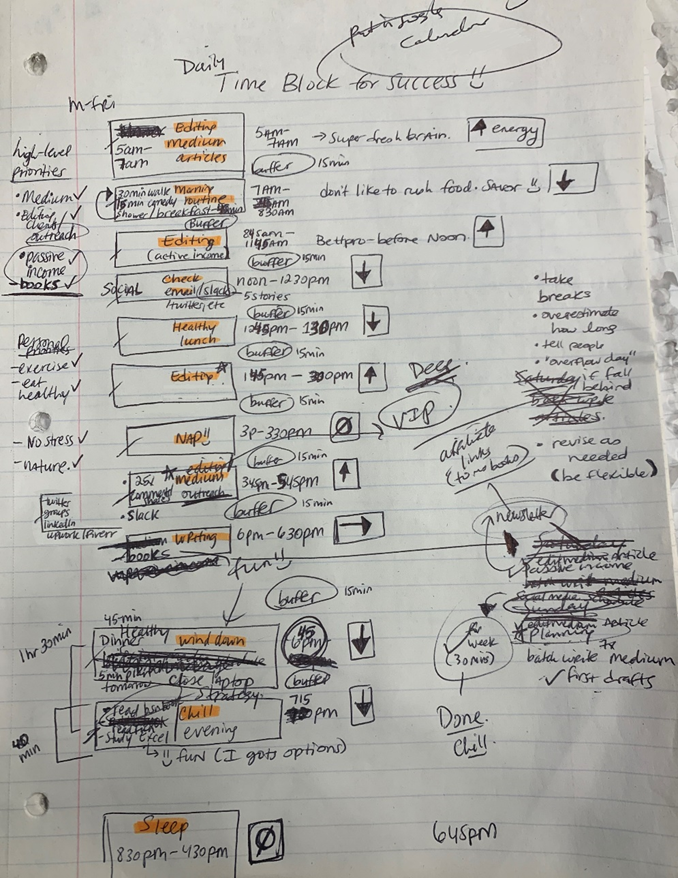
Not on the list, but it helped me plan my day. Physical writing boosts creativity and recall.
Find My Heart
i.e. prioritize
RescueTime suggested I prioritize before planning. Personal and business goals were proposed.
My top priorities are to exercise, eat healthily, spend time in nature, and avoid stress.
Priorities include writing and publishing Medium articles, conducting more freelance editing and Medium outreach, and writing/editing sci-fi books.
These eight things will help me feel accomplished every day.
Make a baby calendar.
Create daily calendar templates.
Make family, pleasure, etc. calendars.
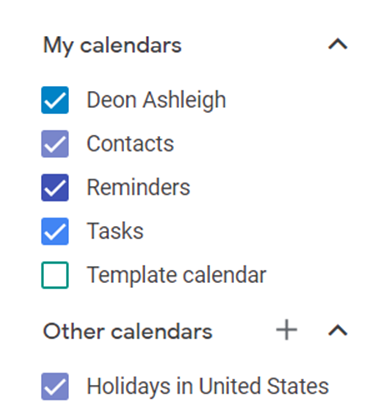
Google Calendar instructions:
Other calendars
Press the “+” button
Create a new calendar
Create recurring events for each day
My calendar, without the template:
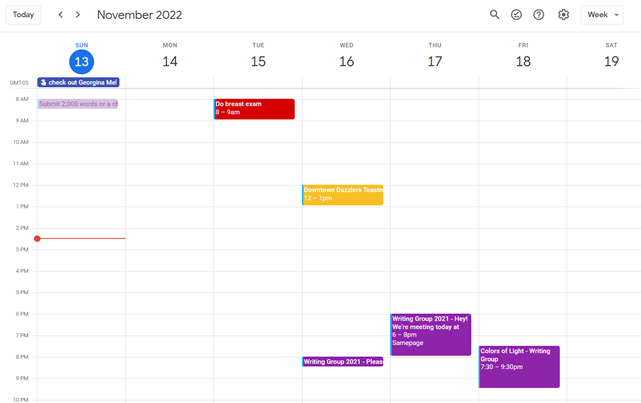
Empty, so I can fill it with vital tasks.
With the template:
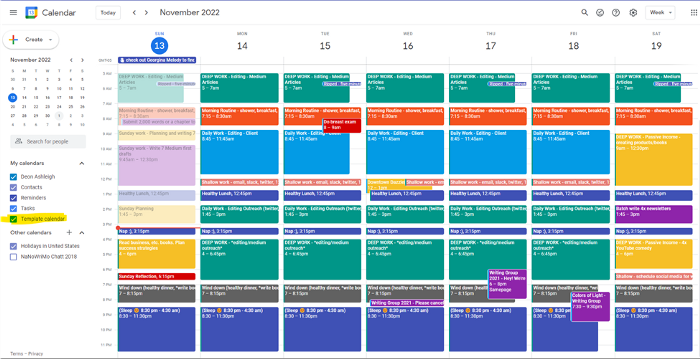
My daily skeleton corresponds with my priorities. I've been overwhelmed for years because I lack daily, weekly, monthly, and yearly structure.
Google Calendars helps me reach my goals and focus my energy.
Get your colored pencils ready
Time-block color-coding.
Color labeling lets me quickly see what's happening. Maybe you are too.
Google Calendar instructions:
Determine which colors correspond to each time block.
When establishing new events, select a color.
Save
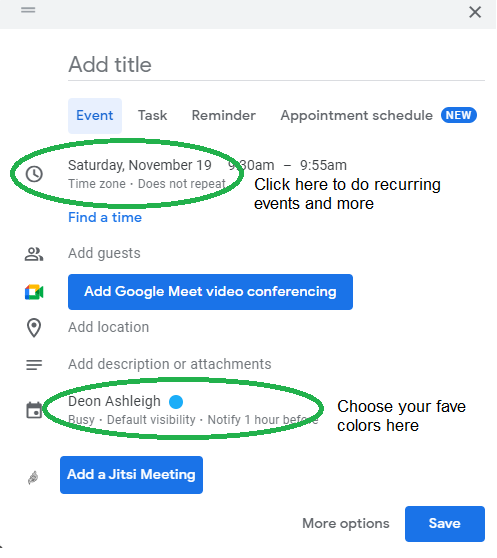
My calendar is color-coded as follows:
Yellow — passive income or other future-related activities
Red — important activities, like my monthly breast exam
Flamingo — shallow work, like emails, Twitter, etc.
Blue — all my favorite activities, like walking, watching comedy, napping, and sleeping. Oh, and eating.
Green — money-related events required for this adulting thing
Purple — writing-related stuff
Associating a time block with a color helps me stay focused. Less distractions mean faster work.
Open My Email
aka receive a daily email from Google Calendar.
Google Calendar sends a daily email feed of your calendars. I sent myself the template calendar in this email.
Google Calendar instructions:
Access settings
Select the calendar that you want to send (left side)
Go down the page to see more alerts
Under the daily agenda area, click Email.

Get in Touch With Your Red Bull Wings — Naturally
aka audit your energy levels.
My daily planner has arrows. These indicate how much energy each activity requires or how much I have.
Rightward arrow denotes medium energy.
I do my Medium and professional editing in the morning because it's energy-intensive.
Niharikaa Sodhi recommends morning Medium editing.
I’m a morning person. As long as I go to bed at a reasonable time, 5 a.m. is super wild GO-TIME. It’s like the world was just born, and I marvel at its wonderfulness.
Freelance editing lets me do what I want. An afternoon snooze will help me finish on time.
Ditch Schedule View
aka focus on the weekly view.
RescueTime advocated utilizing the weekly view of Google Calendar, so I switched.
When you launch the phone app or desktop calendar, a red line shows where you are in the day.
I'll follow the red line's instructions. My digital supervisor is easy to follow.
In the image above, it's almost 3 p.m., therefore the red line implies it's time to snooze.
I won't forget this block ;).
Reduce the Lighting
aka dim previous days.
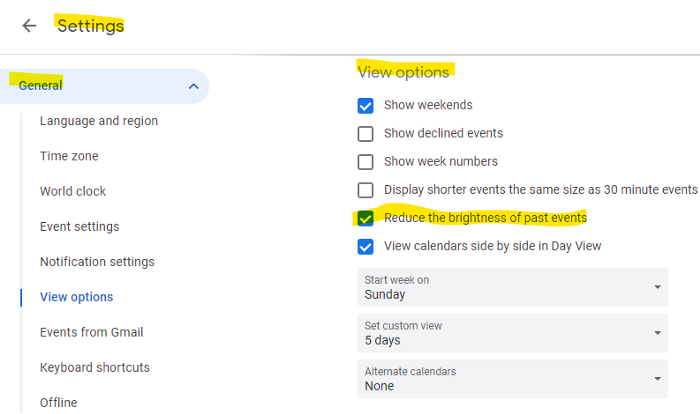
This is another Google Calendar feature I didn't know about. Once the allotted time passes, the time block dims. This keeps me present.
Google Calendar instructions:
Access settings
remaining general
To view choices, click.
Check Diminish the glare of the past.
Bonus
Two additional RescueTimes hacks:
Maintain a space between tasks
I left 15 minutes between each time block to transition smoothly. This relates to my goal of less stress. If I set strict start and end times, I'll be stressed.
With a buffer, I can breathe, stroll around, and start the following time block fresh.
Find a time is related to the buffer.
This option allows you conclude small meetings five minutes early and longer ones ten. Before the next meeting, relax or go wild.
Decide on a backup day.
This productivity technique is amazing.
Spend this excess day catching up on work. It helps reduce tension and clutter.
That's all I can say about Google Calendar's functionality.

Mickey Mellen
3 years ago
Shifting from Obsidian to Tana?
I relocated my notes database from Roam Research to Obsidian earlier this year expecting to stay there for a long. Obsidian is a terrific tool, and I explained my move in that post.
Moving everything to Tana faster than intended. Tana? Why?
Tana is just another note-taking app, but it does it differently. Three note-taking apps existed before Tana:
simple note-taking programs like Apple Notes and Google Keep.
Roam Research and Obsidian are two graph-style applications that assisted connect your notes.
You can create effective tables and charts with data-focused tools like Notion and Airtable.
Tana is the first great software I've encountered that combines graph and data notes. Google Keep will certainly remain my rapid notes app of preference. This Shu Omi video gives a good overview:
Tana handles everything I did in Obsidian with books, people, and blog entries, plus more. I can find book quotes, log my workouts, and connect my thoughts more easily. It should make writing blog entries notes easier, so we'll see.
Tana is now invite-only, but if you're interested, visit their site and sign up. As Shu noted in the video above, the product hasn't been published yet but seems quite polished.
Whether I stay with Tana or not, I'm excited to see where these apps are going and how they can benefit us all.

wordsmithwriter
3 years ago
2023 Will Be the Year of Evernote and Craft Notetaking Apps.
Note-taking is a vital skill. But it's mostly learned.

Recently, innovative note-taking apps have flooded the market.
In the next few years, Evernote and Craft will be important digital note-taking companies.
Evernote is a 2008 note-taking program. It can capture ideas, track tasks, and organize information on numerous platforms.
It's one of the only note-taking app that lets users input text, audio, photos, and videos. It's great for collecting research notes, brainstorming, and remaining organized.
Craft is a popular note-taking app.
Craft is a more concentrated note-taking application than Evernote. It organizes notes into subjects, tags, and relationships, making it ideal for technical or research notes.
Craft's search engine makes it easy to find what you need.
Both Evernote and Craft are likely to be the major players in digital note-taking in the years to come.
Their concentration on gathering and organizing information lets users generate notes quickly and simply. Multimedia elements and a strong search engine make them the note-taking apps of the future.
Evernote and Craft are great note-taking tools for staying organized and tracking ideas and projects.
With their focus on acquiring and organizing information, they'll dominate digital note-taking in 2023.
Pros
Concentrate on gathering and compiling information
special features including a strong search engine and multimedia components
Possibility of subject, tag, and relationship structuring
enables users to incorporate multimedia elements
Excellent tool for maintaining organization, arranging research notes, and brainstorming
Cons
Software may be difficult for folks who are not tech-savvy to utilize.
Limited assistance for hardware running an outdated operating system
Subscriptions could be pricey.
Data loss risk because of security issues
Evernote and Craft both have downsides.
The risk of data loss as a result of security flaws and software defects comes first.
Additionally, their subscription fees could be high, and they might restrict support for hardware that isn't running the newest operating systems.
Finally, folks who need to be tech-savvy may find the software difficult.
Evernote versus. Productivity Titans Evernote will make Notion more useful. medium.com
You might also like

Sukhad Anand
3 years ago
How Do Discord's Trillions Of Messages Get Indexed?
They depend heavily on open source..

Discord users send billions of messages daily. Users wish to search these messages. How do we index these to search by message keywords?
Let’s find out.
Discord utilizes Elasticsearch. Elasticsearch is a free, open search engine for textual, numerical, geographical, structured, and unstructured data. Apache Lucene powers Elasticsearch.
How does elastic search store data? It stores it as numerous key-value pairs in JSON documents.
How does elastic search index? Elastic search's index is inverted. An inverted index lists every unique word in every page and where it appears.
4. Elasticsearch indexes documents and generates an inverted index to make data searchable in near real-time. The index API adds or updates JSON documents in a given index.
Let's examine how discord uses Elastic Search. Elasticsearch prefers bulk indexing. Discord couldn't index real-time messages. You can't search posted messages. You want outdated messages.
6. Let's check what bulk indexing requires.
1. A temporary queue for incoming communications.
2. Indexer workers that index messages into elastic search.
Discord's queue is Celery. The queue is open-source. Elastic search won't run on a single server. It's clustered. Where should a message go? Where?
8. A shard allocator decides where to put the message. Nevertheless. Shattered? A shard combines elastic search and index on. So, these two form a shard which is used as a unit by discord. The elastic search itself has some shards. But this is different, so don’t get confused.
Now, the final part is service discovery — to discover the elastic search clusters and the hosts within that cluster. This, they do with the help of etcd another open source tool.
A great thing to notice here is that discord relies heavily on open source systems and their base implementations which is very different from a lot of other products.

Peter Steven Ho
3 years ago
Thank You for 21 Fantastic Years, iPod
Apple's latest revelation may shock iPod fans and former owners.
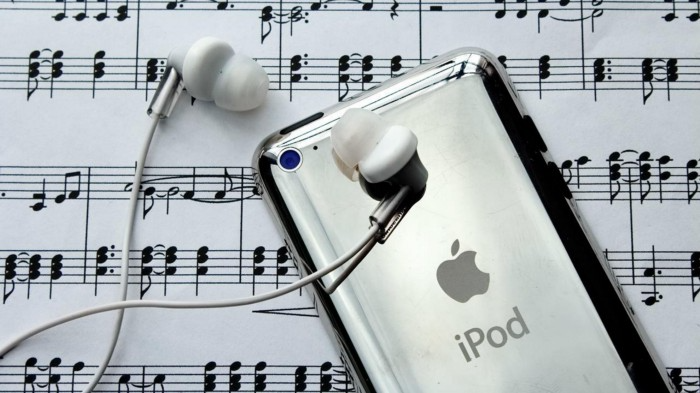
Apple discontinued the iPod touch on May 11, 2022. After 21 years, Apple killed the last surviving iPod, a device Steve Jobs believed would revolutionize the music industry.
Jobs was used to making bold predictions, but few expected Apple's digital music player to change the music industry. It did.
This chaos created new business opportunities. Spotify, YouTube, and Amazon are products of that chaotic era.
As the digital landscape changes, so do consumers, and the iPod has lost favor. I'm sure Apple realizes the importance of removing an icon. The iPod was Apple like the Mac and iPhone. I think it's bold to retire such a key Apple cornerstone. What would Jobs do?
iPod evolution across the ages
Here's an iPod family tree for all you enthusiasts.
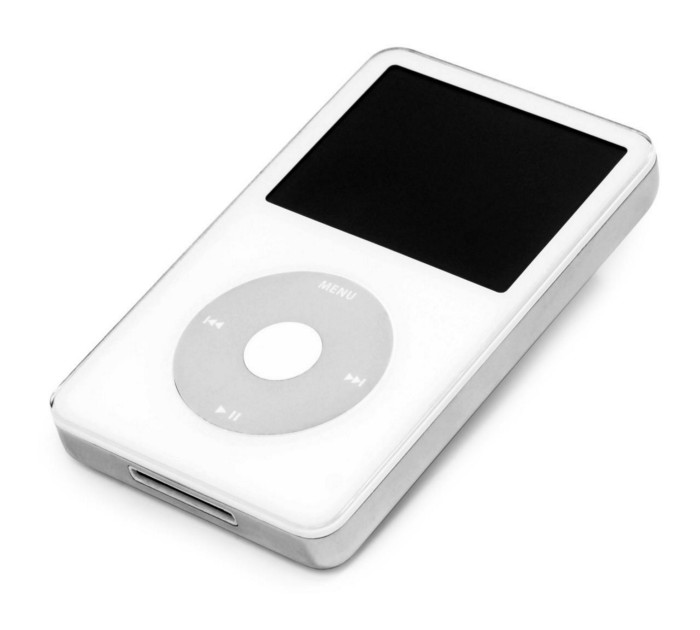
iPod vintage (Oct 2001 to Sep 2014, 6 generations)
The original iPod had six significant upgrades since 2001. Apple announced an 80 GB ($249) and 160 GB ($349) iPod classic in 2007.
Apple updated the 80 GB model with a 120 GB device in September 2008. Apple upgraded the 120 GB model with a 160 GB variant a year later (2009). This was the last iteration, and Apple discontinued the classic in September 2014.
iPod nano (Jan 2004 to Sep 2005, 2 generations)
Apple debuted a smaller, brightly-colored iPod in 2004. The first model featured 4 GB, enough for 1,000 songs.
Apple produced a new 4 GB or 6 GB iPod mini in February 2005 and discontinued it in September when they released a better-looking iPod nano.
iTouch nano (Sep 2005 to July 2017, 7 generations)
I loved the iPod nano. It was tiny and elegant with enough tech to please most music aficionados, unless you carry around your complete music collection.
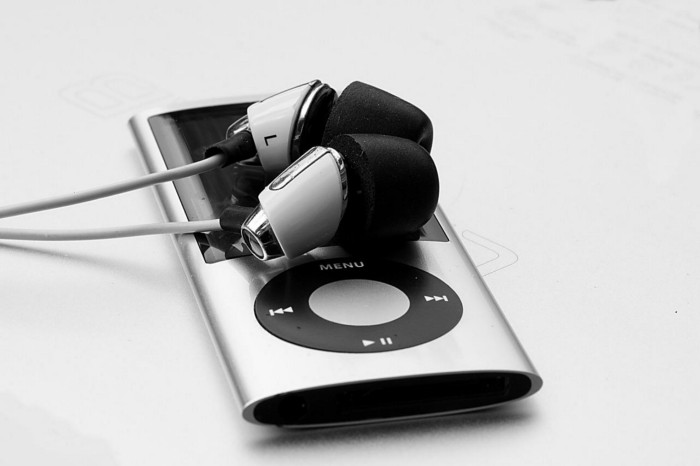
Apple owed much of the iPod nano's small form and success to solid-state flash memory. Flash memory doesn't need power because it has no moving parts. This makes the iPod nano more durable than the iPod classic and mini, which employ hard drives.
Apple manufactured seven generations of the iPod nano, improving its design, display screen, memory, battery, and software, but abandoned it in July 2017 due to dwindling demand.
Shuffle iPod (Jan 2005 to Jul 2017, 4 generations)
The iPod shuffle was entry-level. It was a simple, lightweight, tiny music player. The iPod shuffle was perfect for lengthy bike trips, runs, and hikes.
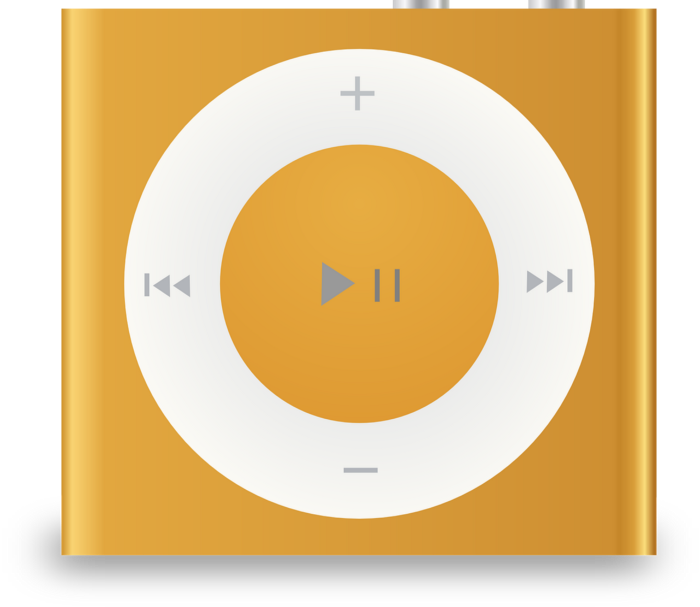
Apple sold 10 million iPod shuffles in the first year and kept making them for 12 years, through four significant modifications.
iOS device (Sep 2007 to May 2022, 7 generations)
The iPod touch's bigger touchscreen interface made it a curious addition to the iPod family. The iPod touch resembled an iPhone more than the other iPods, making them hard to tell apart.
Many were dissatisfied that Apple removed functionality from the iPod touch to avoid making it too similar to the iPhone. Seven design improvements over 15 years brought the iPod touch closer to the iPhone, but not completely.
The iPod touch uses the same iOS operating system as the iPhone, giving it access to many apps, including handheld games.
The iPod touch's long production run is due to the next generation of music-loving gamers.
What made the iPod cool
iPod revolutionized music listening. It was the first device to store and play MP3 music, allowing you to carry over 1,000 songs anywhere.
The iPod changed consumer electronics with its scroll wheel and touchscreen. Jobs valued form and function equally. He showed people that a product must look good to inspire an emotional response and ignite passion.
The elegant, tiny iPod was a tremendous sensation when it arrived for $399 in October 2001. Even at this price, it became a must-have for teens to CEOs.
It's hard to identify any technology that changed how music was downloaded and played like the iPod. Apple iPod and iTunes had 63% of the paid music download market in the fourth quarter of 2012.
The demise of the iPod was inevitable
Apple discontinuing the iPod touch after 21 years is sad. This ends a 00s music icon.
Jobs was a genius at anticipating market needs and opportunities, and Apple launched the iPod at the correct time.
Few consumer electronics items have had such a lasting impact on music lovers and the music industry as the iPod.
Smartphones and social media have contributed to the iPod's decline. Instead of moving to the music, the new generation of consumers is focused on social media. They're no longer passive content consumers; they're active content creators seeking likes and followers. Here, the smartphone has replaced the iPod.
It's hard not to feel a feeling of loss, another part of my adolescence now forgotten by the following generation.
So, if you’re lucky enough to have a working iPod, hang on to that relic and enjoy the music and the nostalgia.

Vishal Chawla
4 years ago
5 Bored Apes borrowed to claim $1.1 million in APE tokens
Takeaway
Unknown user took advantage of the ApeCoin airdrop to earn $1.1 million.
He used a flash loan to borrow five BAYC NFTs, claim the airdrop, and repay the NFTs.
Yuga Labs, the creators of BAYC, airdropped ApeCoin (APE) to anyone who owns one of their NFTs yesterday.
For the Bored Ape Yacht Club and Mutant Ape Yacht Club collections, the team allocated 150 million tokens, or 15% of the total ApeCoin supply, worth over $800 million. Each BAYC holder received 10,094 tokens worth $80,000 to $200,000.
But someone managed to claim the airdrop using NFTs they didn't own. They used the airdrop's specific features to carry it out. And it worked, earning them $1.1 million in ApeCoin.
The trick was that the ApeCoin airdrop wasn't based on who owned which Bored Ape at a given time. Instead, anyone with a Bored Ape at the time of the airdrop could claim it. So if you gave someone your Bored Ape and you hadn't claimed your tokens, they could claim them.
The person only needed to get hold of some Bored Apes that hadn't had their tokens claimed to claim the airdrop. They could be returned immediately.
So, what happened?
The person found a vault with five Bored Ape NFTs that hadn't been used to claim the airdrop.
A vault tokenizes an NFT or a group of NFTs. You put a bunch of NFTs in a vault and make a token. This token can then be staked for rewards or sold (representing part of the value of the collection of NFTs). Anyone with enough tokens can exchange them for NFTs.
This vault uses the NFTX protocol. In total, it contained five Bored Apes: #7594, #8214, #9915, #8167, and #4755. Nobody had claimed the airdrop because the NFTs were locked up in the vault and not controlled by anyone.
The person wanted to unlock the NFTs to claim the airdrop but didn't want to buy them outright s o they used a flash loan, a common tool for large DeFi hacks. Flash loans are a low-cost way to borrow large amounts of crypto that are repaid in the same transaction and block (meaning that the funds are never at risk of not being repaid).
With a flash loan of under $300,000 they bought a Bored Ape on NFT marketplace OpenSea. A large amount of the vault's token was then purchased, allowing them to redeem the five NFTs. The NFTs were used to claim the airdrop, before being returned, the tokens sold back, and the loan repaid.
During this process, they claimed 60,564 ApeCoin airdrops. They then sold them on Uniswap for 399 ETH ($1.1 million). Then they returned the Bored Ape NFT used as collateral to the same NFTX vault.
Attack or arbitrage?
However, security firm BlockSecTeam disagreed with many social media commentators. A flaw in the airdrop-claiming mechanism was exploited, it said.
According to BlockSecTeam's analysis, the user took advantage of a "vulnerability" in the airdrop.
"We suspect a hack due to a flaw in the airdrop mechanism. The attacker exploited this vulnerability to profit from the airdrop claim" said BlockSecTeam.
For example, the airdrop could have taken into account how long a person owned the NFT before claiming the reward.
Because Yuga Labs didn't take a snapshot, anyone could buy the NFT in real time and claim it. This is probably why BAYC sales exploded so soon after the airdrop announcement.